- Go to Policy & Objects and select 'Create New'.
- Destination -> Internet Service -> Filter the name 'anydesk' and select 'Anydesk-Anydesk'.
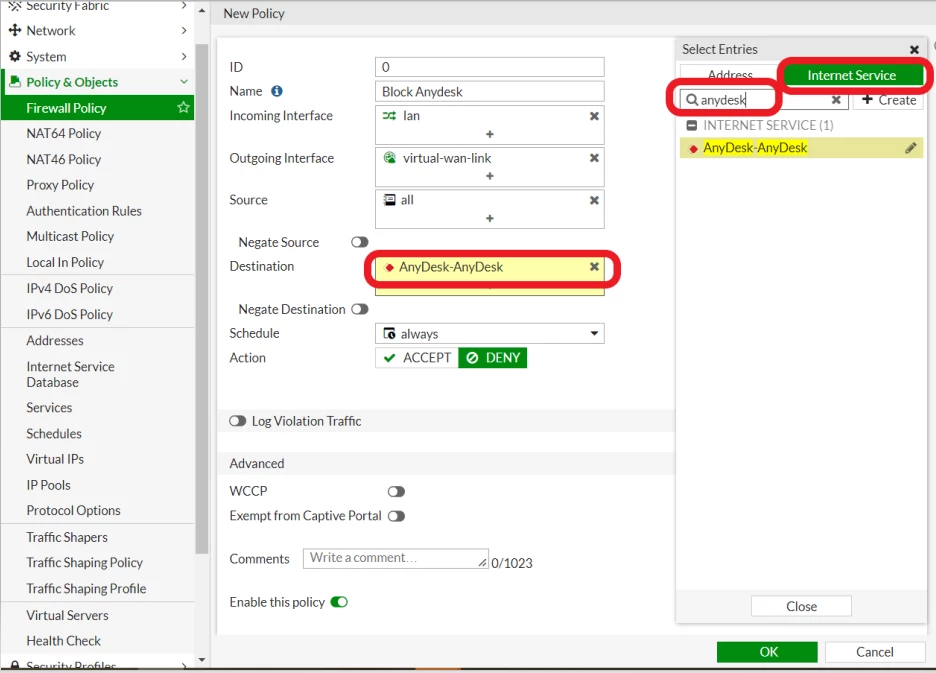 - Configure other fields and select 'OK'.
- Drag the policy to the top to take effect.
Command on the CLI: config firewall policy
edit 0
set name "Block Anydesk"
set srcintf "lan"
set dstintf "virtual-wan-link"
set srcaddr "all"
set internet-service enable
set internet-service-name "AnyDesk-AnyDesk"
set action deny
end Below are the ports and URLs used by AnyDesk:
TCP ports: 80, 443, and 6568.
UDP ports: 50001–50003.
*.net.anydesk.com. To view the list of the IP address and port used by AnyDesk in the FortiGate CLI, use the following command: diagnose internet-service id | grep AnyDesk-AnyDesk
ID: 5963927 name: "AnyDesk-AnyDesk" diagnose internet-service id 5963927 Sample output from the FortiGate: diagnose internet-service id 5963927
Internet Service: 5963927(AnyDesk-AnyDesk)
Version: 00007.04378
Timestamp: 202511220602
Number of Entries: 368
3.162.3.102-3.162.3.102 country(124) region(1536) city(65535) blocklist(0x0) reputation(5), popularity(3) domain(2016) botnet(0) proto(6) port(80 443 6568)
3.175.34.100-3.175.34.100 country(840) region(1380) city(9976) blocklist(0x0) reputation(5), popularity(3) domain(2016) botnet(0) proto(6) port(80 443 6568)
5.188.71.12-5.188.71.12 country(392) region(1906) city(65535) blocklist(0x0) reputation(5), popularity(3) domain(2016) botnet(0) proto(6) port(80 443 6568)
5.188.71.27-5.188.71.27 country(392) region(1906) city(65535) blocklist(0x0) reputation(5), popularity(3) domain(2016) botnet(0) proto(6) port(80 443 6568)
5.188.71.30-5.188.71.30 country(392) region(1906) city(65535) blocklist(0x0) reputation(5), popularity(3) domain(2016) botnet(0) proto(6) port(80 443 6568) | 




