Technical Tip: Automation Backup using FTP does not work
| Description | This article describes how to troubleshoot automation backup issues on FortiGate and the possible reasons. |
| Scope | FortiGate. |
| Solution | To troubleshoot the automation backup issue, the following steps can be done:
SSH 1 :
diagnose sniffer packet any "host <ftp server>" 6 0 l
Press 'Ctrl+C' (Windows or Linux) or 'CMD+C' to stop the capture.
Alternatively, use the packet capture tools as described in Troubleshooting Tip: Packet Capture on FortiOS GUI.
SSH 2:
execute backup config ftp <filename> <ftp server>[:ftp port] <username> <password>
If the backup fails, on FortiGate, the failed backup returns this error:
Connect to ftp server 10.xx.xx.xx:21 ...
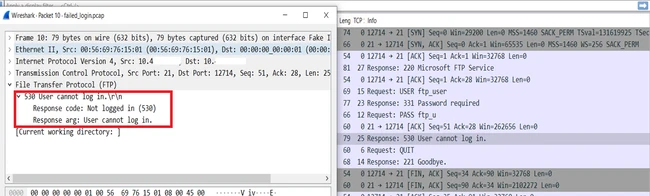
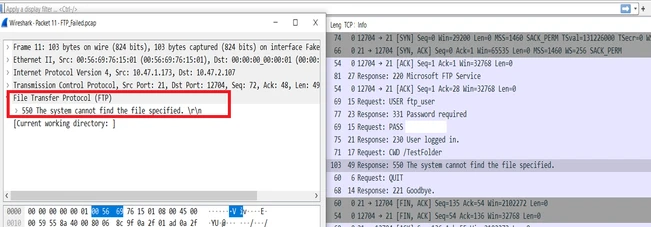
On Wireshark, it is possible to view the error for a failed backup config transfer:
Here are some common reasons for failed FTP backup:
|