


Technical Tip: Automatic patch upgrades
Description | This article describes how to configure automatic patch upgrades: The upgrade will only be performed on a patch within the same major release version. |
Scope | FortiGate v7.2.1 and above. |
Solution | Configurations in the GUI: Go to System -> Firmware & Registration -> Automatic patch upgrades enabled/disabled:
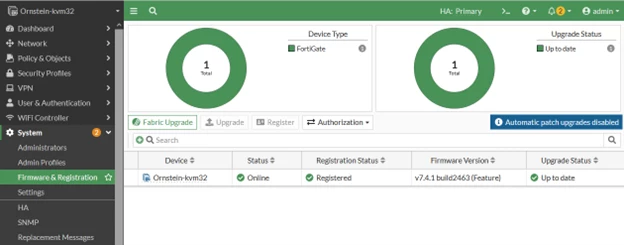
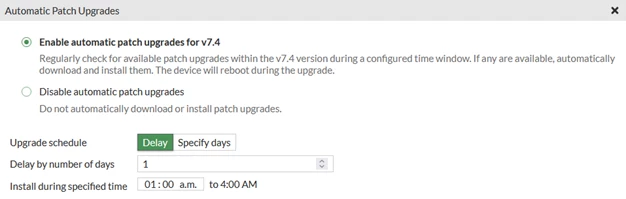
When automatic patch upgrade is enabled, the patch-level upgrade will be scheduled after 'Delay by a number of days' during the specified time.
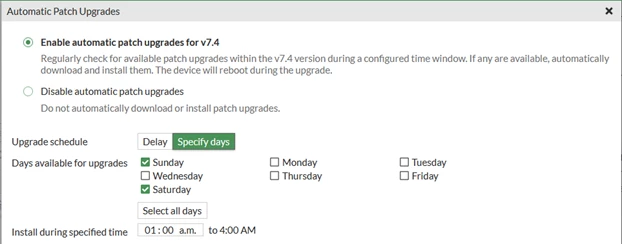
The patch-level upgrade can also be scheduled by specifying the days of the week during the specified time.
After the patch release is successfully installed, the automation stitch 'Firmware upgrade notification' will be triggered to send an email notification.
Note: If the Automatic patch upgrades enabled/disabled is not found at the mentioned path, it is possible to find it at the following GUI path: System -> FortiGuard (automatic upgrade enabled/disabled).
Configurations in the CLI:
To review the installation window of new patch releases:
The event log after configuring the automatic firmware upgrade:
date=2023-09-08 time=16:21:50 eventtime=1694204482840500060 tz="-0400" logid="0100032263" type="event" subtype="system" level="notice" vd="root" logdesc="Automatic firmware upgrade schedule changed" user="system" msg="System patch-level auto-upgrade regular check enabled."
Note: This alert is triggered every time the FortiGate is rebooted.
The event log after successfully updating the firmware:
The event log firmware upgrade notification is triggered:
Starting with FortiOS versions 7.4.12, 7.6.7, and 8.0.0, email notification for firmware upgrade has been improved for better clarity. These notifications can be triggered using automation actions 'Auto Upgrade Complete Email Notification', 'Auto Upgrade Cancelled Email Notification', and 'Auto Upgrade Scheduled Email Notification'.
FortiGates that FortiManager manages or acts as Fabric root or Fabric leaf members will not be affected by this change.
The complete list of the platforms that will be affected by this change is as follows:
Starting from v7.4.5, the 'auto-firmware-upgrade' CLI setting will be enabled by default for all models, including FortiGate VMs. This means the system will automatically upgrade to the latest firmware unless manually configured otherwise. See: Automatic firmware upgrade control.
From version 7.4.5 and above, the option to control automatic firmware upgrades has been updated. Previously, this option was enabled only on entry-level models and disabled by default on all other models, allowing users to manually control firmware upgrades.
Starting with v7.4.8, v7.6.4, and v8.0.0, a new behavior has been introduced on unlicensed or expired-support FortiGate devices: if support is not valid, the FortiGate will automatically schedule a firmware upgrade to the latest patch in its current minor version. This is managed through the CLI under 'config system federated-upgrade', where the upgrade schedule becomes visible.
However, this scheduled upgrade cannot be cancelled, only postponed up to seven days using the command 'execute auto-upgrade delay-installation'; there is no limit on the number of times this can be delayed.
Technical Tip: Understanding Automatic Patch Upgrade: FortiGate Cloud Premium vs Local Setting Technical Tip: How to disable automatic firmware upgrades on FortiGates |

