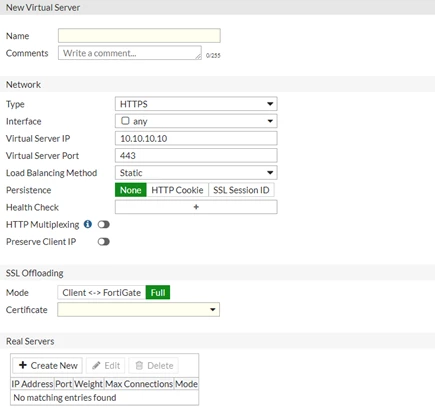
Technical Note: HTTPS/SSL load balance and SSL offloading option missing in GUI
Description
This article describes the reason why SSL offloading and HTTPS server load balance option is missing in the GUI.
Solution
When creating a new virtual server, there are only a few options available in the GUI.
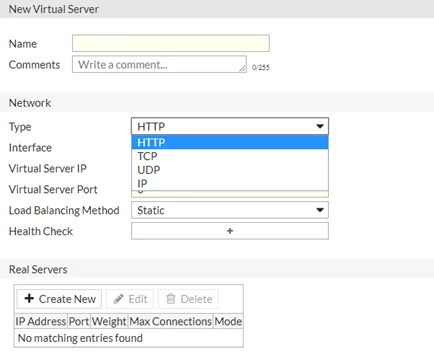
In the CLI, there are more options available. Run the following commands:
config firewall vip
edit SSL
set type server-load-balance
set server-type
http HTTP
https HTTPS
imaps IMAPS
pop3s POP3S
smtps SMTPS
ssl SSL
tcp TCP
udp UDP
ip IP
When HTTPS load balancing is selected from CLI an error message will be displayed when the following command is executed in the CLI to enable SSL offloading:
set ssl-mode fullThis is because FortiGate inspection mode is set to flow-based inspection. With flow-based inspection, SSL offloading option will not be available.
command parse error before 'ssl-mode'
Command fail. Return code -61
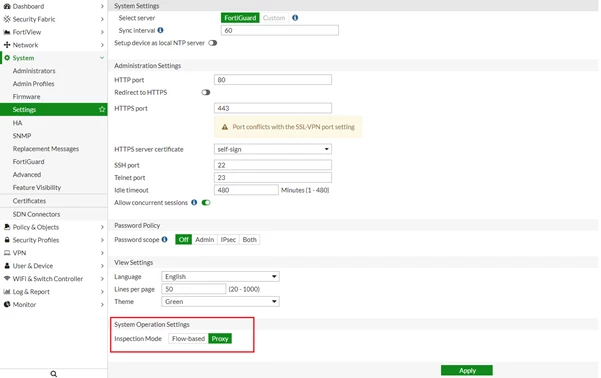
In order to enable SSL offloading, change the inspection mode to proxy based as follows:
-GUI under System > Settings:
-In the CLI:
config system setting
set inspection-mode proxy
end
SSL offloading option is now available after changing the inspection mode to proxy based.