



Technical Note: HTTPS management access to FortiGate after upgrade
Description
Starting with FortiOS release 5.2.2 a new global system parameter is added.
This parameter, with default setting, restricts access to TLS V 1.1 and TLS V 1.2 only.
Therefore, if the browser uses TLS v 1.0 or SSL v3 CLI configuration change is required for HTTPS GUI access.
New default setting with FortiOS release 5.2.2 :
FGT-1 # config system global FGT-1 (global) # get admin-concurrent : enable admin-console-timeout: 0 admin-https-pki-required: disable
admin-https-redirect: disable
admin-https-ssl-versions: tlsv1-1 tlsv1-2 <--- new default setting
admin-lockout-duration: 60
admin-lockout-threshold: 3
Available options :
HTTPS SSL available versions are : TLS 1.0, TLS 1.1, TLS 1.2, SSLV3
Configuration changes :
To allow TLS 1.0 for FortiGate management access the require config change are :
FGT-1 # config system global FGT-1(global) # append admin-https-ssl-versions tlsv1-0 End
Example :
Sniffer trace in case of incorrect setting :
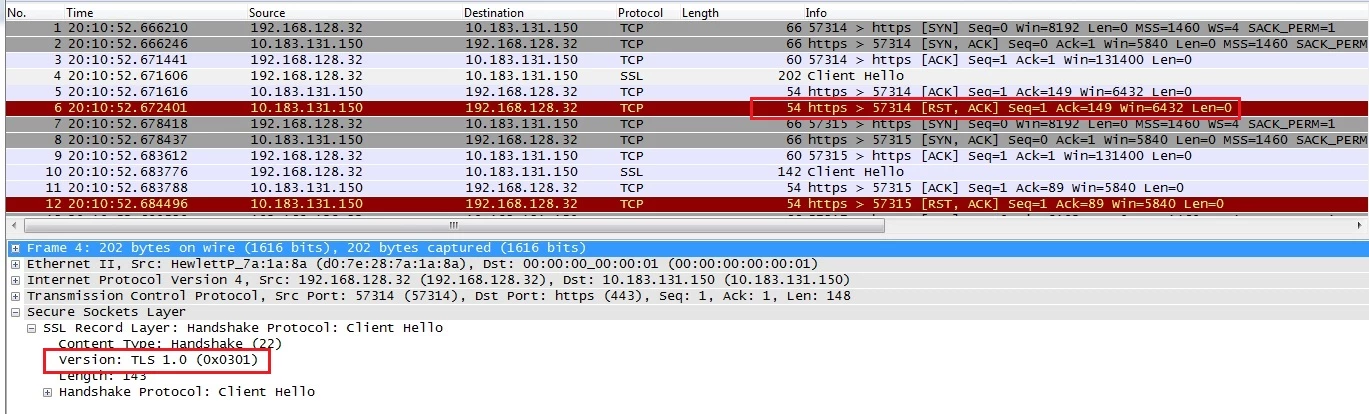
Packet 4 : The browser send handshake as TLS 1.0
Packet 6 : The FortiGate refuse the connection and close it with a reset packet.
Solution
Adjust the FortiGate setting according to SSL version used by the browser with command "set admin-https-ssl version" or "append admin-https-ssl version ".