




Technical Note: Enable IPsec interface Mode.
Description
In some configurations, IPsec interface mode is not enabled or available.
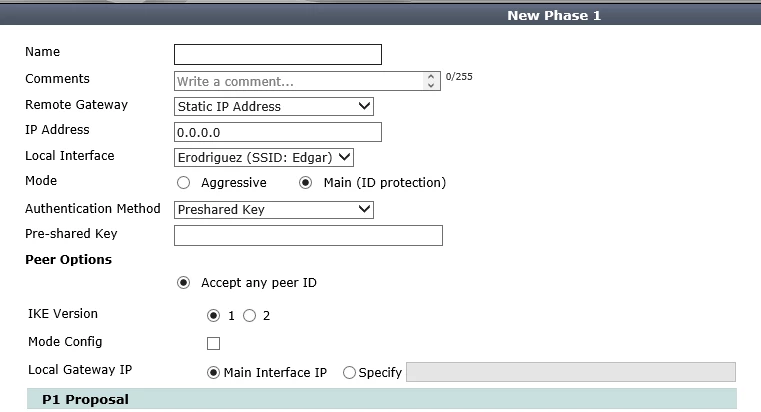
When we try to create IPsec phase 1, option Interface Mode is not available as is shown in figure below.
Scope
All Models, firmware 5.0.x
Solution
To enable IPsec interface Mode, you have to do the following steps.
1.- Go to System -> Features
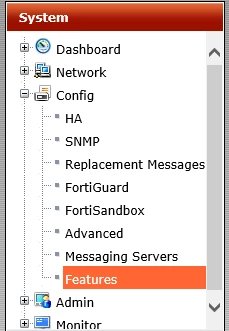
2.- Click on Show More

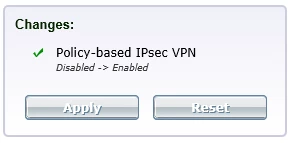
3.- Enable Policy-Based IPsec VPN

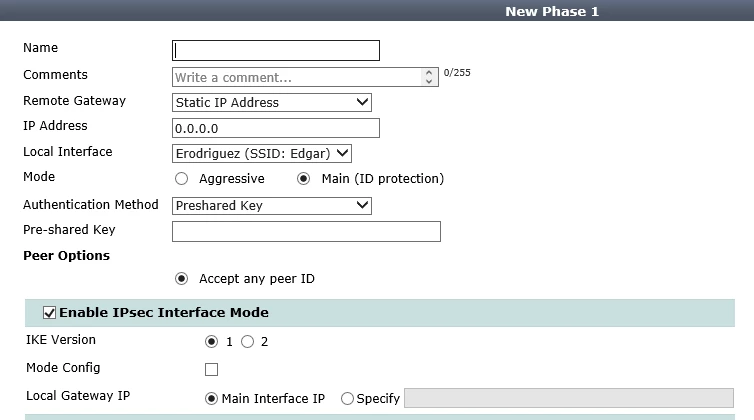
After enabling this feature you will be able to Create IPsec phase with Interface Mode.
In some configurations, IPsec interface mode is not enabled or available.
When we try to create IPsec phase 1, option Interface Mode is not available as is shown in figure below.
Scope
All Models, firmware 5.0.x
Solution
To enable IPsec interface Mode, you have to do the following steps.
1.- Go to System -> Features
2.- Click on Show More
4.- Apply Changes
After enabling this feature you will be able to Create IPsec phase with Interface Mode.