




Technical Note : Alert message 'Failed admin authentication attempt for root'
Description
This article explains the possible cause of the alert message 'Failed admin authentication attempt for root' and gives options to prevent it.
Scope
FortiGate.
Solution
This Alert Message indicates that there is someone trying to access to the FortiGate by using random username/password combinations, a so-called Brute-force/Dictionary Attack.
Hackers will often scan around the Internet for open TCP ports on servers and will try to login with general username/password combinations (For example: root, admin, administrator, etc.).
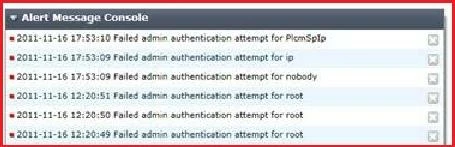
This message indicates that they failed to access the FortiGate, however the following can be used to avoid this kind of attack:
- Disable all administrative access on all interfaces that contain public IP addresses, or restrict IP addresses that can access to the FortiGate. Go to System -> Admin -> Administrator and put all the IP addresses that should be allowed to access the unit under 'Restrict this Admin Login from Trusted Hosts Only'. Specific subnets or specific host IP addresses can be added (For example 192.168.52.53/255.255.255.255 or 192.168.52.0/255.255.255.0).
- Use a VPN for administrative access if Trusted Hosts can not be configured because there a no specific IP addresses,
Related documents:
Configuring Administrator access to a FortiGate unit using Trusted Hosts

