


L2TP in IPsec connectivity issues
Description
This article describes possible issues when trying to establish L2TP in IPsec with a Windows VPN client.
When ike debug is running while trying to connect and the Windows VPN client sends a request to delete IPsec SA and ISAKMP SA, below are possible causes. These are commands to start investigation and troubleshooting:
diagnose debug reset
diagnose debug application ike -1
diagnose debug application l2tp -1
diagnose debug enable
The following is an example of unsuccessful phase1 negotiation:
ike 0: comes 10.109.20.8:500->10.109.17.18:500,ifindex=44....
ike 0: IKEv1 exchange=Informational id=0bff1eef8377cfc7/89fa3fd20f302705:bd169de3 len=76
ike 0: in 0BFF1EEF8377CFC789FA3FD20F30270508100501BD169DE30000004CF088093033BB59FC176A7AA54D4905EA1721DE822191D71538384A368B2EC28AB181D9481591DA1AD4FF002B07FBFC48
ike 0:L2TP_0:0: dec 0BFF1EEF8377CFC789FA3FD20F30270508100501BD169DE30000004C0C0000189E219D6874BF26E2C12DE4528A20E7FC4FDD7041000000100000000103040001B08931860000000000000000
ike 0:L2TP_0:0: recv IPsec SA delete, spi count 1
ike 0:L2TP_0: deleting IPsec SA with SPI b0893186
ike 0:L2TP_0:L2TP-p2: deleted IPsec SA with SPI b0893186, SA count: 0
ike 0:L2TP_0:0: del route 10.109.20.8/255.255.255.255 oif L2TP_0(51) metric 15 priority 0
ike 0:L2TP_0: sending SNMP tunnel DOWN trap for L2TP-p2
ike 0:L2TP_0:L2TP-p2: delete
ike 0: comes 10.109.20.8:500->10.109.17.18:500,ifindex=44....
ike 0: IKEv1 exchange=Informational id=0bff1eef8377cfc7/89fa3fd20f302705:ff7eeb85 len=84
ike 0: in 0BFF1EEF8377CFC789FA3FD20F30270508100501FF7EEB8500000054119E5FB03F125032AB31EB8634042BB841775170B47EFAC547A2307D538EA4A3B64CAD7359271F396E82245CC0CE78D370C66A0E778FED66
ike 0:L2TP_0:0: dec 0BFF1EEF8377CFC789FA3FD20F30270508100501FF7EEB85000000540C0000189794A5DA2B604D6F53536810F0CAF564F0CB0FE80000001C00000001011000010BFF1EEF8377CFC789FA3FD20F30270500000000
ike 0:L2TP_0:0: recv ISAKMP SA delete 0bff1eef8377cfc7/89fa3fd20f302705
ike 0:L2TP_0: deleting
ike 0:L2TP_0: flushing
ike 0:L2TP_0: sending SNMP tunnel DOWN trap
ike 0:L2TP_0: flushed
ike 0:L2TP_0: delete dynamic
ike 0:L2TP_0: deleted
To disable the debugging processes above:
diagnose debug disable
diagnose debug reset
Scope
FortiGate.
Solution
One possible reason a Windows native L2TP client cannot build a tunnel with a FortiGate running as an L2TP server is that its proposals don't match what is set on the firewall. The following is an example of successful proposal negotiations that the Windows 11 L2TP client sends during phase1:
ike V=root:0:a716dbba189e2e3d/0000000000000000:57: responder: main mode get 1st message...
ike V=root:0:a716dbba189e2e3d/0000000000000000:57: VID unknown (20): 01528BBBC00696121849AB9A1C5B2A5100000001
ike V=root:0:a716dbba189e2e3d/0000000000000000:57: VID MS NT5 ISAKMPOAKLEY 1E2B516905991C7D7C96FCBFB587E46100000009
ike V=root:0:a716dbba189e2e3d/0000000000000000:57: VID RFC 3947 4A131C81070358455C5728F20E95452F
ike V=root:0:a716dbba189e2e3d/0000000000000000:57: VID draft-ietf-ipsec-nat-t-ike-02 90CB80913EBB696E086381B5EC427B1F
ike V=root:0:a716dbba189e2e3d/0000000000000000:57: VID FRAGMENTATION 4048B7D56EBCE88525E7DE7F00D6C2D3
ike V=root:0:a716dbba189e2e3d/0000000000000000:57: VID unknown (16): FB1DE3CDF341B7EA16B7E5BE0855F120
ike V=root:0:a716dbba189e2e3d/0000000000000000:57: VID unknown (16): 26244D38EDDB61B3172A36E3D0CFB819
ike V=root:0:a716dbba189e2e3d/0000000000000000:57: VID unknown (16): E3A5966A76379FE707228231E5CE8652
ike V=root:0:a716dbba189e2e3d/0000000000000000:57: negotiation result
ike V=root:0:a716dbba189e2e3d/0000000000000000:57: proposal id = 1:
ike V=root:0:a716dbba189e2e3d/0000000000000000:57: protocol id = ISAKMP:
ike V=root:0:a716dbba189e2e3d/0000000000000000:57: trans_id = KEY_IKE.
ike V=root:0:a716dbba189e2e3d/0000000000000000:57: encapsulation = IKE/none
ike V=root:0:a716dbba189e2e3d/0000000000000000:57: type=OAKLEY_ENCRYPT_ALG, val=AES_CBC, key-len=256
ike V=root:0:a716dbba189e2e3d/0000000000000000:57: type=OAKLEY_HASH_ALG, val=SHA.
ike V=root:0:a716dbba189e2e3d/0000000000000000:57: type=AUTH_METHOD, val=PRESHARED_KEY.
ike V=root:0:a716dbba189e2e3d/0000000000000000:57: type=OAKLEY_GROUP, val=ECP384.
ike V=root:0:a716dbba189e2e3d/0000000000000000:57: ISAKMP SA lifetime=86400
ike V=root:0:a716dbba189e2e3d/0000000000000000:57: SA proposal chosen, matched gateway L2TP
It translates to AES256-SHA1 and group 20 if set on FortiGate.
In older Windows OS versions like Windows 10, L2TP does not support CHAP or MSCHAP. As a result, it is necessary to enable only PAP in VPN properties:
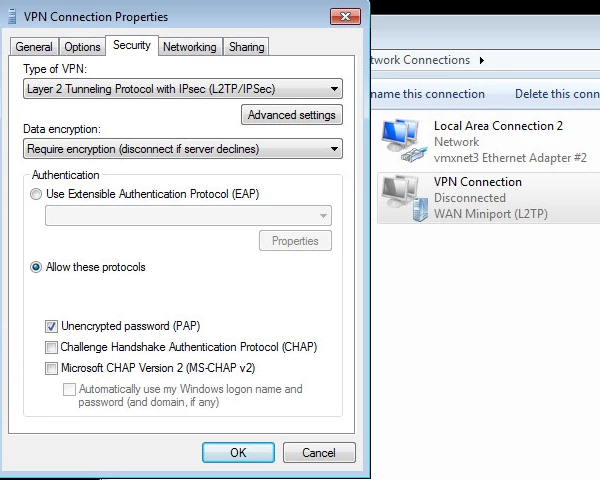
Windows 11, on the other hand, fully supports MSCHAP version 2, and it is safe to proceed with the default settings of the L2TP network adapter.
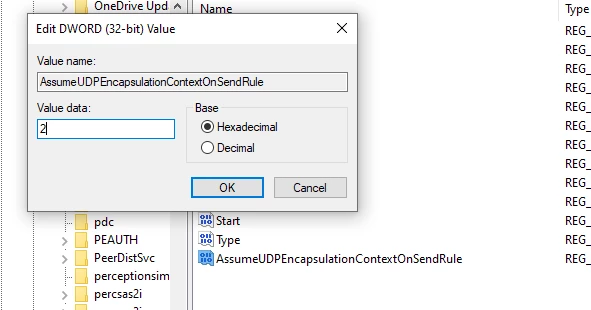
Windows Registry missing: Select 'Start' and type 'regedit', then navigate to HKEY_LOCAL_MACHINE -> SYSTEM -> CurrentControlSet -> Services -> PolicyAgent. Find 'AssumeUDPEncapsulationContextOnSendRule', select it, and set its value to 2.
If it does not exist, create a new DWORD (32-bit) and name it exactly like this (with caps): 'AssumeUDPEncapsulationContextOnSendRule' then set it to 2 (after creation, it is set to 0).
Similarly, create a new key under HKEY_LOCAL_MACHINE -> SYSTEM -> CurrentControlSet -> Services -> RasMan -> Parameters, find 'ProhibitIpSec', select it, and set its value to 0.
If it does not exist, create a new DWORD (32-bit) and name it exactly like this (with caps): 'ProhibitIpSec', then set it to 0. To create a new DWORD, select a blank white space and select New -> DWORD (32-bit) Value.
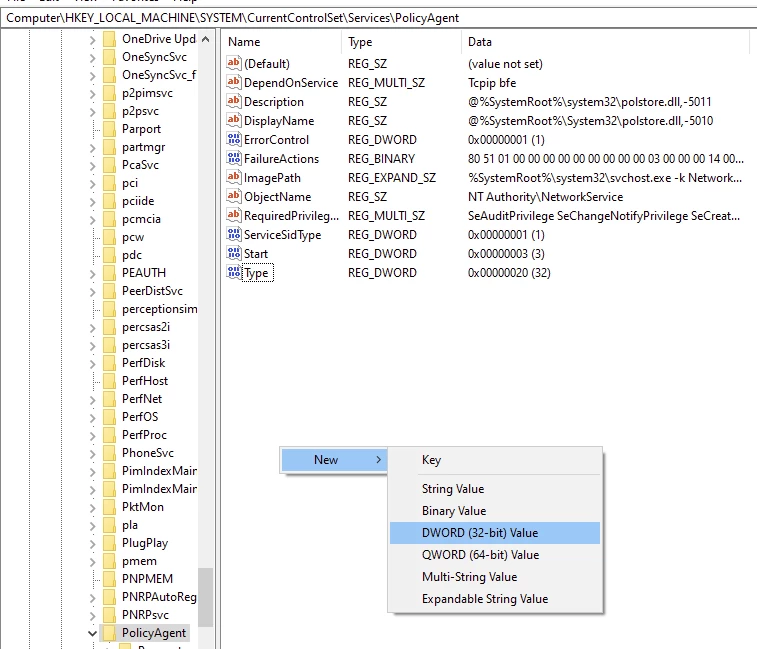
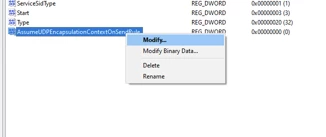
To change the value to 2, 'right-click' on the newly created DWORD and select Modify:
After this, reboot the machine:
Incorrect firewall policy in FortiGate, in a case where a GUI template for Dialup, Windows (Native L2TP/IPsec) was not used:
config firewall policy
    edit 1
        set name “L2TP access to LAN”
        set srcintf "L2TP"
        set dstintf "Lan"
        set srcaddr "all"
        set dstaddr "all"
        set action accept
        set schedule "always"
        set service "ALL"
    next
No L2TP debug output: In a scenario where the IPsec tunnel is being established, and IKE negotiations are successfully progressing, but L2TP debug shows no output, and the L2TP tunnel is failing after a few seconds, this would happen due to a missing firewall policy. L2TP requires a firewall policy as shown below:
In the following:
'set srcintf "L2TP"' is the interface for the IPsec tunnel.
'set dstintf "Internet"' is the interface for the WAN connection.
The 'dstaddr' must include the WAN IP address of the FortiGate.
config firewall policy
    edit 2
        set name “activate L2TP”
        set srcintf "L2TP"
        set dstintf "Internet"
        set srcaddr "all"
        set dstaddr "all"
        set action accept
        set schedule "always"
        set service "L2TP"
        set nat enable
    next
end
It is better to run only the L2TP debug process at this stage.
diagnose debug application l2tp -1
diagnose debug enable
If L2TP debug shows no output, run debug flow to confirm whether L2TP traffic is being blocked:
diagnose debub disable
diagnose debug reset
diagnose debug flow filter clear
diagnose debug flow filter port 1701
diagnose debug flow show function-name enable
diagnose debug flow show iprope enable
diagnose debug console timestamp enable
diagnose debug flow trace start 9999
diagnose debug enable
Test the connection after disabling NPU offload under VPN tunnel settings by running the following commands:
config vpn ipsec phase1-interface
    edit "Tunnel"
        set npu-offload disable
end
Enter the username with the correct case, as it is case-sensitive.
Windows operating systems do not support IPSec NAT-T security associations to servers that are located behind a NAT device.
Therefore, if the VPN server is behind a NAT device, a Windows VPN client computer cannot make an L2TP/IPSec connection to the VPN server. With a packet capture filtered with the remote IP address (redacted in this example), only ISAKMP packets are exchanged, and there are no L2TP or ESP packets.
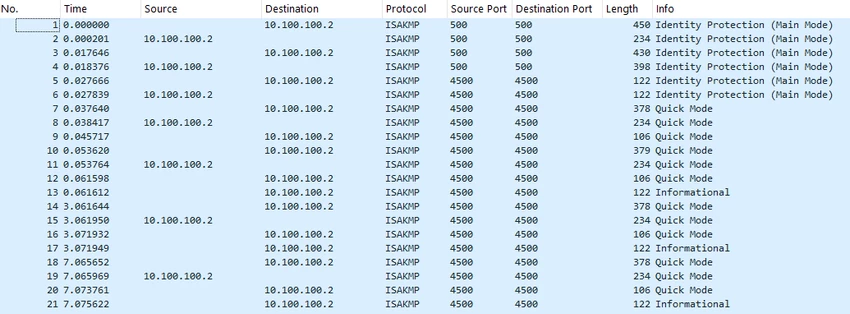
This issue can be solved by creating and configuring the AssumeUDPEncapsulationContextOnSendRule registry value.
Refer to the Microsoft documentation linked in the Related document down this page.
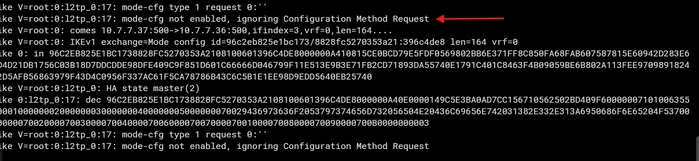
If an IOS device is used to connect and the error 'mode-cfg not enabled, ignoring Configuration Method Request' was observed, make sure the type of VPN on the IOS device is 'L2TP' and not 'IPsec'.
Note: If none of the provided solutions worked, collect debug logs and open a support ticket with Fortinet TAC Support.
Related documents:
