Packets that are too large may be dropped by Internet or private network routers. The exact threshold beyond which packets may be dropped depend on a variety of factors including router configuration and path taken, but is often around 1480 bytes for Internet traffic including encapsulated IPsec traffic.
IP fragmentation is the process of splitting packets into smaller pieces (fragments) so they can pass through a link (interface) with a smaller MTU size than the original packet. It is sometimes necessary to modify the configuration of routers under an administrator's control to ensure only packets below a certain size are sent.
For the purposes of this example, the FortiGate is acting an IPsec gateway and has a tunnel to a remote device. Between the FortiGate and the remote gateway there is an unmanaged router which will drop any packet with a size greater than approximately 1100 bytes. In this case, the FortiGate's configuration should be modified to ensure only smaller packets are sent.
Factors affecting fragmentation decision for traffic to be sent over IPsec tunnel:
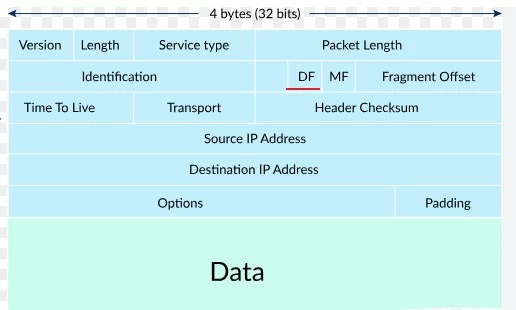
DF bit in IP header: The DF bit is a bit within the IP header which instructs routers whether fragmentation of this IP packet is allowed or not.
By default, FortiGate is configured to honor the DF bit.
config system global
    set honor-df enable
end
Note: The 'honor-df' default value is enabled. This fragments packets only if the DF bit is 0.
If the DF bit in the IP header of the packet is set to 1 (ON) and the packet size exceeds the MTU of the exit interface, FortiGate will not fragment IP packets larger than the MTU of the exit interface. Instead, FortiGate will drop the packet and send a 'fragmentation needed' ICMP message (ICMP type 3 code 4) to the client.
Some endpoints rely on the ICMP 'fragmentation needed' message to tune the size of sent packets.
If it is necessary to allow FortiGate to fragment packets that have the DF bit set, then it is necessary to disable 'honor-df' globally.
config system global
    set honor-df disable
end
 'ip-fragmentation' setting in phase1-interface configuration.
With the pre-encapsulation method, FortiGate will compare the packet size to the tunnel interface MTU to decide if a packet requires fragmentation. If fragmentation is needed and allowed by the DF bit, FortiGate fragments the data packet first, then encrypts and encapsulates each fragment in its own ESP header.
config vpn ipsec phase1-interface
    edit <IPsec tunnel name>
        set ip-fragmentation pre-encapsulation
    next
end
Pre-encapsulation hides a packet's fragmented state from intermediate routers, making fragments indistinguishable from other encrypted data traffic. This can be important if one or more of the intermediate routers drop fragments. With the post-encapsulation method, FortiGate encrypts and encapsulates the original packet before any fragmentation decision is made. The data packet appears in an IPsec tunnel sniffer in its original form and size.
config vpn ipsec phase1-interface
    edit <IPsec tunnel name>
        set ip-fragmentation post-encapsulation
    next
end
Note that by default, the 'ip-fragmentation' is set to 'post-encapsulation'. The packet is then sent to the data layer for transmission and (possibly) fragmentation. In this case, the FortiGate compares the size of the encrypted packet with the MTU of the parent interface of the IPsec tunnel. It does not reference the tunnel MTU for this comparison.
config vpn ipsec phase1-interface
    edit "IPsec-VPN"
        set interface "wan1"
        set ip-fragmentation post-encapsulation
    next
end
Note: The MTU of the configured interface, wan1 in the example above, is used to compare with the packet size when post-encapsulation is used.
If fragmentation is required (and allowed), FortiGate will then fragment the encrypted ESP packet into multiple packets. While the packet payload is still encrypted, intermediate routers are able to detect the packets' fragmented state and may drop them in certain cases. It is not strictly necessary for both sides of an IPsec tunnel to have the same 'ip-fragmentation' and MTU configuration, but if modification is required for data traffic to pass successfully in one direction, it is often required for the other direction as well. MTU of the relevant exit interface. If pre-encapsulation is required, the relevant exit interface is the IPsec tunnel interface. To change the MTU, enable 'mtu-override' and set the desired MTU manually.
config system interface
    edit "IPsec-VPN"
        set type tunnel
        set mtu-override enable
        set mtu 1100
        set interface "wan1"
    next
end
If post-encapsulation is required, the relevant exit interface is the parent interface of the IPsec tunnel. Often, this is a physical interface or a VLAN interface. To change the MTU, enable 'mtu-override' and set the desired MTU manually. Note: Changing this value will affect other traffic exiting over this interface in addition to tunnel traffic.
config system interface
    edit "wan1"
        set mtu-override enable
        set mtu 1100
    next
end
The default ip-fragmentation setting is post-encapsulation. With post-encapsulation ip-fragmentation, the IP packet is already 'wrapped up' with the IPsec header before being fragmented, resulting in just one fragmented packet carrying the IPsec header while the rest of the fragments are payloads. Modifying the MTU requires making a change on the interface hosting the tunnel. If this is a WAN interface, as is often the case, lowering the MTU will lower it for all WAN traffic, not just IPsec tunnel traffic. Pre-encapsulation is not RFC-compliant but is compatible with most IPsec gateways currently in use. If there is a device between IPsec gateways that drops IP fragments, it is necessary to conceal the fragments using pre-encapsulation. Important: When using pre-encapsulation, NPU offloading must also be disabled for the IPsec Phase 1 tunnel. If NPU offloading remains enabled, offloaded traffic bypasses the software path where the pre-encapsulation setting is applied. As a result, the pre-encapsulation will not take effect for the offloaded traffic. This is why the configuration requires NPU offloading to be disabled on the Phase 1 tunnel. The fragmentation method can be seen in the output of 'diagnose vpn tunnel list'.
bound_if=9 lgwy=static/1 tun=intf mode=auto/1 encap=none/552 options[0228]=npu frag-rfc run_state=0 role=sync-primary accept_traffic=1 overlay_id=0
Options contain the 'frag-rfc' flag.
bound_if=9 lgwy=static/1 tun=intf mode=auto/1 encap=none/40 options[0028]=npu run_state=0 role=sync-primary accept_traffic=1 overlay_id=0
Options do not contain the 'flag-rfc' flag.
To verify the MTU size of an interface, use:
diagnose netlink interface list IPsec-VPN

if=IPsec-VPN family=00 type=768 index=28 mtu=1100 link=0 master=0

ref=13 state=start present fw_flags=0 flags=up p2p run noarp multicast
For TCP traffic, an alternate method that can be used to enforce a smaller packet size with fragmentation is adjusting MSS: Technical Tip: Setting TCP MSS value. The most common place to configure this on FortiGate is on the firewall policy handling the data traffic. Notes: If an oversized packet is dropped without fragmentation, check if the IP packet DF bit is ON and FortiOS honor-df is enabled. 'set honor-df disable' will remove the FortiGate from participating in any Path MTU discovery used by the endpoint. It may be necessary to try multiple MTU values until the desired fragmentation result is achieved. Setting a higher MTU is more efficient in terms of header-data ratio and packet handling performance. In general, the highest MTU that does not result in packet loss should be used. By default, fragmented packets are shown in the FortiGate packet sniffer. Capturing and analyzing the packets with Wireshark can provide a more detailed picture of what is taking place. The same MTU value results in a slightly different fragment size depending on the nature of the interface on which the MTU is configured (ie, Ethernet, IPsec SA). MTU is always slightly larger than the minimum packet payload, which will trigger fragmentation since MTU must, at a minimum, include the IP header. NP6 and NP6Lite do not support ip-fragmentation pre-encapsulation 'set ip-fragmentation pre-encapsulation' with NPU offload, so NP offload must be disabled:
config vpn ipsec phase1-interface
    edit <phase-1-name>
        set ip-fragmentation pre-encapsulation
        set npu-offload disable
end
config system np6xlite
    edit "np6xlite_0"
        set ipsec-inner-fragment enable
    next
end
See IPsec and packet fragmentation.
Related document:
config ip-reassembly config system npu
config ip-reassembly
set status enable/disable
end
end
Note: NP7Lite does not support ip-reassembly. See FortiGate NP7Lite architectures for FortiGate models that include NP7Lite processors.
| 


