When troubleshooting a dial-up IPsec VPN with IKEv2, the following error is seen in the IKE debug log output:
ike V=root:0:IPsec-Home-W:17: responder received EAP msg
ike V=root:0:IPsec-Home-W:17: unexpected payload type 41
ike V=root:0:IPsec-Home-W:17: schedule delete of IKE SA de9a206cc7d94ad0/957aa4c9698f726b
ike V=root:0:IPsec-Home-W:17: scheduled delete of IKE SA de9a206cc7d94ad0/957aa4c9698f726b
ike V=root:0:IPsec-Home-W: connection expiring due to phase1 down
The following IKE debug outputs can be run to troubleshoot the dial-up IPsec VPN issues:
diagnose vpn ike log-filter clear
diagnose vpn ike log filter src-addr4 x.x.x.x.
diagnose vpn ike log-filter dst-addr4 x.x.x.x
diagnose debug application ike -1
diagnose debug application fnbamd -1
diagnose debug console timestamp enable
diagnose debug enable
Replace x.x.x.x with the Public IP of the Test user PC.
To stop the debugs:
diagnose debug disable
diagnose debug reset
Note:
Starting from version 7.4.1, the 'diagnose vpn ike log-filter dst-addr4' command has been changed to 'diagnose vpn ike log filter rem-addr4' and the 'diagnose vpn ike log filter src-addr4' command to 'diagnose vpn ike log filter loc-addr4'.
This issue was reported in both FortiClient macOS version 14 and version 15 and Windows 11.
To resolve this issue, make sure the authmethod (Pre-Shared Key or Signature) is the same on both FortiClient and FortiGate. If authmethod Pre-Shared is selected on FortiGate and Signature is selected on FortiClient, or vice versa, then the connection fails with 'unexpected payload type 41'. Check the pre-shared key on both sides (FortiGate and FortiClient) and make sure that they are the same.
ISAKMP payload 41 is 'Notify'. This payload has different subtypes. When the pre-shared key does not match, FortiClient will send a 'Notify type 24 (AUTHENTICATION_FAILED)' message.
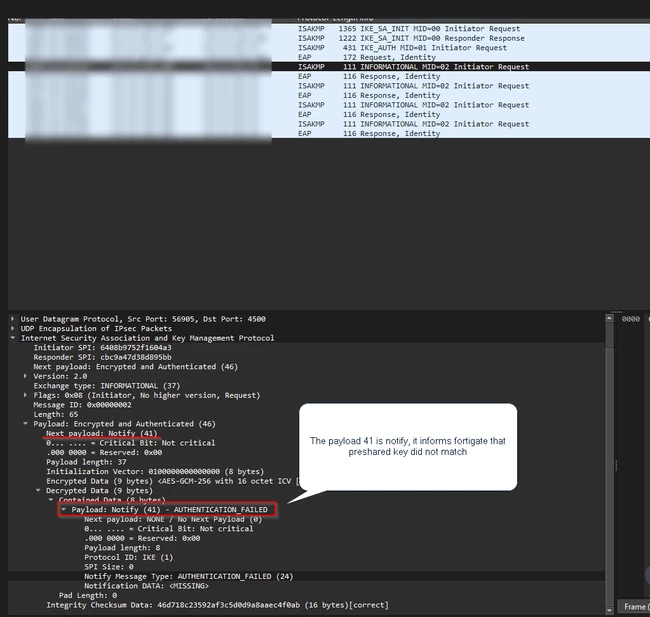 |