Consider the following topology, where an external client accesses an internal web server through a VIP configured on FortiGate.
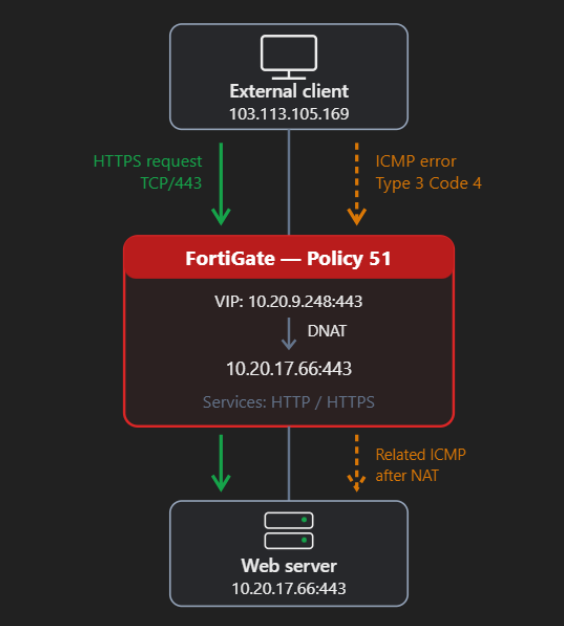
VIP configuration: In this example, two port-forwarding VIPs are configured on FortiGate to translate incoming HTTP and HTTPS traffic destined for 10.20.9.248 to the internal web server at 10.20.17.66.
config firewall vip
    edit "Web-Server-VIP-HTTPS"
        set extip 10.20.9.248
        set mappedip "10.20.17.66"
        set extintf "any"
        set portforward enable
        set extport 443
        set mappedport 443
    next
    edit "Web-Server-VIP-HTTP"
        set extip 10.20.9.248
        set mappedip "10.20.17.66"
        set extintf "any"
        set portforward enable
        set extport 80
        set mappedport 80
    next
end
Firewall policy configuration:
The configured VIPs are referenced as destination address objects in firewall Policy ID 51, which permits HTTP and HTTPS traffic from external clients to the internal web server.
config firewall policy
    edit 51
        set name "Inbound-Web-Access"
        set srcintf "wan1"
        set dstintf "port2"
        set action accept
        set srcaddr "Allowed-Clients"
        set dstaddr "Web-Server-VIP-HTTPS" "Web-Server-VIP-HTTP"
        set schedule "always"
        set service "HTTPS" "HTTP"
        set utm-status enable
        set inspection-mode proxy
        set ssl-ssh-profile "certificate-inspection"
        set av-profile "default"
        set ips-sensor "default"
        set logtraffic all
    next
end
Although ICMP is not explicitly configured as an allowed service, the following fields are observed in the traffic logs:
result="accept (0B/0B)" policyid=51 proto=1 service=HTTPS
ICMP error messages contain the original IP header and a portion of the transport-layer header of the packet that triggered the error.
FortiGate can use this embedded information to identify an existing session and process the ICMP error in the context of that session and its associated firewall policy.
Packet capture analysis:
The following packet capture illustrates an ICMP Type 3 Code 4 (Fragmentation Needed) message received by FortiGate, advertising a next-hop MTU of 1480 bytes.
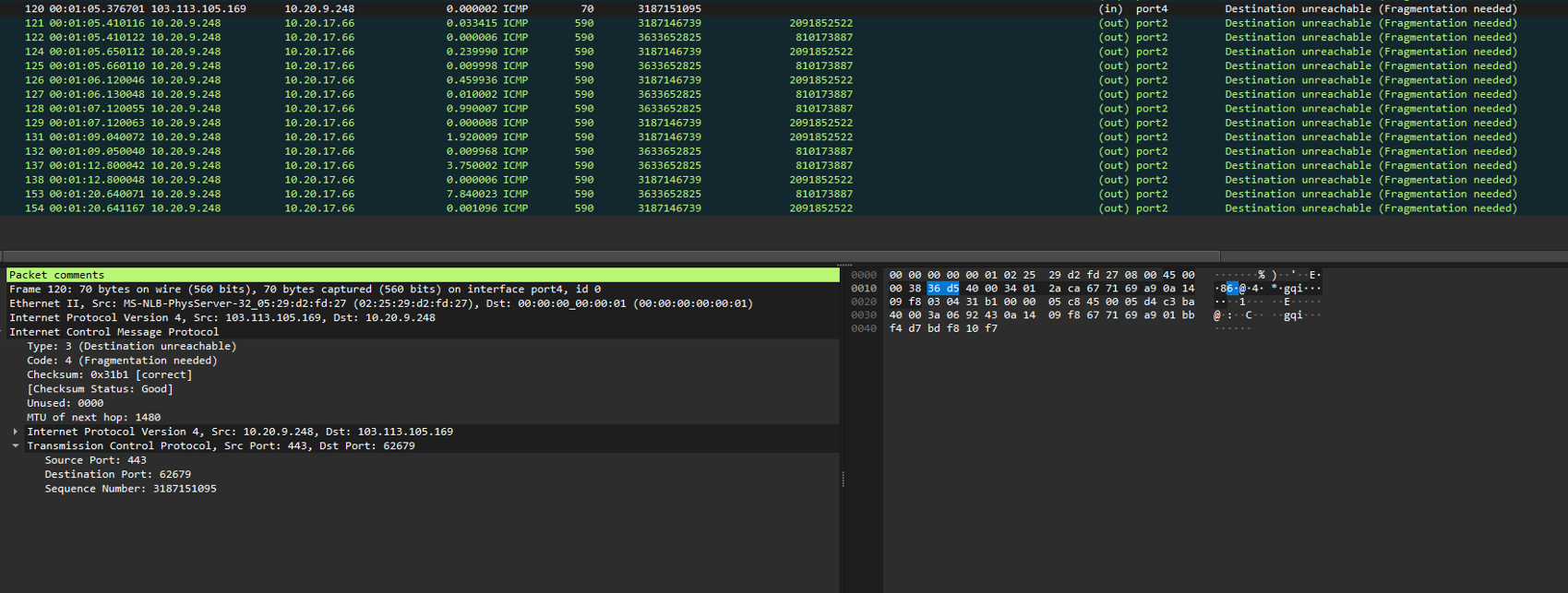
Observe the following fields within the ICMP packet:
Outer destination IP: 10.20.9.248 (VIP).
Embedded source IP: 10.20.9.248 (VIP).
Embedded destination IP: 103.113.105.169 (client).
Embedded TCP source port: 443.
Embedded TCP destination port: 62679.
The embedded IP and TCP headers correspond to the return direction of the HTTPS session established through the VIP. FortiGate can associate the ICMP error with the existing HTTPS session and apply the corresponding NAT translation.
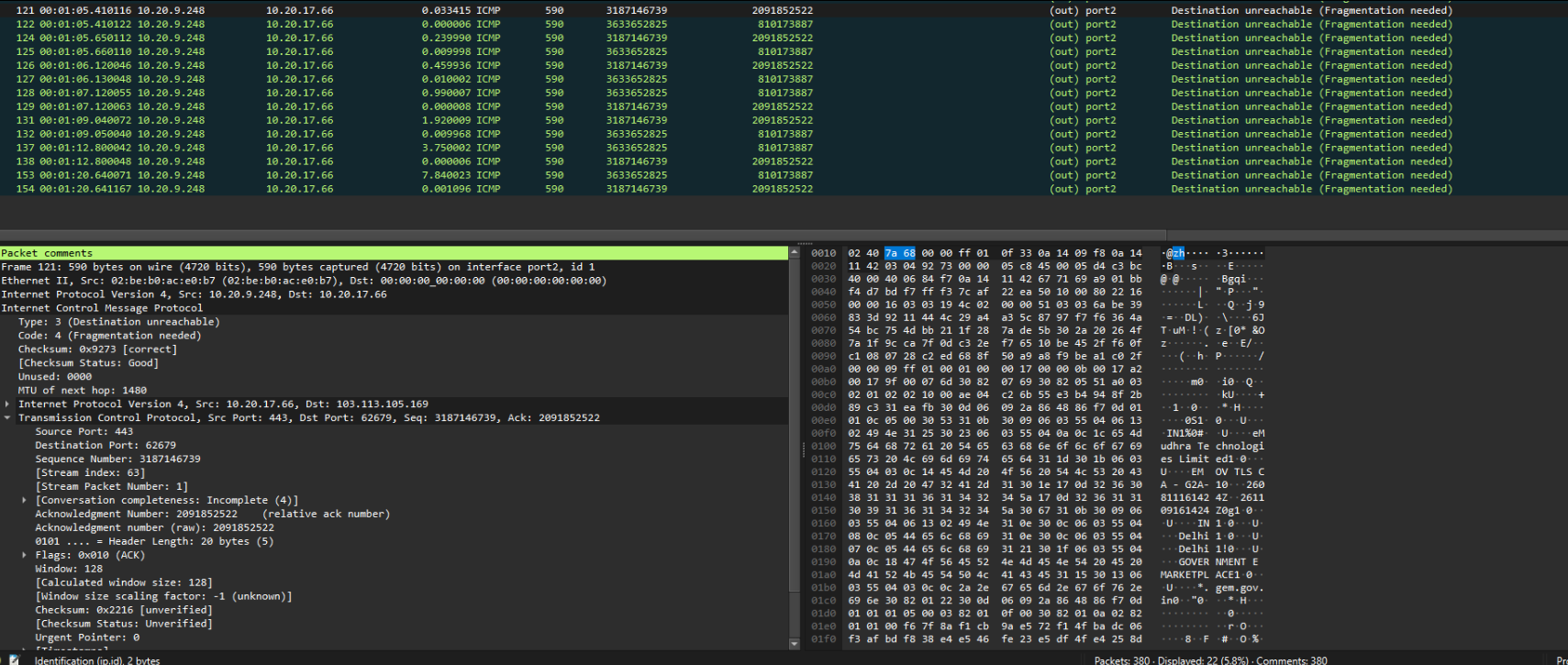
In the outbound packet capture, observe that the outer destination IP and the embedded source IP have been translated from the VIP address (10.20.9.248) to the mapped server address (10.20.17.66).
The following table illustrates the observed packet translation:
Packet field | Incoming packet | Outgoing packet |
|---|
Outer source IP | 103.113.105.169 | 10.20.9.248 | Outer destination IP | 10.20.9.248 | 10.20.17.66 | ICMP Type/Code | 3/4 | 3/4 | Next-hop MTU | 1480 | 1480 | Embedded source IP | 10.20.9.248 | 10.20.17.66 | Embedded destination IP | 103.113.105.169 | 103.113.105.169 |
This explains why the traffic logs may display the following combination:
proto=1: The outer packet is ICMP. service=HTTPS: The recorded service classification corresponds to the HTTPS session context in this example. policyid=51: The firewall policy associated with the original session.
Note:
It is expected behavior for ICMP error messages associated with a valid existing session. It does not indicate that the HTTPS firewall policy permits arbitrary ICMP traffic. ICMP error messages that cannot be associated with an existing session do not benefit from this implicit session-based handling. | 


