Create a REST API Admin in FortiGate under System -> Administrators -> Create New -> REST API Admin to access it via the API. See Technical Tip: How to create a REST API Admin user and assign it to an admin profile.
Save the API key that is generated immediately after selecting the 'Save' button, as in the screenshot below:
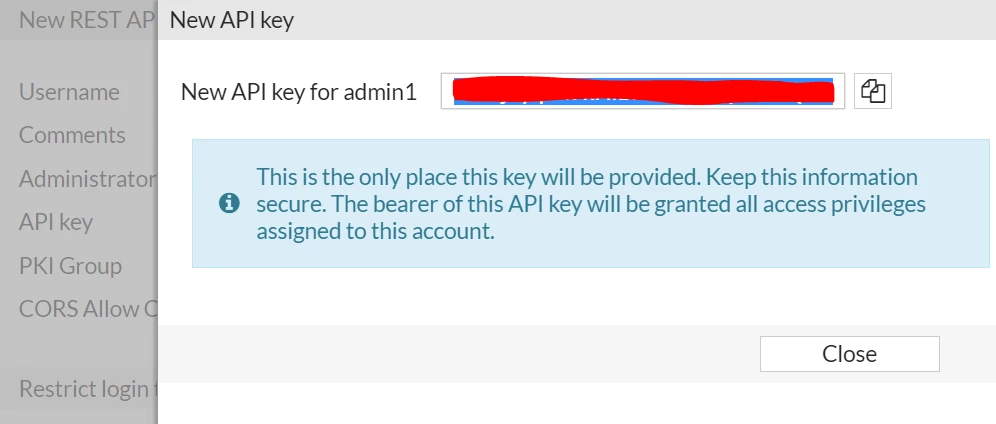 Ensure that the API admin is set with super_admin rights.
config system api-user
    edit "test"
        set api-key ENC <encrypted key>
        set accprofile "super_admin"
        set vdom "root"
    next
end
Create an empty file in Linux using the command: nano /home/backup.py.
Add the following Python script to the file and save it:
FortiOS version 7.4.4 and below:
import requests
api_url = 'https://10.191.20.122/api/v2/monitor/system/config/backup?scope=global&access_token=Api_Key_Generated'

requests.packages.urllib3.disable_warnings()
data = requests.get(api_url, verify=False)
with open('/home/api_configbackup.conf' ,'wb') as f:
    for line in data:           f.write(line)
Where 10.191.20.122 is the IP of the FortiGate. FortiOS version 7.4.5 and above: Authentication details, including the API key, must be passed in the HTTP request header, including Api_Key_Generated.
For example:
import requests
api_url = 'https://10.191.20.122/api/v2/monitor/system/config/backup?scope=global'
requests.packages.urllib3.disable_warnings()
headers = {"Authorization": "Bearer Api_Key_Generated"}
data = requests.get(api_url, verify=False, headers=headers)
with open('/home/api_configbackup.conf' ,'wb') as f:
    for line in data:
        f.write(line)
FortiOS version 8.0.1 and above:
In FortiOS version 8.0.1 and above, it is not possible to back up the full configuration using static encryption, and an encryption method for the backup must be specified. This will cause previously created scripts to fail to retrieve configuration after upgrade. See Encrypted configuration export 8.0.1. Depending on the arguments used in the API call, FortiOS can either: Remove existing secrets in the file, replacing them with "FortinetPasswordMask" (password_mask=true) Encrypt secrets based on the provided password (encrypt_mode=sensitive). Encrypt the entire configuration based on the provided password (default, corresponds to encrypt_mode=full).
Example which encrypts only secrets in configuration:
import requests
api_url = 'https://10.191.20.122/api/v2/monitor/system/config/backup?scope=global&password=password_required_to_restore_backup&encrypt_mode=sensitive'
requests.packages.urllib3.disable_warnings()
headers = {"Authorization": "Bearer Api_Key_Generated"}
data = requests.get(api_url, verify=False, headers=headers)
with open('/home/api_configbackup.conf' ,'wb') as f:
    for line in data:
        f.write(line)
To restore the configuration backup to the firewall later using the REST API, GUI, or CLI, it will be necessary to have the password used by the original API call.
Notes:
The scope is global for the global configuration of the FortiGate. 'Api_Key_Generated' is the value of the token previously generated. /home/api_configbackup.conf is a file path on the Linux machine to save the backup file. FortiOS version 8.0.1 and above: password_required_to_restore_configuration is an administrator-defined password used to encrypt secrets or the entire backup file. The password is required to restore the configuration.
Verifying HTTPS POST request: Before executing the command python3/home/backup.py, it is possible to intuitively test whether the config backup file can be retrieved successfully using the curl command. Test command in FortiOS version 7.6 and below:
curl -k -H "Authorization: Bearer Api_Key_Generated" "https://10.191.20.122/api/v2/monitor/system/config/backup?scope=global" -o api_configbackup.conf
  % Total % Received % Xferd Average Speed Time Time Time Current
Dload Upload Total Spent Left Speed
100 385k 100 385k 0 0 533k 0 --:--:-- --:--:-- --:--:-- 533k
Test command in FortiOS version 8.0.1 and above:
curl -X POST -k -H "Authorization: Bearer API_key_generated" "https://10.191.20.122/api/v2/monitor/system/config/backup?scope=global&password=password_required_to_restore_backup&encrypt_mode=sensitive"  -o api_configbackup.conf
  % Total    % Received % Xferd  Average Speed  Time    Time    Time   Current
                                 Dload  Upload  Total   Spent   Left   Speed
100 679.9k 100 679.9k   0      0 607.3k      0   00:01   00:01         622.6k
Execute the Python script created with the command python3 /home/backup.py.
The file api_configbackup will be created in the specified directory with the configurations of the FortiGate included.
Customizing the REST API call. Additional arguments can be added in the form &<key>=<value> .
For example, to back up the configuration in YAML format, add '&file_format=yaml' as an additional parameter as follows:
..."https://10.191.20.122/api/v2/monitor/system/config/backup?scope=global&file_format=yaml"...
FortiOS REST API documentation is accessible through the Fortinet KYC network; see Accessing Fortinet KYC Network.
FortiGate chassis series.
For chassis-based products (such as 6K - 7K), it may be necessary to set the scope to Global in the account profile to make this work as expected: config system accprofile
edit "API-BACKUP"
set scope global
set secfabgrp read-write
set ftviewgrp read-write
set authgrp read-write
set sysgrp read-write
set netgrp read-write
set loggrp read-write
set fwgrp read-write
set vpngrp read-write
set utmgrp read-write
set wifi read-write
next
end
| 


