


Error "Failed to save changes" while saving custom Application Control signature
Description
Steps to resolve the "Failed to save changes" error encountered when saving a custom Application Control signature.
Scope
FortiGate.
Solution
A syntax error can occur when saving a custom Application Control signature if the signature definition contains line breaks or formatting that prevents the parser from correctly interpreting the opening and closing parentheses.
When attempting to save a custom Application Control signature, the GUI displays the error "Failed to save changes".
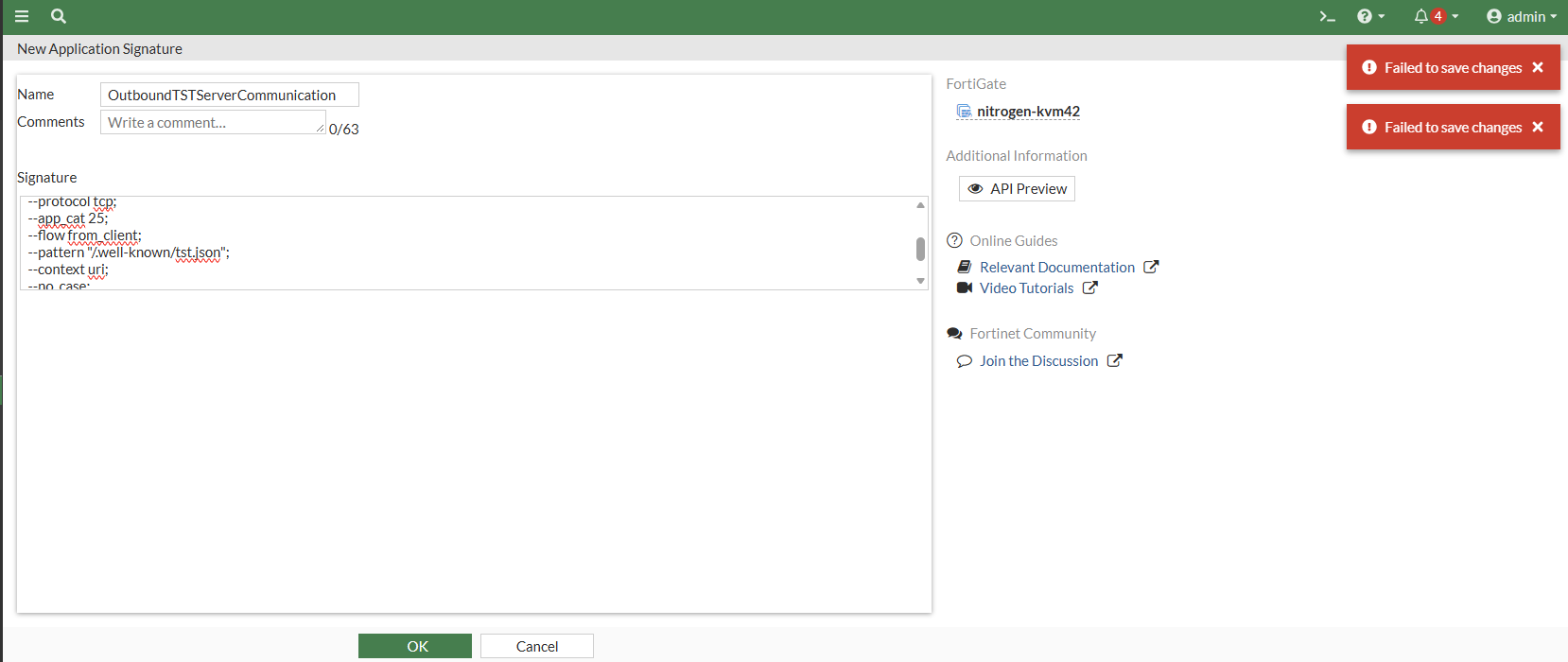
To investigate the issue, run the following commands.
diagnose debug disable
diagnose debug reset
diagnose debug console timestamp enable
diagnose debug cli 8
diagnose debug cmdb-trace
diagnose debug enable
The CLI and CMDB trace debug output indicates that the closing or opening parenthesis cannot be identified. This can occur when the signature definition is formatted across multiple lines in a way that the parser cannot recognize.
kvm42 # 0: config application custom
0: edit "OutboundTSTServerCommunication"
0: set comment ''
0: set signature "F-SBID(
0: --attack_id 9901;
0: --name \"Outbound.TST.Server.Communication\";
0: --default_action drop_session;
0: --service HTTP;
0: --protocol tcp;
0: --app_cat 25;
0: --flow from_client;
0: --pattern \"/.well-known/tst.json\";
0: --context uri;
0: --no_case;
0: --weight 40;
0: )"
0: unset protocol
0: unset technology
0: unset behavior
0: unset vendor
[ERROR] line 1 offset 8:
F-SBID(
       ^^^
       closing round bracket not found
[ERROR] line 2 offset 18:
--attack_id 9901;
                 ^^^
                 closing round bracket not found
[ERROR] line 3 offset 44:
rver.Communication";
                    ^^^
                    closing round bracket not found
[ERROR] line 4 offset 31:
action drop_session;
                    ^^^
                    closing round bracket not found
[ERROR] line 5 offset 16:
--service HTTP;
               ^^^
               closing round bracket not found
[ERROR] line 6 offset 16:
--protocol tcp;
               ^^^
               closing round bracket not found
[ERROR] line 7 offset 14:
--app_cat 25;
             ^^^
             closing round bracket not found
[ERROR] line 8 offset 20:
--flow from_client;
                   ^^^
                   closing round bracket not found
[ERROR] line 9 offset 35:
ell-known/mcp.json";
                    ^^^
                    closing round bracket not found
[ERROR] line 10 offset 15:
--context uri;
              ^^^
              closing round bracket not found
[ERROR] line 11 offset 11:
--no_case;
          ^^^
          closing round bracket not found
[ERROR] line 12 offset 13:
--weight 40;
            ^^^
            closing round bracket not found
[ERROR] line 13 offset 1:
)
^^^
open bracet not found
-2: end
The debug output reports syntax errors, including closing round bracket not found and open bracket not found. These errors indicate that the signature parser cannot correctly interpret the signature definition.
To resolve the issue, enter the custom Application Control signature as a single continuous string, keeping the opening F-SBID( and closing ) within the same string and avoiding unnecessary line breaks.
Navigate to the custom Application Control signature configuration in the FortiGate GUI and update the signature definition to use the following format.
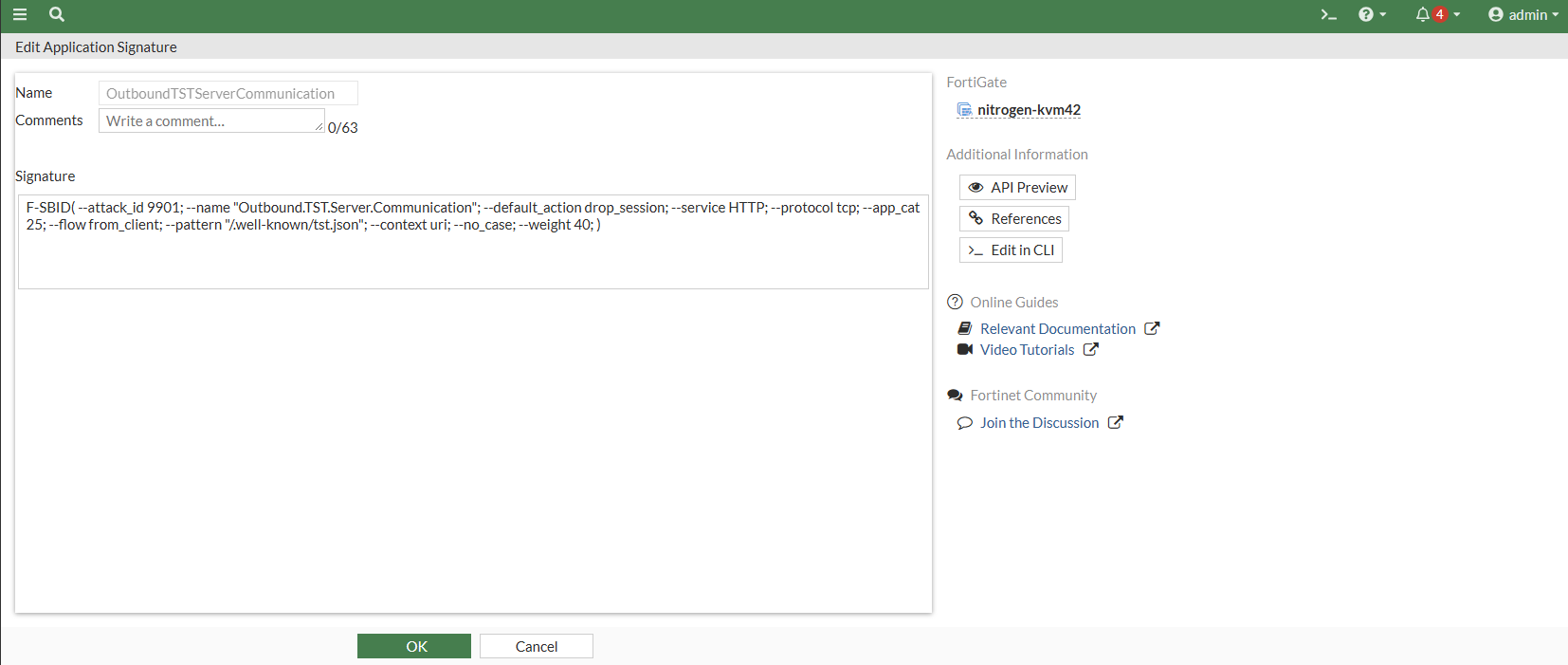
Select Save to apply the changes.
The following debug output confirms that the signature is accepted, and the configuration is saved successfully.
kvm42 # 0: config application custom
0: edit "OutboundTSTServerCommunication"
0: set comment ''
0: set signature "F-SBID( --attack_id 9901; --name \"Outbound.TST.Server.Communication\"; --default_action drop_session; --service HTTP; --protocol tcp; --app_cat 25;
 --flow from_client; --pattern \"/.well-known/tst.json\"; --context uri; --no_case; --weight 40; )"
0: unset protocol
0: unset technology
0: unset behavior
0: unset vendor
0: end
[show_walker_construct:85] open('/tmp/system.conf.2285.xmxxc1) to save config of 'root'
write config file success, prepare to save '/tmp/system.conf.2285.xmxxc1' to '/data/./config/sys_vd_root+root.conf.gz' on flash
flash: block_sz=4096, free_blocks=23953
[__create_file_new_version:312] the new version config file '/data/./config/sys_vd_root+root.conf.gz.v000000024' is created
[symlink_config_file:379] a new version of '/data/./config/sys_vd_root+root.conf.gz' is created: /data/./config/sys_vd_root+root.conf.gz.v000000024
[symlink_config_file:423] the old version '/data/./config/sys_vd_root+root.conf.gz.v000000023' is deleted
[symlink_config_file:425] '/data/./config/sys_vd_root+root.conf.gz' has been symlink'ed to the new version '/data/./config/sys_vd_root+root.conf.gz.v000000024'. The o
ld version '/data/./config/sys_vd_root+root.conf.gz.v000000023' has been deleted
zip config file /data/./config/sys_vd_root+root.conf.gz success!
The configuration save process completes successfully, and the custom Application Control signature is added.

