Two issues: The DDNS domain is updated to the private IP instead of the public IP address.
It is not possible access the firewall with the DDNS domain name.
DDNS domain updating to private IP: First, enable FortiGuard DDNS under Network -> DNS, select an interface, and define the domain as shown below. 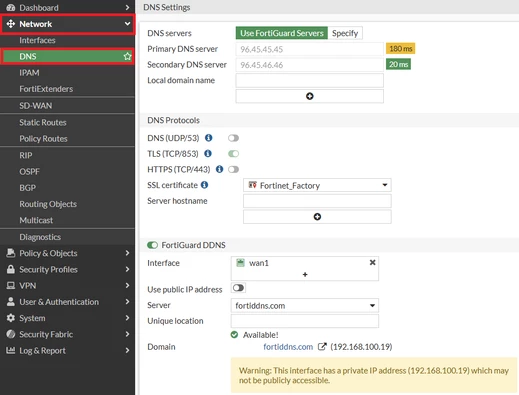 The domain gets the IP address of the affected interface and updates the DNS record with the domain and IP address. If the ISP provides a private IP address, the domain will be mapped to that private IP. In this case, because the private IP address is not routable over the Internet, users will not be able to access the FortiGate using this domain name. In order to avoid this scenario, it is necessary to enable "Use public IP address" option as shown below: 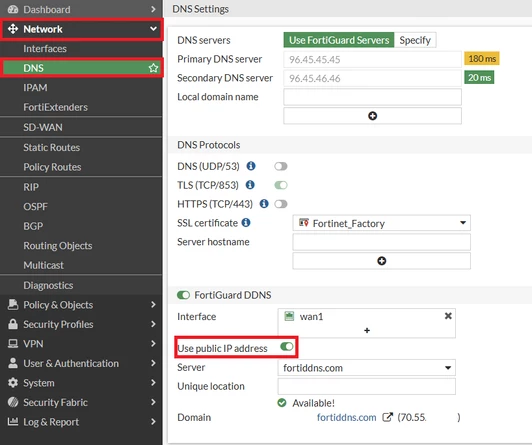 To enable it in the CLI, configure the following:
config sys ddns
    edit <id of DDNS>
        set ddns-server FortiGuardDDNS
        set use-public-ip enable
    end
Note that "use-public-ip" option is only available when using FortiGuardDDNS. When this "use-public-ip" option is enabled, the first IP that exists inline to the ISP from the firewall gets that IP and maps it to the DDNS domain in question.
When "use-public-ip" is enabled, verify that the configured monitor-interface has Internet connectivity and can reach https://api.ipify.org. FortiGate uses this endpoint to determine its external public IP address. Enabling use-public-ip also forces DDNS update requests to leave through the configured monitor-interface. If that interface cannot reach the Internet, the DDNS update may fail.
To ensure FortiGate and FortiGuard server connectivity, check the FortiGuard connection status under Dashboard -> Status, specifically in the Licenses widget.
It is not possible to access firewall with DDNS domain name:
Suppose the domain does not point to the IP address of the interface, but to the IP address of the firewall's upstream router (in the scenario where the private IP points to the IP address of the firewall interface).
In such a scenario, it is necessary to perform port forwarding on the upstream router to forward all traffic to the firewall.
Packet flow:
This is the packet flow.
On the user machine, the firewall is accessed with a DDNS domain name. The domain refers to the IP of the upstream router and the firewall is behind the upstream router.
Therefore, port forwarding must be performed on the upstream router for traffic to reach the firewall. |