Bidirectional Forwarding Detection (BFD) is a lightweight, low-overhead protocol that provides rapid detection of failures in the bidirectional path between two forwarding engines. On FortiGates, BFD integrates seamlessly with dynamic routing protocols like Border Gateway Protocol (BGP) to accelerate neighbor failure detection and routing convergence. This integration is particularly valuable in: High-availability setups with redundant links. Multi-homed eBGP connections to ISPs. Large-scale ADVPN or SD-WAN overlays using BGP.
Configuration steps:
Enable BFD globally (recommended):
config system settings
    set bfd enable
    set bfd-desired-min-tx 250
    set bfd-required-min-rx 250
    set bfd-detect-mult 3
end
Enable BFD on interfaces:
config system interface
    edit "port1"
        set bfd enable # Or 'global' to inherit
        set bfd-desired-min-tx 300
        set bfd-required-min-rx 300
        set bfd-detect-mult 3
    next
end
Single-Hop eBGP with BFD:
On FortiGate A:
config router bgp
    set as 65001
    set router-id 1.1.1.1
        config neighbor
            edit "10.1.1.2"
                set remote-as 65002
                set bfd enable
            next
        end
Advertise networks as needed:
config network
    edit 1
        set prefix 192.168.1.0 255.255.255.0
    next
end
Repeat symmetrically on FortiGate B.
Multihop eBGP with BFD: Additional steps for non-direct peers: On FortiGate A:
config system settings
    set bfd enable
end
config system interface
    edit "port1"
        set bfd enable
    next
end
config router bgp
    set as 65001
        set router-id 1.1.1.1
            config neighbor
                edit "172.16.201.2"
                    set remote-as 65002
                    set bfd enable
                    set ebgp-enforce-multihop enable
                    set soft-reconfiguration enable
                next
                    edit "2000:172:16:201::2"
                        set remote-as 65002
                        set bfd enable
                        set ebgp-enforce-multihop enable
                        set soft-reconfiguration enable
                    next
            end
end
Multihop templates (optional for custom timers/auth).
config router bfd
    config multihop-template
        edit 1
            set src 172.16.200.0 255.255.255.0
            set dst 172.16.201.0 255.255.255.0
        next
    end
end
Be cautious when using BFD when graceful-restart is configured. Combining them is not recommended. BFD can detect the temporary unavailability and trigger immediate session/route withdrawal on the peer side, defeating the purpose of Graceful-Restart. Verification commands: BFD Sessions: get router info bfd neighbor (IPv4) / get router info6 bfd neighbor (IPv6). BGP Summary: get router info bgp summary. BGP Neighbors: get router info bgp neighbors <ip>. Routes: get router info routing-table bgp.
Troubleshooting: Capture BFD packets (UDP ports 3784 control, 3785 echo if used):
diagnose sniffer packet any "port 3784" 4
Multi-hop BFD uses UDP port 4784.
diagnose sniffer packet any "port 4784" 4
Enable BFD debugging:
diagnose debug reset
diagnose debug application bfdd -1
diagnose debug console timestamp enable
diagnose debug enable
To disable:
diagnose debug disable
diagnose debug reset
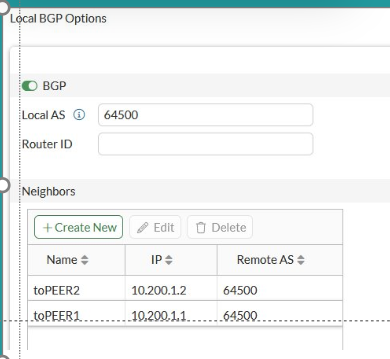
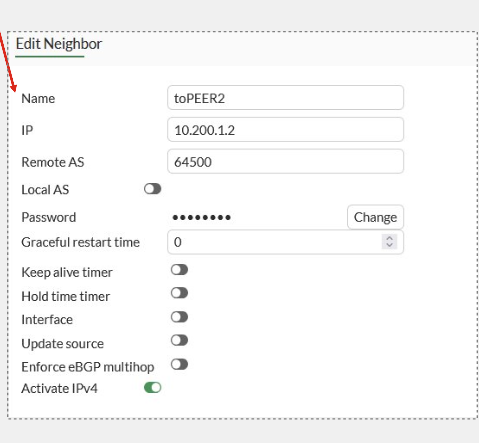
Note: Starting with FortiOS 8.0, a descriptive name can be assigned to BGP neighbors using set name <string>. The configured name is displayed with the peer IP address in the GUI and logs, which can simplify BGP troubleshooting in deployments containing multiple peers.
In the GUI, navigate to Network -> BGP -> Neighbors. The Name column displays the configured neighbor names alongside their IP addresses.
To configure or modify a neighbor name, select the neighbor, select Edit, and enter a descriptive value in the Name field:
For more details, see BGP neighbor naming support.
Related articles:
| 



