


ADVPN with BGP on loopback
Description
This article describes an example configuration for the ADVPN scenario with BGP on Loopback. More details on advantages or disadvantages can be found here: BGP on loopback.
Scope
FortiGate version 7.0 or above.
Solution
The topology used in this example is simple. Single HUB with 2 Spokes; each device has a Loopback with a unique IP address that is used to establish BGP and for routing between Spokes. Each Spoke has 2 connections to the HUB.
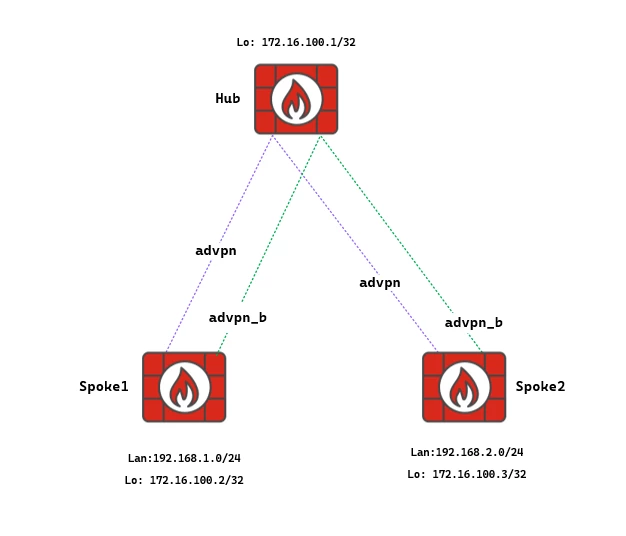
Configuration HUB:
Loopback configuration.
config system interface
    edit "Loopback"
        set vdom "root"
        set ip 172.16.100.1 255.255.255.255
        set allowaccess ping
        set type loopback
        set role lan
        set snmp-index 17
    next
end
VPN Configuration:
HUB # show vpn ipsec phase1-interface
    config vpn ipsec phase1-interface
        edit "advpn"
            set type dynamic
            set interface "port1"
            set ike-version 2
            set net-device disable
            set exchange-ip-addr4 172.16.100.1
            set add-route disable
            set dpd on-idle
            set auto-discovery-sender enable
            set network-overlay enable
            set network-id 1
            set psksecret SUPER_SECRET
            set dpd-retryinterval 5
        next
        edit "advpn_b"
            set type dynamic
            set interface "port2"
            set ike-version 2
            set net-device disable
            set exchange-ip-addr4 172.16.100.1
            set add-route disable
            set dpd on-idle
            set auto-discovery-sender enable
            set network-overlay enable
            set network-id 2
            set psksecret SUPER_SECRET
            set dpd-retryinterval 5
        next
    end
HUB # show vpn ipsec phase2-interface
    config vpn ipsec phase2-interface
        edit "advpn"
            set phase1name "advpn"
            set proposal des-md5 des-sha1
        next
        edit "advpn_b"
            set phase1name "advpn_b"
            set proposal des-md5 des-sha1
        next
    end
HUB # show firewall policy 7
    config firewall policy
        edit 7
            set name "Loopback"
            set uuid 4ad1cfde-f640-51ed-2e70-a6aa412e87ae
            set srcintf "advpn" "advpn_b"
            set dstintf "Loopback"
            set action accept
            set srcaddr "all"
            set dstaddr "all"
            set schedule "always"
            set service "ALL"
        next
    end
HUB #
BGP configuration is very similar to standard ADVPN configuration with IBGP configuration.
HUB # show router bgp
    config router bgp
        set as 65500
        set router-id 172.16.100.1
        set ibgp-multipath enable
        set recursive-next-hop enable
        set tag-resolve-mode merge
            config neighbor-group
                edit "advpn"
                    set soft-reconfiguration enable
                    set interface "Loopback"
                    set remote-as 65500
                    set update-source "Loopback"
                    set route-reflector-client enable
                next
            end
            config neighbor-range
                edit 1
                    set prefix 172.16.100.0 255.255.255.0
                    set neighbor-group "advpn"
                next
            end
            config network
                edit 1
                    set prefix 172.16.100.0 255.255.255.0
                next
            end
    end
Network 172.16.100.0/24 is the whole Loopback subnet for HUB and all Spokes. HUB will need to distribute this network because Spokes will use this network for next-hop resolution. Either it is possible to create a static route for this network via VPN interfaces, or if the subnet is not in the routing table, network-import-check needs to be disabled.
Next-hop-self should be disabled for the ADVPN design, as it breaks the ADVPN setup.
The loopback summary can also be configured as a static route, pointing to a Blackhole with an AD of, for example, 252. It can announce this network on the HUB/s under BGP 'config network'.
For example:
config router static
  edit "x"
   set dst 172.16.100.0 255.255.255.0
   set distance 252
   set blackhole enable
  next
end
Location-ID: It is also important to configure the location ID. It allows the hub to segregate traffic between different child tunnels terminated on the same ISP. This is especially used to symmetrically reply to the SLA probes and avoid issues with the SD-WAN SLA health checks. The location-ID can be configured under the system settings, and the IP will be the same as what is used in the BGP neighbours.
config system settings
   set location-id 172.16.100.1
end
Configuration Spoke:
Both Spokes have the same configuration, except for their IPs.
Loopback and VPN configuration:
Spoke1 # show system interface Loopback
    config system interface
        edit "Loopback"
            set vdom "root"
            set ip 172.16.100.2 255.255.255.255
            set allowaccess ping
            set type loopback
        next
    end
Spoke1 # show vpn ipsec phase1-interface
    config vpn ipsec phase1-interface
        edit "advpn"
            set interface "port1"
            set ike-version 2
            set net-device enable
            set exchange-ip-addr4 172.16.100.2
            set proposal des-sha1
            set add-route disable
            set dpd on-idle
            set dhgrp 21
            set idle-timeout enable
            set idle-timeoutinterval 5
            set auto-discovery-receiver enable
            set network-overlay enable
            set network-id 1
            set remote-gw 20.0.0.1
            set psksecret SUPER_SECRET
            set dpd-retryinterval 3
        next
        edit "advpn_b"
            set interface "port3"
            set ike-version 2
            set net-device enable
            set exchange-ip-addr4 172.16.100.2
            set proposal des-sha1
            set add-route disable
            set dpd on-idle
            set dhgrp 21
            set idle-timeout enable
            set idle-timeoutinterval 5
            set auto-discovery-receiver enable
            set network-overlay enable
            set network-id 2
            set remote-gw 30.0.0.1
            set psksecret SUPER_SECRET
            set dpd-retryinterval 3
        next
    end
    config vpn ipsec phase2-interface
        edit "advpn"
            set phase1name "advpn"
            set proposal des-md5 des-sha1
        next
        edit "advpn_b"
            set phase1name "advpn_b"
            set proposal des-md5 des-sha1
        next
    end
BGP configuration is again similar to standard ADVPN. However, in the case that the shortcut is created and has multiple VPNs, to have failover available to other VPN overlays for cases where the current shortcut will be out of SLA, some additional changes are needed.
The configuration:
spoke1# show router route-map
    config router route-map
        edit "set-tag"
            config rule
                edit 1
                    set set-tag 1
                next
            end
        next
    end
Spoke1 # show router bgp
    config router bgp
        set as 65500
        set router-id 10.255.255.2
        set ibgp-multipath enable
        set recursive-next-hop enable
        set tag-resolve-mode merge
            config neighbor
                edit "172.16.100.1"
                    set soft-reconfiguration enable
                    set interface "Loopback"
                    set remote-as 65500
                    set route-map-in "set-tag"
                    set update-source "Loopback"
                    set additional-path both
                next
            end
            config network
                edit 1
                    set prefix 192.168.1.0 255.255.255.0
                next
                edit 2
                    set prefix 172.16.100.2 255.255.255.255
                next
            end
config system settings
set location-id 172.16.100.2
end
Two important settings to correctly resolve the next-hop are as follows:
    set recursive-next-hop enable
    set tag-resolve-mode merge
Both settings are under BGP. The first setting allows the next-hop to be resolved via another BGP route. Tag-resolve-mode merge allows resolving the next-hop with the best-match route and with the route with the same tag at the same time. This is important when the shortcut is created. An example is shown below.
At the same time, it is necessary to mark routes with tags in the incoming direction. This is the purpose of the 'set-tag' route-map in the configuration.
Verification:
How will it look in a state where no shortcut is formed: All outputs are from Spoke1. 2 tunnels are established, 1 BGP only.
Spoke1 # get router info bgp sum
VRF 0 BGP router identifier 10.255.255.2, local AS number 65500
BGP table version is 9
1 BGP AS-PATH entries
0 BGP community entries
Neighbor V AS MsgRcvd MsgSent TblVer InQ OutQ Up/Down State/PfxRcd
172.16.100.1 4 65500 4569 4550 8 0 0 00:35:42 3
Total number of neighbors 1
Spoke1 # get router info routing-table all
Codes: K - kernel, C - connected, S - static, R - RIP, B - BGP
O - OSPF, IA - OSPF inter area
N1 - OSPF NSSA external type 1, N2 - OSPF NSSA external type 2
E1 - OSPF external type 1, E2 - OSPF external type 2
i - IS-IS, L1 - IS-IS level-1, L2 - IS-IS level-2, ia - IS-IS inter area
V - BGP VPNv4
* - candidate default
Routing table for VRF=0
S* 0.0.0.0/0 [10/0] via 10.0.0.254, port10, [1/0]
C 10.0.0.0/24 is directly connected, port10
C 20.0.0.0/24 is directly connected, port1
C 30.0.0.0/24 is directly connected, port3
B 172.16.100.0/24 [200/0] via 172.16.100.1 tag 1 (recursive via advpn tunnel 20.0.0.1), 00:34:29
(recursive via advpn_b tunnel 30.0.0.1), 00:34:29, [1/0]
S 172.16.100.1/32 [15/0] via advpn tunnel 20.0.0.1, [1/0]
[15/0] via advpn_b tunnel 30.0.0.1, [1/0]
C 172.16.100.2/32 is directly connected, Loopback
B 172.16.100.3/32 [200/0] via 172.16.100.3 tag 1 (recursive via advpn tunnel 20.0.0.1), 00:26:17
(recursive via advpn_b tunnel 30.0.0.1), 00:26:17, [1/0]
C 192.168.1.0/24 is directly connected, port2
B 192.168.2.0/24 [200/0] via 172.16.100.3 tag 1 (recursive via advpn tunnel 20.0.0.1), 00:26:17
(recursive via advpn_b tunnel 30.0.0.1), 00:26:17, [1/0]
If checking the BGP neighbor status, the egress interface is index 20, which is, in this case, the ADVPN tunnel interface.
Spoke1 # get router info bgp neighbors 172.16.100.1
VRF 0 neighbor table:
BGP neighbor is 172.16.100.1, remote AS 65500, local AS 65500, internal link
-- ommitted --
Connections established 7; dropped 6
Local host: 172.16.100.2, Local port: 1807
Foreign host: 172.16.100.1, Foreign port: 179
Egress interface: 20 <-
Nexthop: 172.16.100.2
Nexthop interface: Loopback
Nexthop global: ::
Nexthop local: ::
BGP connection: non shared network
Last Reset: 00:36:23, due to BGP Notification sent
Notification Error Message: (CeaseUnspecified Error Subcode)
Spoke1 # diagnose netlink interface list | grep index=20
if=advpn family=00 type=768 index=20 mtu=1300 link=0 master=0
If the ADVPN tunnel is not available, BGP will start flowing via the secondary advpn_b tunnel.
If examining 192.168.2.0/24 in detail, the next-hop will be resolved based on tag-match:
Spoke1 # get router info routing-table details 192.168.2.0/24
Routing table for VRF=0
Routing entry for 192.168.2.0/24
Known via "bgp", distance 200, metric 0, best
Last update 00:31:24 ago
* vrf 0 172.16.100.3, tag 1 priority 1 (recursive via advpn tunnel 20.0.0.1), tag-match
(recursive via advpn_b tunnel 30.0.0.1), tag-match
The traffic will start flowing between Spoke1 and Spoke2, and the shortcut will be negotiated. The new shortcut tunnel is advpn_0. Because 'tag-resolve-mode merge' is enabled, the routing-table will look like this:
Spoke1 # get router info routing-table all
Codes: K - kernel, C - connected, S - static, R - RIP, B - BGP
O - OSPF, IA - OSPF inter area
N1 - OSPF NSSA external type 1, N2 - OSPF NSSA external type 2
E1 - OSPF external type 1, E2 - OSPF external type 2
i - IS-IS, L1 - IS-IS level-1, L2 - IS-IS level-2, ia - IS-IS inter area
V - BGP VPNv4
* - candidate default
Routing table for VRF=0
S* 0.0.0.0/0 [10/0] via 10.0.0.254, port10, [1/0]
C 10.0.0.0/24 is directly connected, port10
C 20.0.0.0/24 is directly connected, port1
C 30.0.0.0/24 is directly connected, port3
B 172.16.100.0/24 [200/0] via 172.16.100.1 tag 1 (recursive via advpn tunnel 20.0.0.1), 00:43:24
(recursive via advpn_b tunnel 30.0.0.1), 00:43:24, [1/0]
S 172.16.100.1/32 [15/0] via advpn tunnel 20.0.0.1, [1/0]
[15/0] via advpn_b tunnel 30.0.0.1, [1/0]
C 172.16.100.2/32 is directly connected, Loopback
S 172.16.100.3/32 [15/0] via advpn_0 tunnel 20.0.0.3, [1/0]
C 192.168.1.0/24 is directly connected, port2
B 192.168.2.0/24 [200/0] via 172.16.100.3 tag 1 (recursive via advpn_0 tunnel 20.0.0.3), 00:00:12
(recursive via advpn_b tunnel 30.0.0.1), 00:00:12, [1/0]
Spoke1 # get router info routing-table details 192.168.2.0/24
Routing table for VRF=0
Routing entry for 192.168.2.0/24
Known via "bgp", distance 200, metric 0, best
Last update 00:00:58 ago
* vrf 0 172.16.100.3, tag 1 priority 1 (recursive via advpn_0 tunnel 20.0.0.3), best-match
(recursive via advpn_b tunnel 30.0.0.1), tag-match
If the 'tag-resolve-mode' is disabled (default setting), the routing-table looks a bit different. At the initial state, when no shortcut is created, there will be no visible difference:
Spoke1 # show full router bgp | grep tag-resolve
set tag-resolve-mode disable
Spoke1 # get router info routing-table all
Codes: K - kernel, C - connected, S - static, R - RIP, B - BGP
O - OSPF, IA - OSPF inter area
N1 - OSPF NSSA external type 1, N2 - OSPF NSSA external type 2
E1 - OSPF external type 1, E2 - OSPF external type 2
i - IS-IS, L1 - IS-IS level-1, L2 - IS-IS level-2, ia - IS-IS inter area
V - BGP VPNv4
* - candidate default
Routing table for VRF=0
S* 0.0.0.0/0 [10/0] via 10.0.0.254, port10, [1/0]
C 10.0.0.0/24 is directly connected, port10
C 20.0.0.0/24 is directly connected, port1
C 30.0.0.0/24 is directly connected, port3
B 172.16.100.0/24 [200/0] via 172.16.100.1 (recursive via advpn tunnel 20.0.0.1), 00:51:10
(recursive via advpn_b tunnel 30.0.0.1), 00:51:10, [1/0]
S 172.16.100.1/32 [15/0] via advpn tunnel 20.0.0.1, [1/0]
[15/0] via advpn_b tunnel 30.0.0.1, [1/0]
C 172.16.100.2/32 is directly connected, Loopback
B 172.16.100.3/32 [200/0] via 172.16.100.3 (recursive via advpn tunnel 20.0.0.1), 00:00:58
(recursive via advpn_b tunnel 30.0.0.1), 00:00:58, [1/0]
C 192.168.1.0/24 is directly connected, port2
B 192.168.2.0/24 [200/0] via 172.16.100.3 (recursive via advpn tunnel 20.0.0.1), 00:00:58
(recursive via advpn_b tunnel 30.0.0.1), 00:00:58, [1/0]
But when the shortcut is created, the difference will be visible:
Spoke1 # get router info routing-table all
Codes: K - kernel, C - connected, S - static, R - RIP, B - BGP
O - OSPF, IA - OSPF inter area
N1 - OSPF NSSA external type 1, N2 - OSPF NSSA external type 2
E1 - OSPF external type 1, E2 - OSPF external type 2
i - IS-IS, L1 - IS-IS level-1, L2 - IS-IS level-2, ia - IS-IS inter area
V - BGP VPNv4
* - candidate default
Routing table for VRF=0
S* 0.0.0.0/0 [10/0] via 10.0.0.254, port10, [1/0]
C 10.0.0.0/24 is directly connected, port10
C 20.0.0.0/24 is directly connected, port1
C 30.0.0.0/24 is directly connected, port3
B 172.16.100.0/24 [200/0] via 172.16.100.1 (recursive via advpn tunnel 20.0.0.1), 00:52:10
(recursive via advpn_b tunnel 30.0.0.1), 00:52:10, [1/0]
S 172.16.100.1/32 [15/0] via advpn tunnel 20.0.0.1, [1/0]
[15/0] via advpn_b tunnel 30.0.0.1, [1/0]
C 172.16.100.2/32 is directly connected, Loopback
S 172.16.100.3/32 [15/0] via advpn_0 tunnel 20.0.0.3, [1/0]
C 192.168.1.0/24 is directly connected, port2
B 192.168.2.0/24 [200/0] via 172.16.100.3 (recursive via advpn_0 tunnel 20.0.0.3), 00:01:58, [1/0]
As shown in the example, the second route towards 192.168.2.0/24 via the backup tunnel is missing. Because of that, traffic will be forced to egress the advpn_0 shortcut even if it is out of SLA until the tunnel is flushed.
Use the loopback as the source interface, as the loopback is always up and stable. The loopback is down when the device is down.
Advertise this loopback in the BGP network, in case using an IGP protocol like OSPF or ISIS should have reachability.
Note: In case of ADVPN and SD-WAN with loopback, avoid using a remote BGP peer (which is loopback) for health-check under SD-WAN. Use a different IP for health-check instead of the BGP remote peer. The reason is that a kernel route for the health-check server IP will be created and will not be removed even when the health check fails. This will cause the spoke to continue sending BGP traffic over the same VPN tunnel even if it is down.
Example config from Spoke2:
Use another IP instead of the BGP peer loopback; the HUB is shown below.
config health-check
    edit "health_check_HUB"
        set server "172.16.100.1"
        set embed-measured-health enable
        set source 172.16.100.2
        set members 1 2
        set class-id 2
            config sla
                edit 1
                    set link-cost-factor latency packet-loss
                    set latency-threshold 175
                    set packetloss-threshold 1
                next
            end
    next
end
Related document:
