Troubleshooting Tip: Uploaded HTTPS/SSH certificate does not display
Description
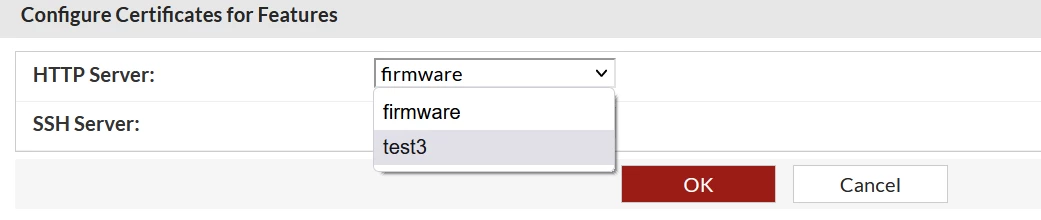
This article explains how to work around an issue where, after uploading a certificate to use for HTTPS and SSH, the certificate does not display under the 'Service' section. Instead, only firmware displays.
Scope
Any supported version of FortiDeceptor.
Solution
FortiDeceptor does not support generating 'CSR' certificates. However, when importing certificates for SSH and HTTPS access to FortiDeceptor, the .crt, PKCS12, and .pem formats are supported.
This means that if a .crt file was uploaded without a key, FortiDeceptor will consider it as CA certificate. FortiDeceptor will not have the private key necessary to use it for HTTPS and SSH encryption or decryption.
To fix the issue, follow these steps:
1) Use a third party tool or internal service to generate a CSR with a private key.
2) While generating the CSR, add all of the relevant FortiDeceptor information.
3) Sign this CSR from the CA, whether public or private.
4) Navigate to System -> Certificates and select Import.
5) Import the .crt and .key files:
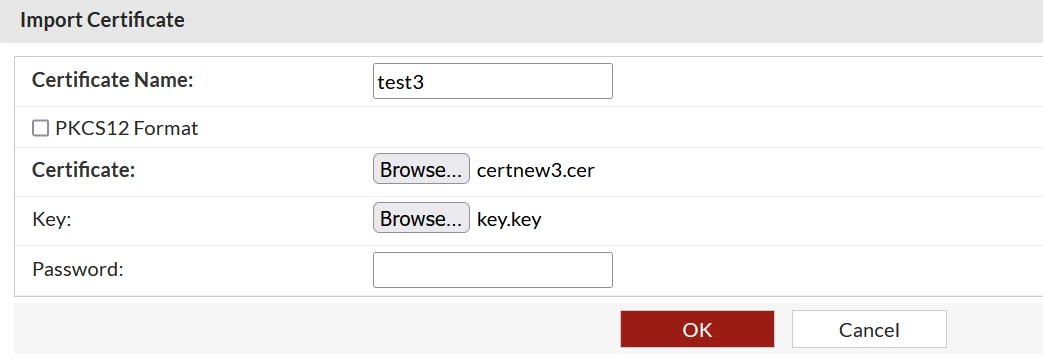
6) Once they have been imported successfully, select 'Service' to find it there.