btey
Staff & Editor
Staff & Editor
Mar 20, 2024 9:17 AM UTC

Troubleshooting Tip: SMS gateway using HTTPS protocol unable to send a text message: HTTP request failed

Description

This article provides a solution for the following error when it is encountered in the SMS gateway (HTTPS protocol):


'Unable to send a text message: HTTP request failed (url: https://x.x.x.x/, status: 0, res: ). Please check your configuration'.

Scope FortiAuthenticator SMS Gateway HTTPS protocol.
Solution

The error message is as follows:


errormsg.PNG 

Packet capture is shown as below:

Connection closed by FortiAuthenticator after Change Cipher Spec.
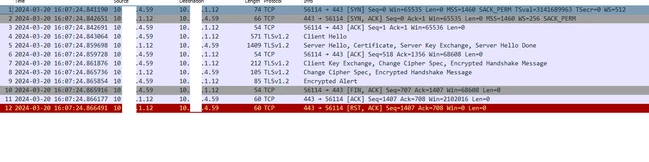
 

packet capture.PNG


Resolution:

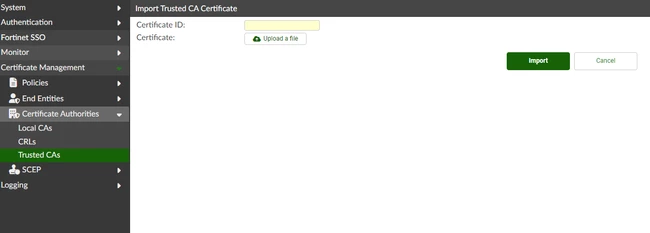
  1. Obtain the SMS gateway server CA certificate from the respective party. Ensure that this CA certificate is imported into FortiAuthenticator by going to Certificate Management ->Certificate Authorities > Trusted CAs. It is possible to manually import the CA certificate or 'Learn Certificate'.


import CA certificate.PNG


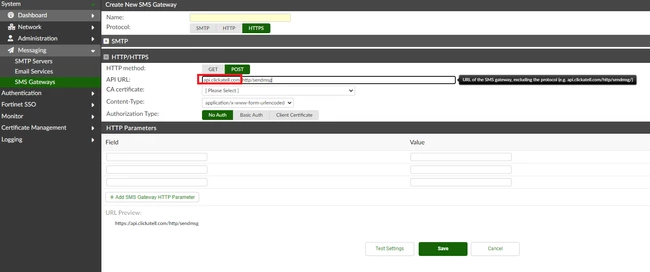
  1. Ensure the API URL hostname matches the server certificate common name.


URL.PNG


  1. Ensure FortiAuthenticator can resolve the URL hostname to an IP address.
    Risk and Resilience in the Age of AI. An OT Thought Leadership Summit for Houston's Critical Infrastructure Leaders. Date: Thursday, December 3, 2026. Time: 8:30 am - 1:30 pm (CT). Location: The Westin Houston, Memorial City | 945 Gessner Road, Houston, TX 77024