| Scenario 1: The Master account is currently accessible. - Transfer assets to the new Master account:
Customer Service Tip: How to change the master account ID (email address) used for product registration Asset Transfer -
Assets transferred to the new Master account. Verify in the Fortinet Support portal Asset Management -> Account Services. -
Create a technical ticket for the FortiAppSec Team and provide relevant information for the migration process. Existing Master account: XXX@email.com
Existing Account ID: 123456
New Master account: YYY@email.com
New Account ID: 654321 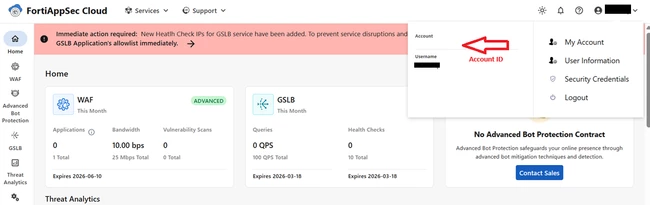
-
Verify the new Master account via the FortiAppSec Cloud portal accessibility after being notified by the technical team on migration process completion. Scenario 2: Master account access is lost(user no longer has access to registered email). - Create a customer service ticket for asset transfer. Provide relevant information for the account transfer.
Technical Tip: How to create a ticket for Fortinet TAC Existing Master account: XXX@email.com
New Master account: YYY@email.com -
Once notified, verify assets transferred to the new Master account. Verify in the Fortinet Support portal Asset Management -> Account Services. -
Create a technical ticket for the FortiAppSec Team and provide relevant information for the migration process. Existing Master account: XXX@email.com
Existing Account ID: 123456
New Master account: YYY@email.com
New Account ID: 654321 -
Verify the new Master account via the FortiAppSec Cloud portal accessibility after being notified by the technical team on migration process completion. Note: The New Master account must be a registered FortiCloud account. Configured IAM users in the old Master account are not migrated to the new Master account. | 



