Ahmed_Galal
Staff
Staff
March 24, 2025

Technical Tip: How to trigger a CLI script when a virtual server goes down.

  • March 24, 2025
  • 0 replies
  • 233 views
Description This article describes how to configure an Automation Stitch to trigger a CLI script when a virtual server goes down
Scope FortiADC.
Solution

Prerequisite:

  • Read/Write admin account.
  • Determine which script is needed to be triggered when the virtual server becomes down.


Steps:

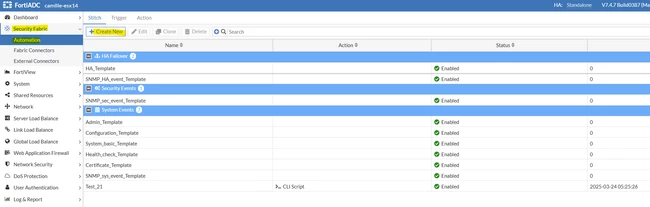
  • Navigate to Security Fabric -> Automation -> Create a new Stitch

Screenshot_1.png


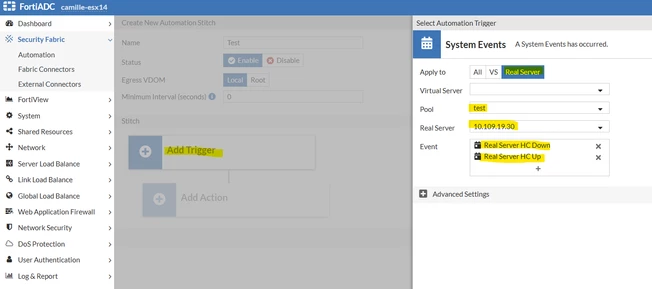
  • Select System Events -> Select Real Server -> Fill in the Pool name & Real Server IP.
  • In the Event section, select Real Server HC Down & UP.


Screenshot_2.png


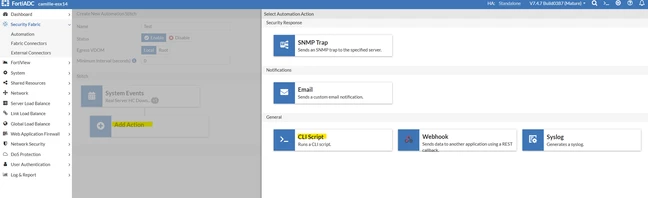
  • Select Add Action -> Select CLI Script -> Fill in the name.
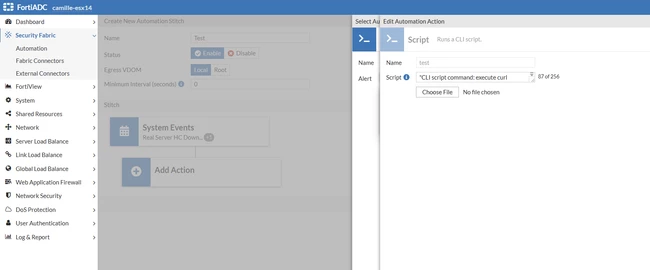
  • Create a new Alert -> Fill the Script content as planned earlier. 
  • The Script content can be any CLI command. For example: 


get system status


Screenshot_3.png


Screenshot_4.png


Related articles:

Creating automation stitches - FortiADC handbook

    Thought Leadership Security Summit. Outpace New Threats with AI - enhanced defense. Tuesday, Septmeber 15, 8:30 AM - 2:30 PM PT. The Golf Club at Newcastle, WA.
    Virtual event | September 2026. SASE summit. The age of autonomous trust. Register here!