| Solution | A pair of FortiADC can synchronize their configuration without using High-Availability, given that they match the same Hardware Platform and Software Platform too. This works as a Push/Pull method of Synchronizing config among FortiADCs. For this, FortiADC by default uses port TCP-995.
To Configure Config-Sync: - Go to Settings -> Basic -> Enable Config-Sync, and change the port to another number if the default (995) is used somewhere in the network.
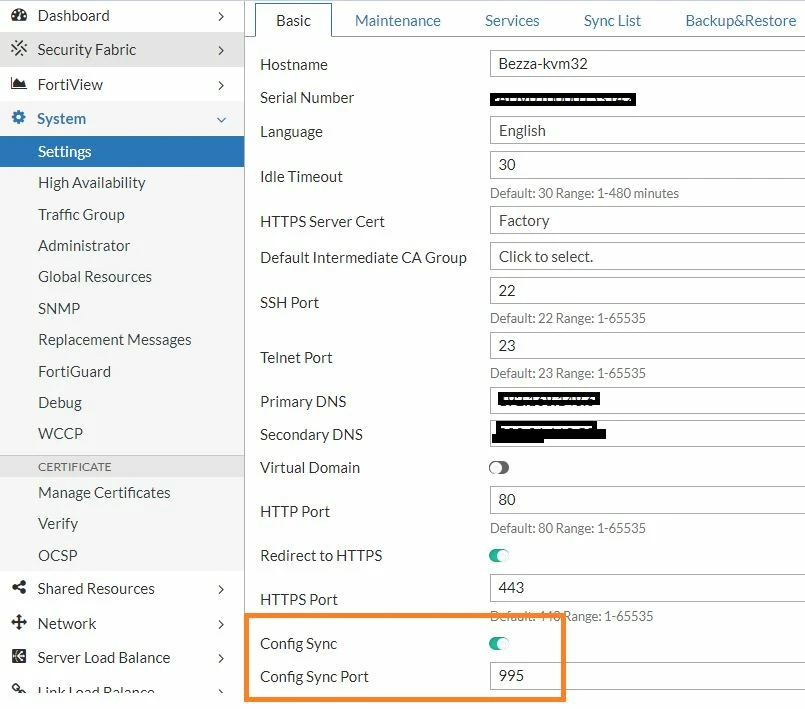
-
Go to Settings -> Sync-List -> Create-New. -
Fill in the information in the boxes.
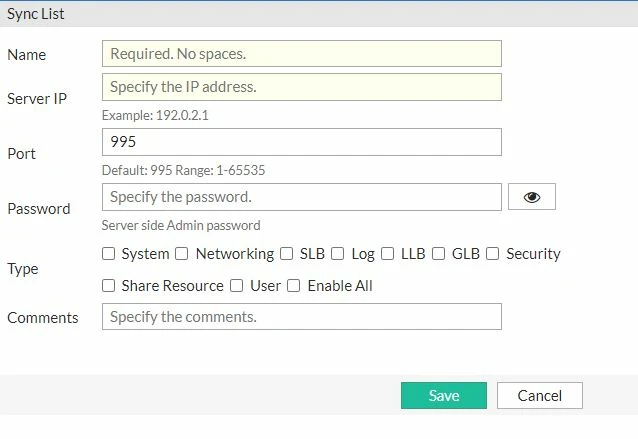
Server-IP is the FortiADC; from/to config needs to sync: -
Once configured on one device, it is necessary to repeat the same steps on another device in the pair as well. Make sure their IP addresses are reachable from each other (it is possible to verify with a Ping Test). -
After configuring both devices in the pair, choose which device needs to be the config source. -
Config Sync is manual and does not perform any Automatic Sync if config changes are made on any device in the pair. -
The device that is going to send the config will select the option to and select Sync. 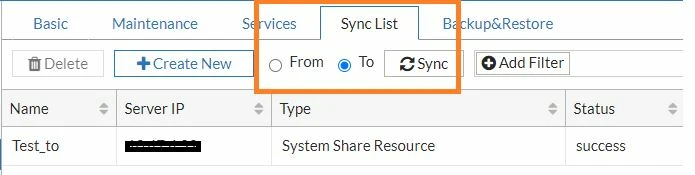
-
Config sync can be initiated from the receiving device; it is just necessary to select 'from', select the source device from the list, and select Sync. Related document:
config config sync-list execute config-sync |



