Solution | When onboarding FortiGate to FortiManager, it is usually a seamless process, but issues may occur for various reasons. In this article, the most common issues seen are discussed along with their solutions.
To start troubleshooting the issue, review the event logs on the FortiManager, as well as run fgfmsd debugs, which gives a direction to look to find the root cause of the issue. Follow the instructions in Technical Tip: How to troubleshoot connectivity issues between FortiGate and FortiManager.
Run the following commands to run the debug processes on FortiManager: diagnose debug reset
diagnose debug application fgfmsd -1
diagnose debug timestamp enable
diagnose debug enable
To disable the processes: diagnose debug reset
diagnose debug disable
Scenario 1: When trying to add a FortiGate to FortiManager, an error message 'unregistered device ignored' is observed in the FortiManager debugs. This error occurs if 'fgfm-deny-unknown' is enabled on the FortiManager. To resolve this, either follow the special instructions to add FortiGate to FortiManager as described in the following KB article or disable this setting: config system global
set fgfm-deny-unknown enable
end
Instructions to add FortiGate to FortiManager with fgfm-deny-unknown enable: Technical Tip: How to add FortiGate with its current config to FortiManager when 'set fgfm-deny-unknown enable'. Debug snippet: ": "<unknown>", "version": 700}, "from": 1}, "url": "dvm\/cmd\/manage\/device"}], "session": -1}
FGFMs(FG101F1111111111-302-2.2.2.27): server:
get connect_tcp
localid=10744
chan_window_sz=32768
deflate=gzip
tcp_port=80
bind /var/tmp/fgfm/.fos.FG101F1111111111.rpc-FMG-0000000000-VLW1Gc OK.
Response [unknown]:{ "id": 9501, "result": [{ "status": { "code": -20012, "message": "Unregistered device ignored"}, <-----
"url-"dvm\/cmd\/manage\/device"}]}
FGFMs(probing...): Cleanup session 0x556647524780, 1.1.1.1.
FGFMs(probing...): Destroy session 0x556647524780, 1.1.1.1.
FGFMs(FG101F1111111111-302-2.2.2.27): fgfm_tcp_chan.c,__chan_write,278:error.
FGFMs(FG101F1111111111-302-2.2.2.27): Destroy tcp channnel local_id=16568, remote_id=10744, sock_rd=492, sock_wr=634, sock_size=0, c
Scenario 2: Starting with FortiManager v7.4.7 (Special Notices) and v7.6.3 (Special Notices), connections from VM-based devices to FortiManager are restricted by default for security reasons. As part of this change, FortiManager no longer permits VM platform connections over FGFM unless explicitly allowed. To allow VM platform connection in FGFM, enter the following command in the FortiManager CLI:
config system global
    set fgfm-allow-vm enable
end
Scenario 3: In this scenario, FortiManager is showing an 'unknown CA' error in the debugs. This error could be seen on the FortiManager while adding a new FortiGate to FortiManager, and, for example, an intermediate CA is missing on the FortiManager. Ensure that all necessary CA certificates are present on the FortiManager to resolve this issue. Debug logs:
2025-06-03 13:44:48 FGFMs: issuer matching...try next if not match... local_issuer(Test Server CA 019), remote_CA_subject(Local Root CA )
2025-06-03 13:44:48 FGFMs: Remote CA subject is /C=GB/O=Test hlc/CN=LOcal Root CA .
2025-06-03 13:44:48 FGFMs: issuer matching...try next if not match... local_issuer(fortinet-subca2001), remote_CA_subject(LOcal Root CA )
2025-06-03 13:44:48 FGFMs: Remote CA subject is /C=GB/O=Test hlc/CN=LOcal Root CA .
2025-06-03 13:44:48 FGFMs: issuer matching...try next if not match... local_issuer(support), remote_CA_subject(LOcal Root CA )
2025-06-03 13:44:48 FGFMs: No more valid certificates
2025-06-03 13:44:48 FGFMs: ssl_proto.c,642: TLSv1.3 SSLv3/TLS write certificate
2025-06-03 13:44:48 FGFMs: ssl_proto.c,642: TLSv1.3 TLSv1.3 write server certificate verify
2025-06-03 13:44:48 FGFMs: ssl_proto.c,642: TLSv1.3 SSLv3/TLS write finished
2025-06-03 13:44:48 FGFMs: ssl_proto.c,642: TLSv1.3 TLSv1.3 early data
2025-06-03 13:44:48 FGFMs: ssl_proto.c,744: TLSv1.3 read fatal alert: unknown CA
2025-06-03 13:44:48 FGFMs: ssl_proto.c,759: TLSv1.3 error
2025-06-03 13:44:48 FGFMs: ssl_proto.c,__get_error,1519, error=1, errno=0,Success, ssl=no valid cert.
2025-06-03 13:44:48 FGFMs(probing...): Connection was interrupted. sockevents[-1] sslerr[-6]
2025-06-03 13:44:48 FGFMs(probing...): Cleanup session 0x55ae63ac2280, 1.1.1.1.
2025-06-03 13:44:48 FGFMs(probing...): Destroy session 0x55ae63ac2280, 1.1.1.1.
2025-06-03 13:45:02 __start_tunnel_by_devlist,336: devid=265, admin=admin.
Scenario 4: When adding a new FortiGate to FortiManager, an error may be encountered stating 'serial number (fgvmultm12345678) in 'get' message doesn't match the subject CN (test.lab.com) in peer's certificate' on FortiManager v7.4.6 with custom certificates. This error occurs because the serial number is missing in the FortiGate certificate's SAN.
In FortiManager v7.4.6, the 'fgfm-peercert-withoutsn' setting has been removed, so the verification cannot be disabled. Ensure that the FortiGate certificate contains the serial number in either the CN or the SAN. Note that FortiManager expects the serial number in the CN of the FortiGate certificate on FortiManager v7.4.6. This behavior is fixed in FortiManager v7.4.7, where a certificate can be created with the serial number in the SAN, and it should work. To validate that on FortiGate, go to System -> Certificates, review the subject of the Certificate 'Fortinet_Factory', and ensure that the CN is showing the serial number of the FortiGate.
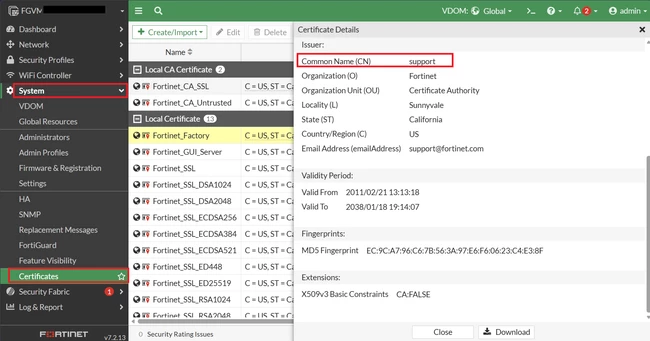 If the CN is showing as 'FortiGate' or 'support' instead, run the following command in the FortiGate CLI, replacing FGVMXXXXXXXX with the FortiGate serial number.
execute vm-license FGVMXXXXXXXX

This operation will reboot the system!
Do you want to continue? (y/n)y
If the following error occurs while executing the above command, manually upload the license file using the procedure described in Technical Tip: Uploading the FortiGate VM license:
FortiCare response error 57.
Failed to download VM license.
If it is a hardware FortiGate, apply the following command:
FortiGate (root)# execute vpn certificate local generate default-ssl-key-certs
FortiGate (root)# get vpn certificate local details
Note: If FortiManager is configured to use fgfm-peercert-withoutsn on v 7.4.5 (or older) and an upgrade is made to v7.4.6, FortiManager will encounter the same error in the debugs after the upgrade, because fgfm-peercert-withoutsn is removed and not available on v7.4.6: Release Notes: 7.4.6 Special Notices.
Debug outputs:
2025-06-03 14:20:42 FGFMs(probing...): SAN: <DNS:Test.lab.com>
2025-06-03 14:20:42 FGFMs(probing...): __get_handler:1060: sn doesn't matche
2025-06-03 14:20:42 FGFMs(probing...): __get_handler:1088: serial number (FGVMULTM12345678 in 'get' message doesn't match the subject CN (test.lab.com) in peer's certificate.
Scenario 4: Sometimes, when adding a device, there might be an issue with the configuration present on the device, which can prevent the addition of a device to FortiManager.
To check and confirm if there is an issue with the configuration, the following commands can be run on FortiManager.
To retrieve the OID of the device being added to FortiManager:
diagnose dvm device list
Specify the OID of the device from the output above in the following command:
diagnose test deploymanager reloadconf <OID>
This command will load the configuration and comment where it finds the invalid data source. This configuration needs to be corrected before attempting to add the device again.
Scenario 5: Sometimes, debug logs show the following error: 'message': 'Insufficient number of licenses'. __get_handler:1030: peer_sn=FGVMMLTMXXXX, msg_sn=FGVMMLTMXXXX, session_cn=FGVMMLTMXXXX
__get_handler:1047: sn matched
FGFMs(probing...): __get_handler: serialno in peer cert is <FGVMMLTMXXXX>
FGFMs(probing...): __get_handler: peer_ip=172.8.0.5, session_ip=172.8.0.5
FGFMs(probing...): __get_handler: set reachable = 1
FGFMs(probing...): fgfm_get_inst_info,112: serial=, devid=0, revision=0, timestamp=0.
Request [fgfm fos:1619:129970]:
{ "client": "fgfm fos:1619", "id": 129970, "method": "exec", "params": [{ "data": { "create_unreg": 1, "device": { "beta": -1, "
branch_pt": 2829, "build": 2829, "conn_mode": 0, "dev_status": 0, "faz.perm": 15, "flags": 1, "hostname": "NAME", "ip":
"172.8.0.5", "maxvdom": 2, "mgmt_mode": 1, "mgmt_uuid": "00000000-0000-0000-0000-000000000000", "mr": 4, "name": "NAME"
, "os_type": 0, "os_ver": 7, "patch": 9, "platform_id": -1, "platform_str": "FortiGate-VM64", "sn": "FGVMMLTMXXXX", "source"
: 1, "tab_status": "<unknown>", "version": 700}, "from": 1}, "url": "dvm\/cmd\/manage\/device"}], "session": -1}
Response [unknown]:
{ "id": 129970, "result": [{ "status": { "code": -20016, "message": "Insufficient number of licenses"}, "url": "dvm\/cmd\/manage
\/device"}]}
svr.c,__dvm_manage_dev_cb,798: session(0, FGVMMLTMXXXX) timeout before manage dev return.
svr.c,778: Invalid device from manage_dev response, disconnecting session=0x55cd3dc6d17c.
FGFMs(probing...): Destroy session 0x55cd3dc6d17c, 172.8.0.5.
FGFMs(probing...): Cleanup session 0x55cd3dc6d17c, 172.8.0.5.
These debug logs pointed to a known issue resolved in FortiManager versions 7.4.9 and 7.6.5.
Note: When adding the FortiGate to the FortiManager, it is important to check the compatibility between the two. For e.g. at the time of this writing, if the FortiGate is running 8.0.0 and FortiManager is still running v7.6.7, they are not compatible. A further compatibility matrix can be found here:
Compatibility tool
Related articles:
|





