When an address group is assigned to the IPv4-split-include setting in an IPsec Phase1-interface, adding a new address object to the group causes the setting to vanish from the GUI. In the IPsec Phase1-interface configuration, split tunneling is implemented by defining the address group 'VPN_SplitGrp' in the ipv4-split-include parameter: config vpn ipsec phase1-interface
edit "Client_VPN"
set type dynamic
set interface "port1"
set mode aggressive
set peertype any
set net-device enable
set mode-cfg enable
set ipv4-dns-server1 192.20.10.10
set ipv4-dns-server2 192.20.10.11
set ipv4-dns-server3 8.8.8.8
set proposal aes128-sha256 aes256-sha256 3des-sha256 aes128-sha1 aes256-sha1 3des-sha1
set dpd on-idle
set xauthtype auto
set authusrgrp "Admin_GRP"
set ipv4-start-ip 192.168.42.10
set ipv4-end-ip 192.168.42.200
set ipv4-netmask 255.255.255.0
set ipv4-split-include "VPN_SplitGrp"
set save-password enable
set psksecret ENC 6PzRNssKVoMy
set dpd-retryinterval 60
next
end
Firewall address group:
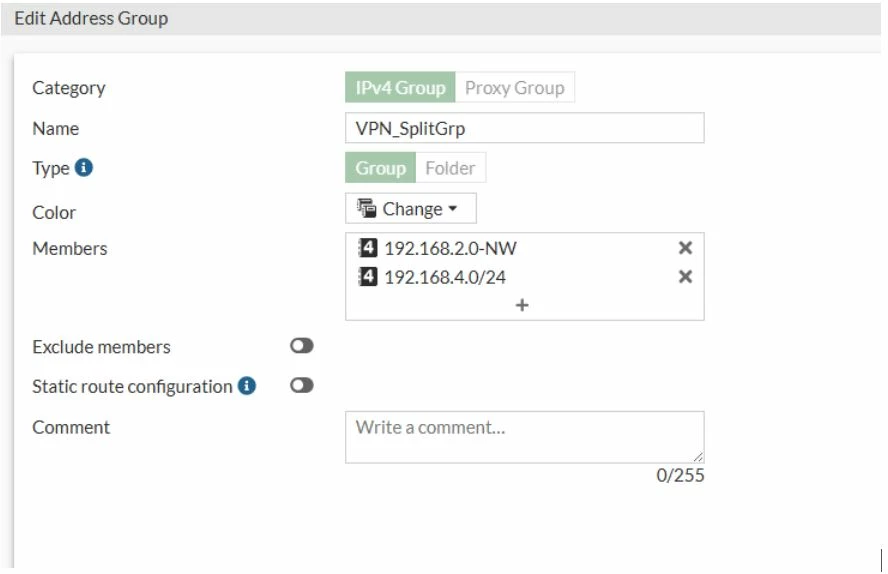
When the address object 'servers' is added to the 'VPN_SplitGrp' address group, the associated address group configured in the accessible network section of the GUI disappears.
config firewall addrgrp
    edit "VPN_SplitGrp"
        set uuid 78382660-2336-51f0-5c59-503b3c38bdef
        set member "192.168.2.0-NW" "192.168.4.0/24" "servers"
    next
end
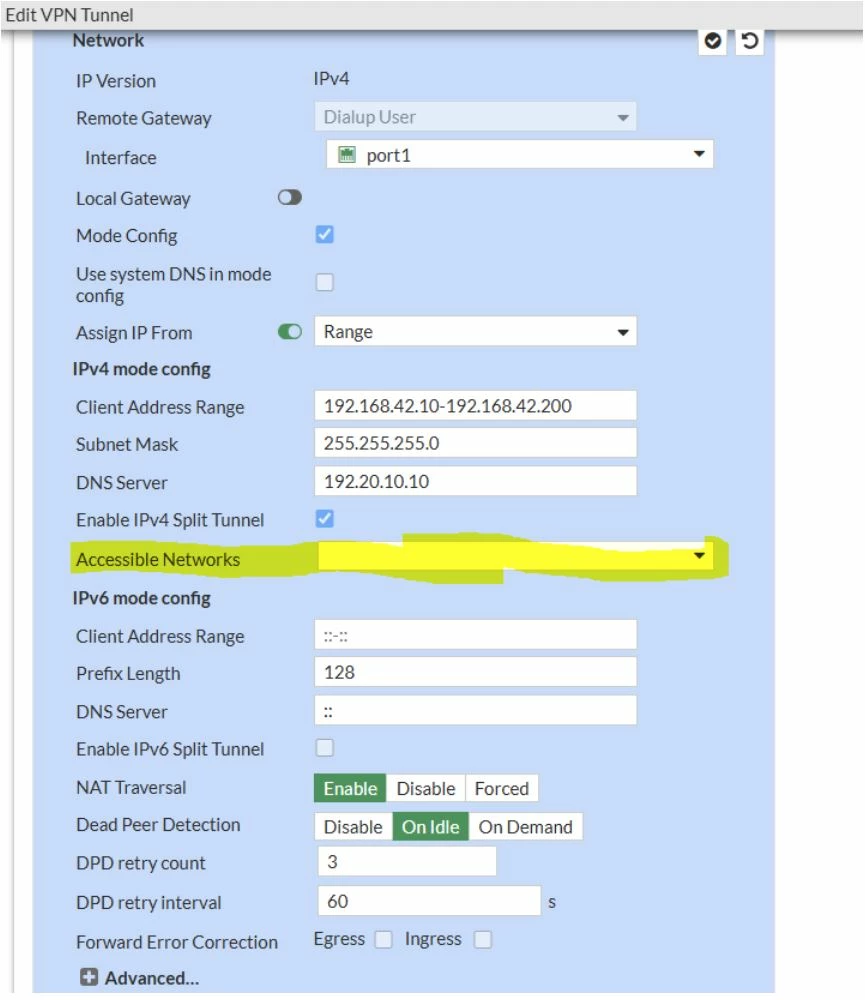 Upon checking through the CLI, the 'VPN_SplitGrp' address group remains listed under ipv4-split-include. However, after a system reboot, the IPv4-split-include configuration is cleared, as illustrated below: config vpn ipsec phase1-interface
edit "Client_VPN"
set type dynamic
set interface "port1"
set mode aggressive
set peertype any
set net-device enable
set mode-cfg enable
set ipv4-dns-server1 192.20.10.10
set ipv4-dns-server2 192.20.10.11
set ipv4-dns-server3 8.8.8.8
set proposal aes128-sha256 aes256-sha256 3des-sha256 aes128-sha1 aes256-sha1 3des-sha1
set dpd on-idle
set xauthtype auto
set authusrgrp "Admin_GRP"
set ipv4-start-ip 192.168.42.10
set ipv4-end-ip 192.168.42.200
set ipv4-netmask 255.255.255.0
set save-password enable
set psksecret ENC CXSTQ4c+5Z84
set dpd-retryinterval 60
next
end
This issue is triggered only when an FQDN-type address object is added to the address group defined in the IPv4-split-include configuration.
This is expected behavior because it is not possible to have a FQDN address object in an IPsec split address group; the address group is considered invalid and removed from VPN 'Split tunnel' settings.
From version 7.4.8 and above, a feature was added to prevent users from updating or modifying the address group once it is configured into Split tunnel IPsec:
FortiGate-100F-NAT (root) # show  vpn  ipsec  phase1-interface IPSEC_users
config vpn ipsec phase1-interface
    edit "IPSEC_users"
        set type dynamic
        set interface "wan1"
        set mode aggressive
        set peertype one
        set net-device disable
        set mode-cfg enable
        set ipv4-dns-server1 8.8.8.8
        set proposal aes128-sha256 aes256-sha256
        set dpd on-idle
        set dhgrp 5
        set peerid "client_ipsecusers"
        set ipv4-start-ip 172.16.32.1
        set ipv4-end-ip 172.16.32.100
        set ipv4-split-include "VPN_IPSEC_Split"
        set psksecret ENC lm0fjjd1cWSS
    next
end
FortiGate-100F-NAT (root) # show firewall addrgrp "VPN_IPSEC_Split"
config firewall addrgrp
    edit "VPN_IPSEC_Split"
        set uuid 5f1ff0b6-a0e6-51f1-4d35-54116f17040b
        set member "VPN Rackspace_remote_subnet_1" "SapSolman-Des" "SRV_DESA" "SRV_QA_47" "SRV_QA_162"
    next
end
FortiGate-100F-NAT (root) # show firewall address gmail.com
config firewall address
    edit "gmail.com"
        set uuid a1a2be2e-4663-51f1-3459-66bda6c72012
        set type fqdn
        set fqdn "gmail.com"
    next
end
When trying to update the VPN Split group:
FortiGate-100F-NAT (root) # config  firewall addrgrp
FortiGate-100F-NAT (addrgrp) # edit VPN_IPSEC_Split
FortiGate-100F-NAT (VPN_IPSEC_Split) # set  member "VPN Rackspace_remote_subnet_1" "SapSolman-Des" "SRV_DESA" "SRV_QA_47" "SRV_QA_162" "gmail.com"
FortiGate-100F-NAT (VPN_IPSEC_Split) # end
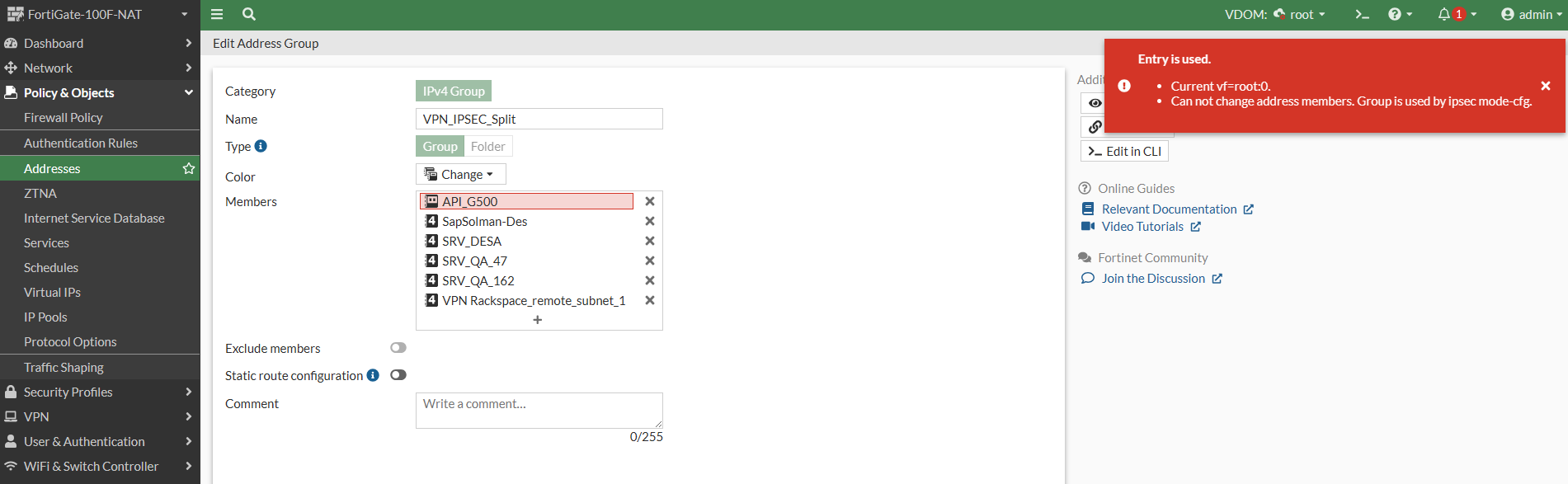
Can not change address members. Group is used by ipsec mode-cfg.
object set operator error, -23 discard the setting
Command fail. Return code -23
If an 'ipmask' type firewall address is used, the result is the same; the firewall address group can not be edited because it is already used in the VPN IPsec Split configuration.
FortiGate-100F-NAT (root) # show  firewall address IP_DST_67.12.11.10
config firewall address
    edit "IP_DST_67.12.11.10"
       set subnet 67.12.11.10 255.255.255.255
        set uuid 5c03f74e-8b95-51f1-eb17-48e9a5dc3a5c
    next
end
FortiGate-100F-NAT (root) # config firewall addrgrp
FortiGate-100F-NAT (addrgrp) # edit VPN_IPSEC_Split
FortiGate-100F-NAT (VPN_IPSEC_Split) # set  member "VPN Rackspace_remote_subnet_1" "SapSolman-Des" "SRV_DESA" "SRV_QA_47" "SRV_QA_162" "IP_DST_67.12.11.10"
FortiGate-100F-NAT (VPN_IPSEC_Split) # end
Can not change address members. Group is used by ipsec mode-cfg.
object set operator error, -23 discard the setting
Command fail. Return code -23
On the FortiGate GUI, the following error will be displayed:
Release Notes:
1134882 - The ipv4-split-include setting is missing from the GUI.
Release Notes FortiOS 7.4.8 | 





