


Technical Tip: Routing in FortiGate (route-lookup-process)
Description
This article describes how FortiGate performs route lookup and selects the outgoing interface.
Scope
FortiGate.
Solution
By design and by default FortiGate performs two routing lookups for any session:
One on the first packet sent by the originator.
Another one on the first reply packet coming from the responder.
No more route lookups are done unless the session is impacted by a routing or configuration change, in which case the existing session is marked dirty and route information on the session is flushed and new route lookups are performed. This mechanism helps the FortiGate to revalidate routes, interfaces and associated Gateways.
How FortiGate decides routes:
FortiGate has multiple routing module blocks shown in the flow diagram below.
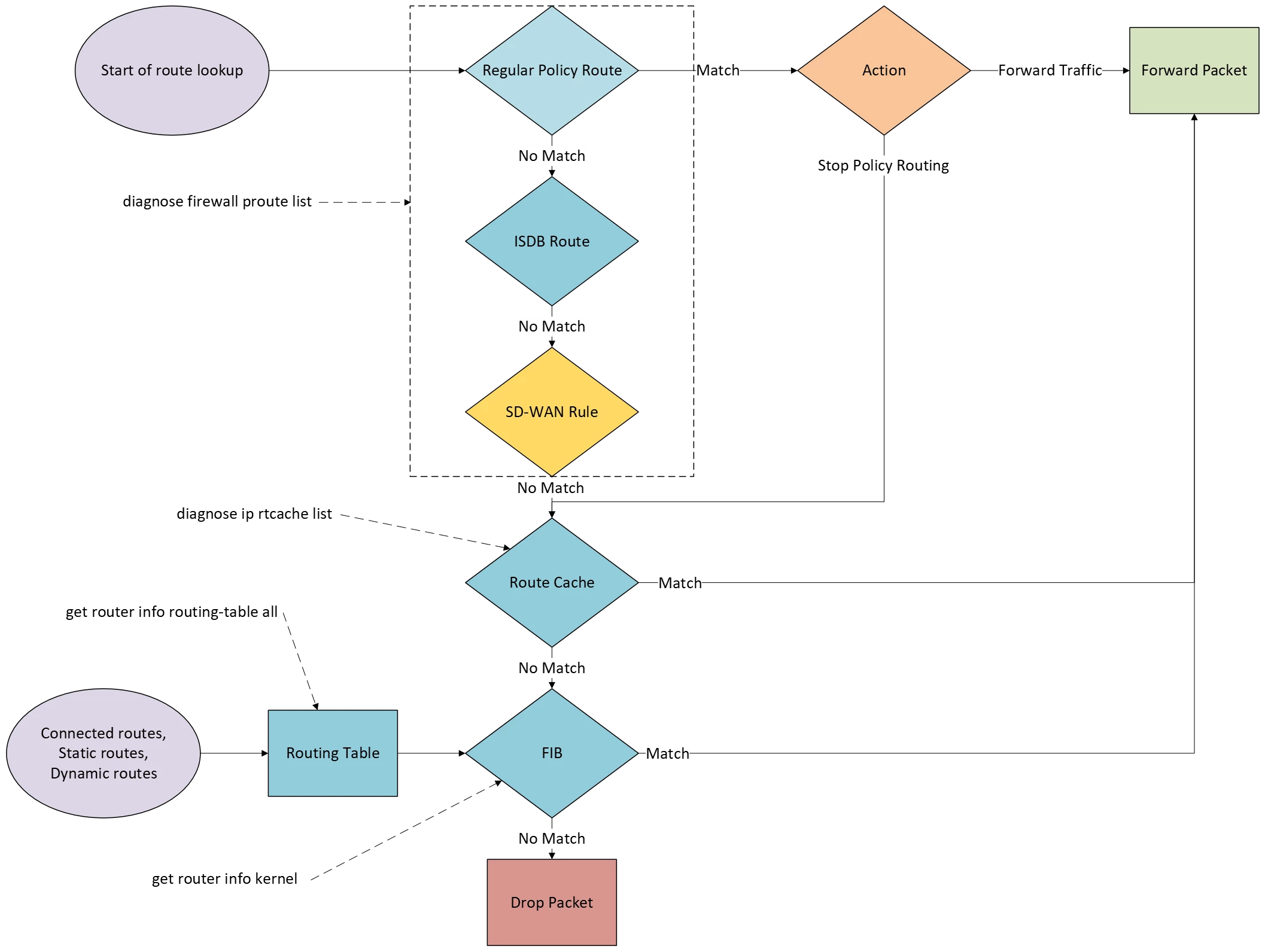
FortiGate searches its policy routes. View it using the following command:
diagnose firewall proute list
If there is a match in a policy route, and the action is Forward Traffic, FortiGate routes the packet accordingly.
If the action is Stop Policy Routing, FortiGate goes to the next table, which is the route cache. View that content using the following CLI command:
diagnose ip rtcache listIf there is no match in the policy route or no Policy Routes configured, then FortiGate looks for ISDB routes. This route is created by creating new Static Routes with destination using ISDB object. ISDB is an extensive and publicly accessible database that categorizes IP addresses based on various criteria, including IP address ranges, ownership information, associated service port numbers, and an evaluation of IP security credibility. This valuable data is sourced from the FortiGuard service system.
If no ISDB routes configured, then FortiGate looks for the SD-WAN rules, finds a matching entry lookup, if there is a match, it will forward the packet immediately and stop traversing the routing tables.
When configuring a static route that references an SD-WAN zone, it is not necessary to specify a gateway address because FortiGate retrieves it from the member configuration.
Note:
SD-WAN service rules are policy routes that allow the routing of specific traffic over specific SD-WAN members. However, regular policy routes have precedence over SD-WAN policy routes.
FortiGate searches the forwarding information base (FIB).
The FIB is similar to the routing table generated by multiple routing protocols (main routing table) and is the table used for packet forwarding.
If there is no match in any of those tables, FortiGate drops the packet because it is unroutable.
To view the main routing table:
get router info routing-table all
And FIB routes are also known as kernel routes:
get router info kernel
Note:
v6.4.0 and v6.2.3, SD-WAN policy routes are skipped when the dst-ip for the traffic belongs to a directly connected subnet. FortiGate Kernel v3.6 onward has removed the command to view the route cache:
diagnose ip rtcache list
To check the Linux version, this command can be used.
fnsysctl cat /proc/version
Related articles:

