FortiGate displays the error message 'Error', 'cmdb save error', or 'Alreadyactivated' when importing or activating a physical FortiToken seed.
In this case, verify whether the issue matches the relevant log entries shown below.
 
diagnose fortitoken info
FORTITOKEN DRIFT STATUS
FTK200BB******  0 cmdb save error
Troubleshooting commands to identify the issue:
diagnose fortitoken info
diagnose debug disable
diagnose debug reset
diagnose debug application forticldd -1
diagnose fortitoken debug enable
diagnose debug enable
This error does not indicate a defect with the newly purchased FortiToken hardware, and it is instead a known issue (bug ID #1218458) affecting FortiOS v7.4.10, v7.4.11, v7.6.3 to v7.6.6, and v8.0.0.
This bug is now resolved as of FortiOS v7.4.12, v7.6.7, and later revisions, but only partially-resolved for FortiOS v8.0.0. An additional issue was later identified within the FortiOS v8.0 branch specifically, and so this issue will be fully resolved as of FortiOS v8.0.1 and later.
Upgrade to one of these versions to fix the issue, or perform the following workaround:
Workaround:
Importing FortiTokens via serial number does not work until this issue is resolved, but in the meantime it is possible to import FortiTokens using the seed file method instead. The token seed file can be obtained by contacting Fortinet Customer Service. Refer to Technical Tip: Process for requesting token seed files for hardware FortiTokens.
After requesting a FortiGate/FortiAuthenticator FTK200CD seed from Fortinet Customer Service, follow the steps below: Extract the Zip file with the password provided by Customer Service.
  Log in to FortiGate and navigate to User & Authentication -> FortiTokens -> Local tokens.
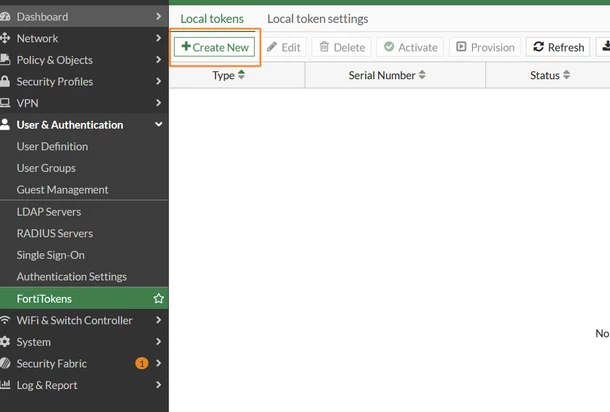
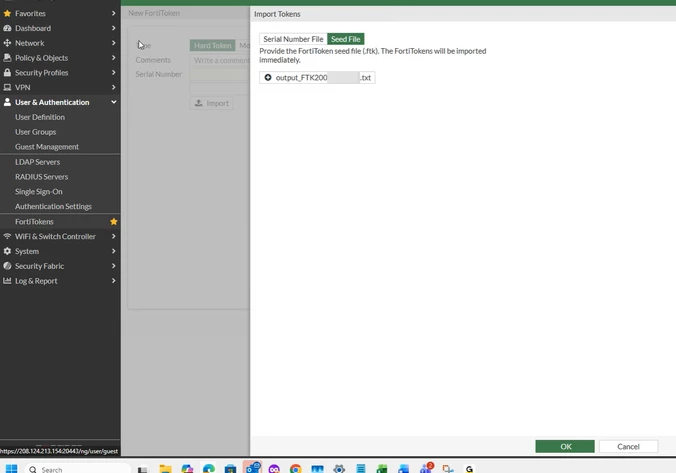
Select Create New -> Import -> Seed File, then select Upload and specify 'output_FTK200CD.txt' before selecting OK.
 Navigate to User & Authentication -> FortiTokens -> Local tokens. All newly imported FortiTokens will be visible.
Related document:
Registering hard tokens |