Unlock Exclusive Benefits
Join Our Community Today!
Join our community and post in the forum to earn your exclusive Welcome 2026 Badge! Become a member today!
LOGIN/REGISTER
CONTINUE AS A GUEST
- Support Forum
- Knowledge Base
- Customer Service
- Internal Article Nominations
- FortiGate
- FortiClient
- FortiADC
- FortiAIOps
- FortiAnalyzer
- FortiAP
- FortiAuthenticator
- FortiBridge
- FortiCache
- FortiCare Services
- FortiCarrier
- FortiCASB
- FortiConverter
- FortiCNP
- FortiDAST
- FortiData
- FortiDDoS
- FortiDB
- FortiDNS
- FortiDLP
- FortiDeceptor
- FortiDevice
- FortiDevSec
- FortiDirector
- FortiEdgeCloud
- FortiEDR
- FortiEndpoint
- FortiExtender
- FortiGate Cloud
- FortiGuard
- FortiGuest
- FortiHypervisor
- FortiInsight
- FortiIsolator
- FortiMail
- FortiManager
- FortiMonitor
- FortiNAC
- FortiNAC-F
- FortiNDR (on-premise)
- FortiNDRCloud
- FortiPAM
- FortiPhish
- FortiPortal
- FortiPresence
- FortiProxy
- FortiRecon
- FortiRecorder
- FortiSRA
- FortiSandbox
- FortiSASE
- FortiSASE Sovereign
- FortiScan
- FortiSIEM
- FortiSOAR
- FortiSwitch
- FortiTester
- FortiToken
- FortiVoice
- FortiWAN
- FortiWeb
- FortiAppSec Cloud
- Lacework
- Wireless Controller
- RMA Information and Announcements
- FortiCloud Products
- ZTNA
- 4D Documents
- Customer Service
- Community Groups
- Blogs
FortiGate
FortiGate Next Generation Firewall utilizes purpose-built security processors and threat intelligence security services from FortiGuard labs to deliver top-rated protection and high performance, including encrypted traffic.
- Fortinet Community
- Knowledge Base
- FortiGate
- Technical Tip: Manual firmware upgrade/downgrade o...
Options
- Subscribe to RSS Feed
- Mark as New
- Mark as Read
- Bookmark
- Subscribe
- Printer Friendly Page
- Report Inappropriate Content


Description
This article describes individual FIM/FPM firmware upgrades.
- Manual FIM02 firmware upgrade/downgrade via GUI.
- Manual FPM04 firmware upgrade/downgrade via GUI.
A 7k chassis running on 7000-FortiOS v6.0.4 is used.
Replacing the FIM/FPM module in the FortiGate 7040E is needed.
More detailed information about module replacement is available in the FortiGate Handbook.
A new received FIM/FPM blade arrived with different code version on it (e.g. 7000-FortiOS v6.0.9).
To bring the chassis up and running, be sure that all the blades are running under same firmware version.
Upgrade/downgrade the new received FIM/FPM module.
FortiGate-7040E chassis is used as an example.
FortiGate-7040E has 2 FIM modules and 2 FPM modules.
More detailed information here:
FortiGate 7000 hardware.
After physical replacement, the new installed blade will be in Secondary status.
Accordingly, upgrade/downgrade steps will be identical for FIM01/FIM02 and FPM03/FPM04.
FIM01 and FPM03 are Primary blades. In this case, the non-primary FIM02 and FPM04 blades will be upgraded.
Scope
For version 6.0.4.
Solution
Manual FIM02 firmware upgrade/downgrade via GUI.
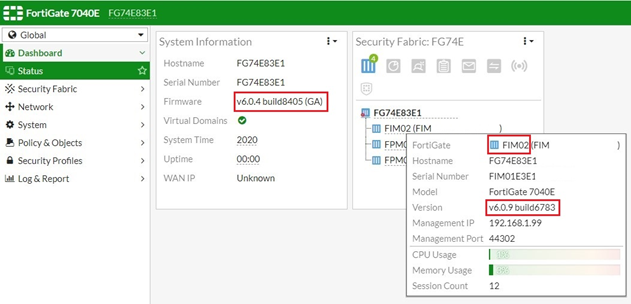
After physically plugging in a new FIM02 blade, the current setup looks like this:
---------FPM03-6.0.4---------
----------FIM01-6.0.4---------
----------FIM02-6.0.9---------
---------FPM04-6.0.4---------
After logging in to the GUI, it will be possible to see the FIM02 blade in the list inside the Security Fabric Widget, but hovering the mouse cursor over it will show the current (v6.0.9) firmware version.
The back plane will also be out-of-sync.
Check this with CLI commands.
It is possible to gain console access to the blade with control+T and perform the following command:
get system status
Upgrade process:
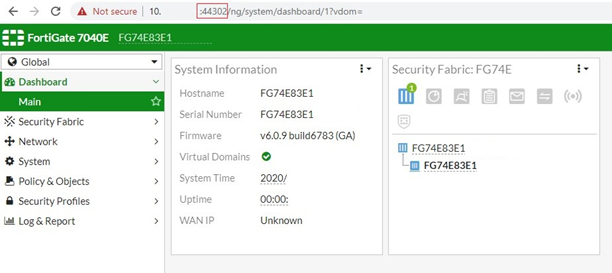
- To directly connect to FIM02 GUI, use special management port numbers(https://mgmtIP:44302). See Managing individual FIMs and FPMs - FortiGate 7000 handbook.
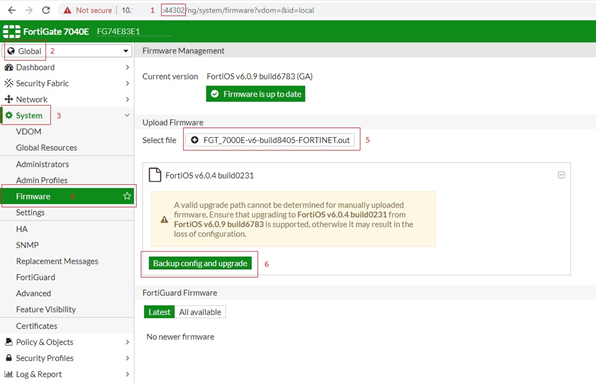
- In the Global VDOM, go to System -> Firmware, select 'Browse' and select firmware file. Select 'Backup config and upgrade' and select 'Continue'.
Manual FPM04 firmware upgrade/downgrade via GUI:
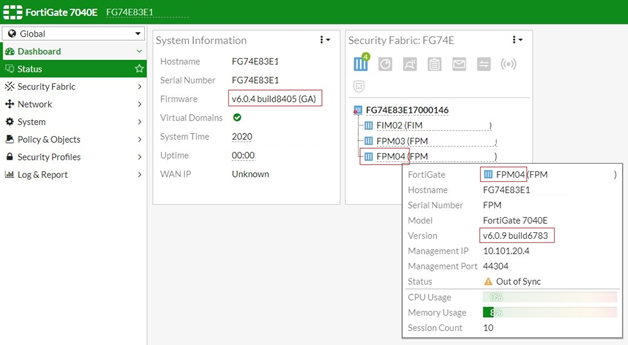
After physically plugging in a new FPM04 blade, the current setup looks like this:
---------FPM03-6.0.4---------
----------FIM01-6.0.4---------
----------FIM02-6.0.4---------
---------FPM04-6.0.9---------
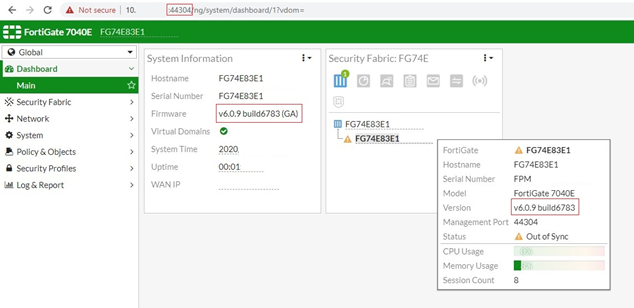
After logging in to the GUI, it will be possible to see the FPM02 blade in the list inside the Security Fabric Widget, but hovering the mouse cursor over it will show the current (v6.0.9) firmware version.
The back plane will also be out-of-sync.
Check this with CLI commands.
Upgrade process:
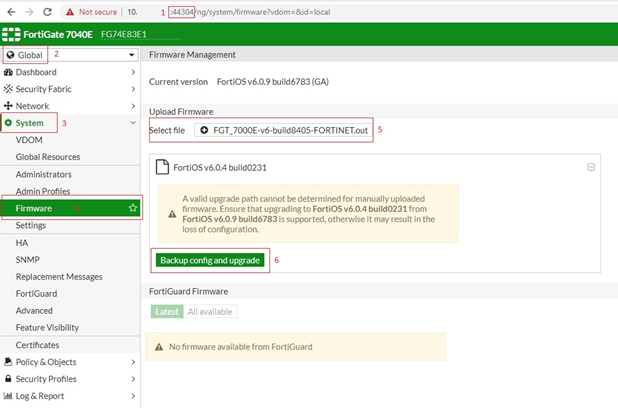
- To directly connect to FPM04 GUI, use special management port numbers (https://mgmtIP:44304).
- In the Global VDOM, go to System -> Firmware, select 'Browse' and select firmware file. Select 'Backup config and upgrade' and select 'Continue'.
After the upgrade:
Check with the following commands whether all is working properly and the blades are in sync:
diagnose load-balance status
diagnose system confsync status
Related articles:
Technical Tip: FortiGate-6000/7000 Chassis health check commands
Labels:



Broad. Integrated. Automated.
The Fortinet Security Fabric brings together the concepts of convergence and consolidation to provide comprehensive cybersecurity protection for all users, devices, and applications and across all network edges.
Security Research
Company
News & Articles
Copyright 2026 Fortinet, Inc. All Rights Reserved.