WAN Failover NAT Issues
Hi All,
I'm trying to configure a WAN2 failover but I'm getting stuck on NAT.
I have a primary leased line internet circuit on WAN1.
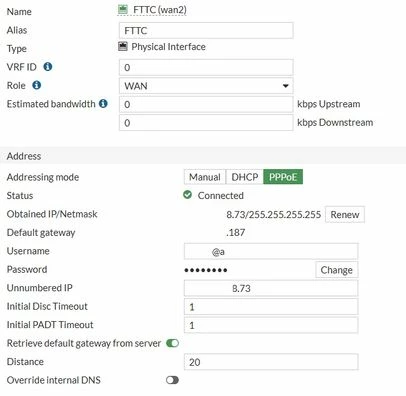
I have a secondary FTTC internet circuit on WAN2
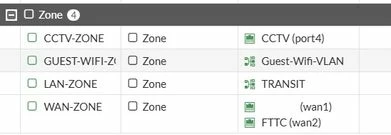
Both WAN interfaces are in a WAN-ZONE.
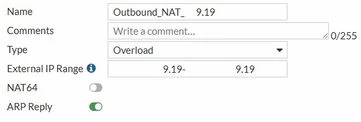
All firewall policies currently have a specific outbound NAT address with a dynamic ip pool address.
This outbound NAT address is different to the public IP assigned to the firewall.
The IP Pool addresses are Overload addresses.
I have several IP Pool addresses with incremented public ip addresses assigned.
Some firewall policies will have different outbound NAT IP Pool address.
It is a single public IP from the range allocated to the internet circuit on WAN1.
I plan to configure link-monitor to detect when there is problem with WAN1, override the current static routes and send all outbound traffic via WAN2.
The problem.
When testing, If a client hits a policy like this below, it cannot get to the internet.
This is due to the option, "Use Dynamic IP Pool" and the fact that "Outbound_NAT_9.19" is not a IP from the WAN2 ISPs network.
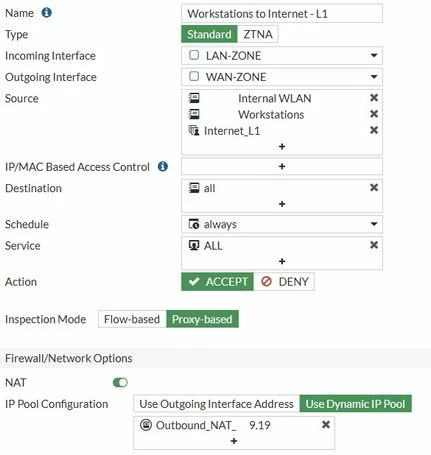
If I set it to "Use Outgoing Interface Address", it works, but then I will not be able to specify the Outbound NAT address that I want to use.
What's the best way configure this?
I'm not really looking to use SD-WAN, as 99% of the time all traffic should use WAN1 and only WAN2 if WAN1 is unavailable.
WAN1 is 1Gb Leased Line, WAN2 is 80Mb FTTC.
Below is screenshots of the other related configs.