captainit
New Member
September 24, 2024
Question

Many interfaces when using VPN

  • September 24, 2024
  • 37 replies
  • 9521 views

Hello,

We have a problem with our VPN.

We are experiencing an issue that occurs once every month, where employees (it changes - skipping between users) using only Mac computers come to the office (but happens also in their home wifi) and are unable to access internet when they are connected to VPN.

We use:
Forticlient vpn only free - last version

IPSEC VPN

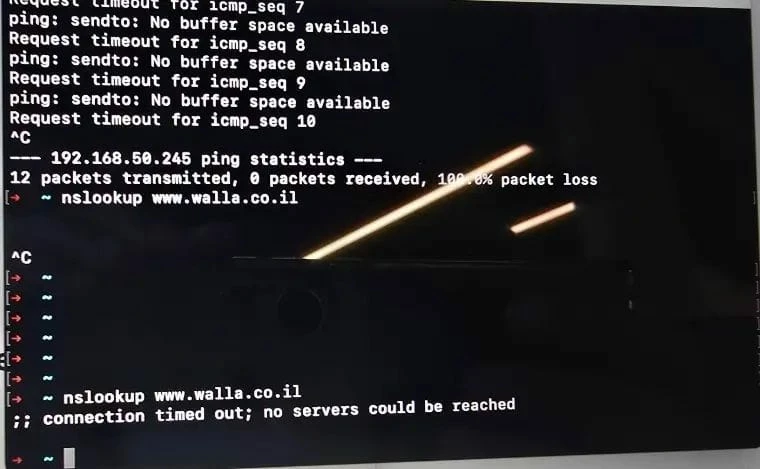
When they try to ping servers/addresses: sendto no buffer space available

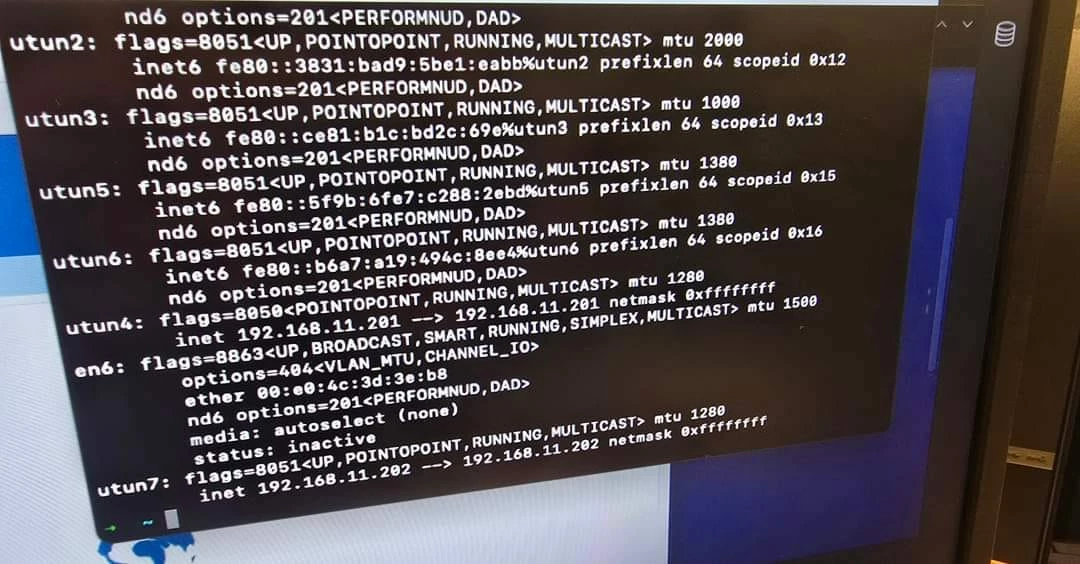
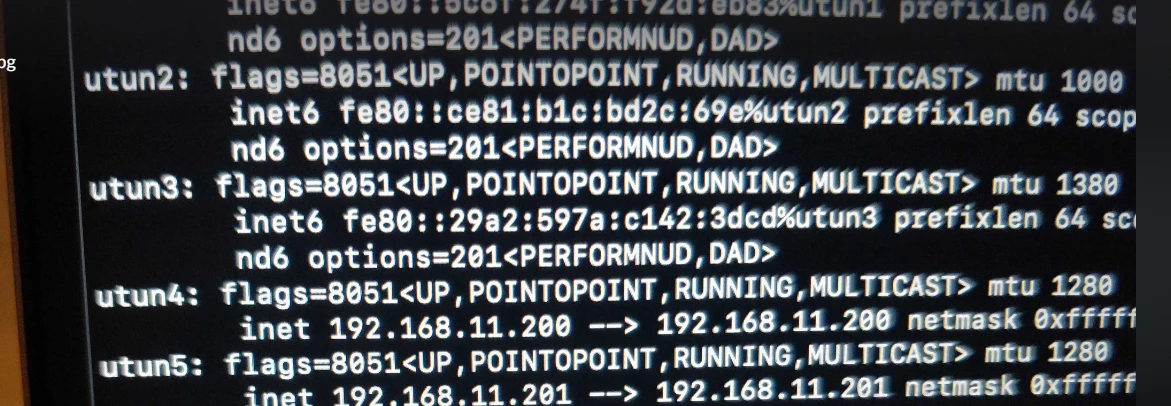
When it happens I see many interfaces with addresses of VPN (192.168.11.0/24). 
After disabling interface with VPN: ifconfig interface utun4 down - internet works!


Another user told me: WIFI works, VPN works. He leaves the computer, computer goes to sleep mode and after that Forticlient seems as connected but no internet!

Another user reported: I was on the train, using HOTSPOT and Forticlient. 

Close the lid (So internet was disconnected). Went to the Office, I was connected to Office's WIFI and had this problem of buffering.


Why are there many interfaces instead of just one? Why does FortiClient create multiple connections?
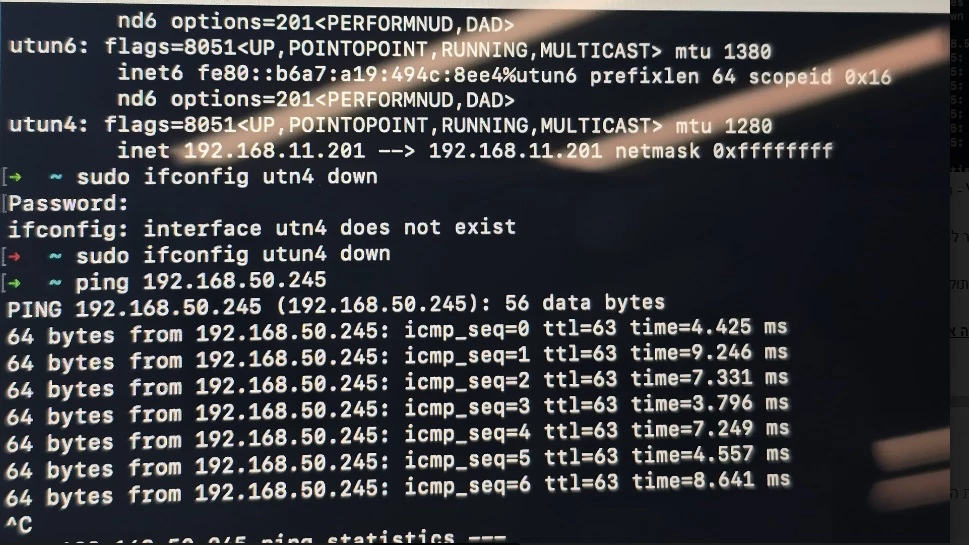
#Same user#Same user#Same user#Same user#Same user#Same user#Another user#Another user


Thanks

37 replies

AEK
SuperUser
SuperUser
September 24, 2024

Hi CaptainIT

If it is full tunnel then I guess the active default route is pointing to the wrong tunnel interface, and when you disable it then the default route points to the right interface.

And regarding the multiple interface creation, do you confirm that it creates one new interface each time you initiate a new VPN connection? Or does it create them all at once?

Can you also check if the below access rights are provided:

https://docs.fortinet.com/document/forticlient/7.4.0/macos-release-notes/223986/special-notices


AEK
captainit
captainitAuthor
New Member
September 25, 2024

Hello,
If it is full tunnel then I guess the active default route is pointing to the wrong tunnel interface, and when you disable it then the default route points to the right interface - what can I do please to fix it? I have full tunnel


And regarding the multiple interface creation, do you confirm that it creates one new interface each time you initiate a new VPN connection? Or does it create them all at once?  It creates one when people using FortiClient normally without any problem and when they problem we see multiple interfaces.

Can you also check if the below access rights are provided - Checked - they have permission.


What can I do please in order to solve this problem ?

Thanks


AEK
SuperUser
SuperUser
September 25, 2024

Hi

Which MacOS version?

AEK
captainit
captainitAuthor
New Member
September 25, 2024

All the users with Somoma 

AEK
SuperUser
SuperUser
September 25, 2024

Can you try an older FCT version like 7.0.13 or 7.2.5?

AEK
AEK
SuperUser
SuperUser
October 7, 2024

Anything relevant in FortiClient logs or in system event logs?

In FortiClient you can export the logs then try search around the time of the issue.

On MacOS I'm not sure but it should be in /var/log/system.log and with Console app (try to filter on network logs).

AEK
captainit
captainitAuthor
New Member
October 7, 2024

Attaching file of the logs from Forticlient:
The problem appears yersterday (In my clock time it is around 08:45-09:15 AM)

Thanks

AEK
SuperUser
SuperUser
October 7, 2024

By the way there is a known issue on 7.4.0 and some 7.2.x versions. This bug looks the same as yours but it affects ZTNA instead of IPsec.

1012318

Endpoints cannot connect to ZTNA after sleep or lid is off/on.


AEK
captainit
captainitAuthor
New Member
October 15, 2024

Hello,
I’m having trouble understanding an issue with the IPsec configuration in FortiClient VPN. We initially set the local ID in Phase 1 to a group using a full tunnel. Later, we changed it to a local ID with a split tunnel in the same client. However, after the computer wakes up from sleep mode, users seem to reconnect to the full tunnel. I can tell this because I’ve written a script that kills FortiClient if the public IP matches the office's public IP.
What can I do to resolve this issue?
Please help

AEK
SuperUser
SuperUser
October 15, 2024

Hi Captain

Can you share the routing table before and after wake up?

On the other hand did you manage to fix the initial issue?

AEK
captainit
captainitAuthor
New Member
October 15, 2024

We have reinstalled Forticlient for this user so now it is working again.
I don't know what to do, really...........

I just know that for sure he received the public IP of the office because I have script that if the public IP of internet is the same IP of office - kill Forticlient and it does.


captainit
captainitAuthor
New Member
October 15, 2024

This is my configuration for my IPSEC VPN in Fortigate,


Can I do something that may solve it?pro.png

AEK
SuperUser
SuperUser
October 15, 2024

Your screenshot shows only a little part that can't help. But I guess you enabled IPv4 split tunnel, right?

However I don't think the issue is from FG side since your client connects first with split tunnel successfully. So I think the issue is from client side.

Can you share the client's routing table before and after wake up? You can hide the public IP addresses before sharing.

AEK
captainit
captainitAuthor
New Member
October 15, 2024

Yes but it happens also for other users once a month.

I cannot share the routing table because now it works perfectly. So it will not refelect the real peoblem.

And also when doing ifconfig when it happens we can see 2 interface of utnu with the same segment of the VPN.

I really do not know what to do.

And as said - script of killng Forticlient is not helping.

Please help. It happens at least 3-4 times for different MACs computers.


Thanks

AEK
SuperUser
SuperUser
October 17, 2024

Hi Captain

I asked for the routing table but in your last message I think you said it works perfectly.

If there are some sensitive info that you can't share then you can blur them.

On the other hand, having a full tunnel after PC wake up may mean that a default route is being injected, while it shouldn't. We need confirmation from the output so we can move forward.

AEK
captainit
captainitAuthor
New Member
October 17, 2024

Hey,

Now we dont have a problem. Only one a month and I can't predict who will be the new one. Those people with the bugs are the same but most of the time they can work.

For example I dont have the problem now. Can I share with you my routing table before and after sleep even though I have never had this problem?

Thanks

AEK
SuperUser
SuperUser
October 17, 2024

The routing table must come from the affected node when you reproduce the error.

Once we understand well the issue you can for example make the right script to correct the issue.

AEK
captainit
captainitAuthor
New Member
October 17, 2024

I have Forticlient IPSEC  - how can I know?