

KennethH
Explorer
January 14, 2022
Solved

EAP-TLS challenges

  • January 14, 2022
  • 3 replies
  • 10492 views

Hello,

Just got a brand-new Fortinet setup.
Tried to do EAP-TLS with computer authentication + LDAP + Company PKI.
But can't get it to work, so went back to basic, and using FortiAuthenticator as CA and User authentication

I am getting this error:


2022-01-14T20:46:50.517025+01:00 FortiAuthenticator radiusd[19012]: (85) eap_tls: Verify User Kenneth (GUI user type: 0, id: 3) certificate binding
2022-01-14T20:46:50.517384+01:00 FortiAuthenticator radiusd[19012]: rlm_eap_tls: Certificate binding check failed. (CN=Kenneth, Issuer=/C=DK/L=Viborg/O=HandbergIT/OU=IT/CN=fac.handberg.pri)
2022-01-14T20:46:50.517642+01:00 FortiAuthenticator radiusd[19012]: (85) eap_tls: ERROR: TLS Alert write:fatal:internal error


Have imported the user certificate in Local user certificate personal store.


Do someone have any idea why?
Best answer by KennethH

The issue is now resolved with help from Fortinet Technical Support
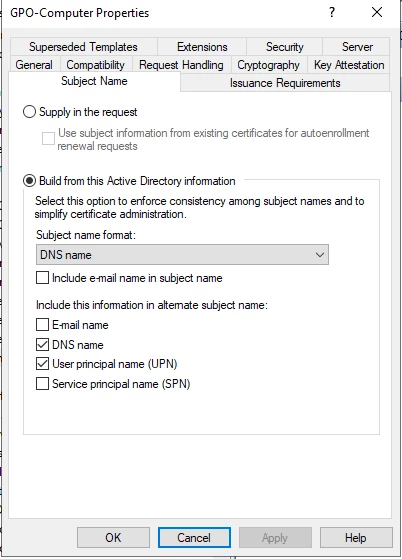
Pr. Default MS-Certificate Authority does NOT add Subject to the cert req.
After changing from "none" to "DNS name" and re-issued the certificate everything works.


KennethH_0-1642577910897.png


3 replies

KennethH
KennethHAuthor
Explorer
January 15, 2022

Got it working.
Re-added the user and applied Certificate binding again.
Now it works.
facauth: Updated auth log 'Kenneth': 802.1x authentication successful


If anyone has a guide to EAP-TLS with computer authentication, I would be really happy.

iMaMinSKY
New Member
October 14, 2024

Could you please tell, which attribute did you enter to the "Certificate binding common name" field in the Sync Rule?

KennethH
KennethHAuthor
Explorer
January 16, 2022

Went back to computer-auth, cause it's the main goal.
Cant get pass this error:


  • client certificate: subject '(null)' or issuer '/DC=pri/DC=handberg/CN=handberg-HANDITDC01-CA' is empty


  1. The computer has the certificate from CA in local computer store.
  2. Wifi profile is set to use computer authentication.
  3. Certificate binding is set on the user
    KennethH_1-1642320618571.png
  4. LDAP User Mapping Attributes is set like this:

          KennethH_0-1642320368033.png

    5. Radius-EAP Configuration

         KennethH_3-1642320816750.png


Debbie_FTNT
Staff & Editor
Staff & Editor
January 17, 2022

Hey Kenneth,

welcome to FortiAuthenticator :).
Great that you figured out the initial certificate binding issue.

Regarding EAP-TLS and computer authentication on FortiAuthenticator, we do have a basic guide: https://docs.fortinet.com/document/fortiauthenticator/5.5.0/cookbook/48587/wireless-802-1x-eap-tls-with-computer-authentication
This is written for FortiAuthenticator 5.5, but still largely applies - the main difference is the RADIUS client configuration on FortiAuthenticator, as instead of client+profile config, newer FortiAuthenticators require client+policy config (RADIUS policy is just the former RADIUS client profile, essentially).

As for your issue right now, with the "subject '(null)' or issuer is empty" - based on that error alone, it sounds as if your FortiAuthenticator is getting a client certificate that doesn't contain a subject or CA, or the subject/CA doesn't match up with the binding.
- double-check the certificate configured on your wireless client, in particular subject and issuer
- double-check the certificate binding on FortiAuthenticator
- take a capture on FortiAuthenticator to observe the RADIUS/EAP exchange and perhaps double-check certificates this way (how to take captures on FortiAuthenticator: https://community.fortinet.com/t5/FortiAuthenticator/Technical-Tip-How-to-run-a-packet-capture-with/ta-p/196764)
- if you still have the issue, reach out to Fortinet Technical Support and open a ticket for some dedicated troubleshooting

KennethH
KennethHAuthor
Explorer
January 17, 2022

Hello Debbie,
Thanks for your answer.
There are some things in the guide, that I cant do in the newer versions.
Like Software switch with internal and wifi interfaces.
I can created a ticket with Technical support.
When I get it to work, I'll post the findings here.

KennethH
KennethHAuthorAnswer
Explorer
January 19, 2022

The issue is now resolved with help from Fortinet Technical Support
Pr. Default MS-Certificate Authority does NOT add Subject to the cert req.
After changing from "none" to "DNS name" and re-issued the certificate everything works.


KennethH_0-1642577910897.png


Debbie_FTNT
Staff & Editor
Staff & Editor
January 19, 2022

Thank you for sharing the solution :)

