




Troubleshooting Tip : MSN users cannot login through a FortiGate when HTTPS Content Filtering Mode is "Deep Scan"
Description
This article provides the root cause and solution for the following issue: MSN users cannot login when the HTTPS Content Filtering Mode is "Deep Scan".
This article applies only to FortiGate hardware using CP6 technology and where SSL content inspection is performed.
Due to the initial authentication required for the HTTPS protocol on port 443, MSN clients don't accept server certificate signed by the Fortinet SSL proxy. Disconnection occurs at the initial authentication stage.
Users might experience similar issues with other IM applications such as AIM 6.0.
Scope
All FortiGate with CP6 hardware.
Solution
The following steps describe how to create a FortiGate FQDN firewall addresses, and add an ACCEPT firewall policy including this address to exempt the MSN login Server.
- Go to Firewall > Address.
- Select Create New.
- Enter an address name, for example login.live.com.
- Set Type to FQDN.
- In the FQDN field enter login.live.com.
- Leave Interface set to Any.
- Select OK.
To add the address group to an ACCEPT firewall policy
- Go to Firewall > Policy.
- Select Create New.
- Set the Source interface and Source Address to the same settings as the policy you have that allows users to access the Internet.
- Set the Destination Address to login.live.com.
- Set the Service set to ANY and Schedule set to always.
- Set the Action to ACCEPT.
- Select OK.
- Move the accept policy above all other outbound policies that allow Internet access
2. FortiOS 4.0 MR2 and above is based on FortiGuard Web Filtering
1. Go to the Firewall Policy that requires this action, enable the UTM Web Filter, create a new profile and select the SSL exempt category in FortiGuard Web Filtering. This is shown in the screenshot below :-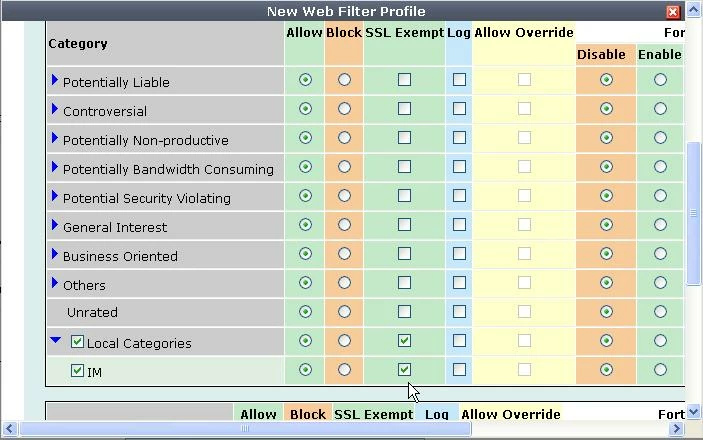
2. In Firewall Policy > UTM> Protocol Options, select the default setting, save the modifications to the Firewall Policy and exit.
3. In UTM=>Web Filter =>Local Category create a local IM category for example "IM"
4. In UTM=> Web Filter=>Local Ratings , add a new entry with the URL of the the IM server host for example: kdc.uas.aol.com or login.live.com. Define the Local Rating category "Instant Messaging".


