



Technical Tip: Verify applied configuration change in CLI
Description
This article describes how to check the corresponding CLI configuration when the FortiGate configuration has changed in web GUI.
Scope
FortiGate.
Solution
When changing settings of the FortiGate in the web GUI, the configuration will be written and saved in the command format to the FortiGate configuration file.
With many features and settings available in FortiOS, it will sometimes be difficult to trace the corresponding CLI commands to do some advanced troubleshooting or cross-verify in the CLI.
Run the following commands to display the changes in the CLI format when changes in the web GUI interface are made:
diagnose debug reset
diagnose debug cli 8
diagnose debug enable
After the above commands are executed, any changes in the GUI will be displayed accordingly in the CLI.
Sample output when Disabling memory logging from the GUI:
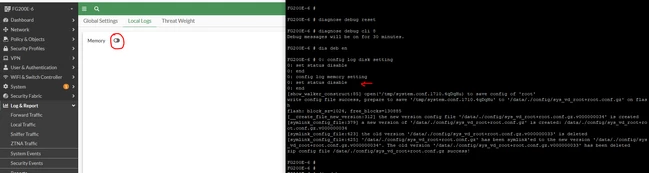
To disable the debug commands, run the following commands:
diagnose debug reset
diagnose debug disable

