

Contributor III
October 10, 2006

Technical Tip: OSPF areas

  • October 10, 2006
  • 0 replies
  • 4590 views

Description

This article describes the OSPF areas.

Scope

FortiGate.

Solution

An area is a logical collection of network devices, sharing identical information about the topology of that area. Multi-area OSPF is a hierarchical design, dividing networks into multiple areas to streamline traffic and reduce overhead.
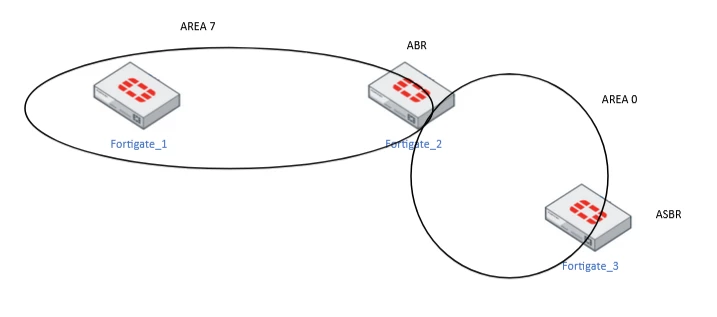
ospf area.png


This design significantly improves network efficiency by limiting traffic updates within the boundaries of each area.


In OSPF, there is a backbone area and one or more non-backbone areas. The backbone area forms the core of the OSPF design. The backbone area is responsible for distributing routing information between non-backbone areas.


There is one backbone area in each AS. All OSPF areas must connect to the backbone area.


Areas are identified by an Area ID, the Backbone area is identified by the number '0' or '0.0.0.0', and non-backbone areas can be given any area ID. Each area must have an Area border router (ABR) that connects to the backbone area, Area 0.


The ABR is responsible for maintaining the topology in sync with the other routers that are fully adjacent to it, meaning all the routers in that area must have an identical link-state information/database.


Also, ABR maintains a separate link state database for each area that is connected.


OSPF areas are groupings of OSPF routers or logical parts of a network. An area's routing information can be sent as a summary to other areas.


ABRs may learn routes to other areas from the backbone area, and as well advertise their database or choose to advertise a summary of the database. Hence, summarization of routes is only possible on an ABR in an OSPF domain.


ASBR is a router that connects an OSPF autonomous system to the external network. The route to reach the ASBR is shared by the ABR of each area.


Router roles in a multi-area design:

  • Internal Router (IR): a router with all interfaces in a single area. It maintains only one link-state database.

  • Backbone Router (BR): a router with at least one interface in Area 0.

  • Area Border Router (ABR): a router with interfaces in two or more areas, one of which must be Area 0. It generates Type 3 summary LSAs into the areas it connects.

  • Autonomous System Boundary Router (ASBR): a router that redistributes external routes (static, BGP, connected, etc.) into OSPF. It generates Type 5 external LSAs.


A single FortiGate can act as several of these roles at the same time, for example, ABR and ASBR simultaneously, when it connects multiple areas and also redistributes static routes.


LSA types and area boundaries:

  • Type 1 (Router LSA): generated by every router, flooded only within its own area.

  • Type 2 (Network LSA): generated by the Designated Router (DR) on multi-access segments, flooded only within the area.

  • Type 3 (Summary LSA): generated by the ABR to advertise inter-area prefixes.

  • Type 4 (ASBR Summary LSA): generated by the ABR to advertise the location of an ASBR to other areas.

  • Type 5 (AS External LSA): generated by the ASBR for redistributed external routes, flooded to all normal areas.

  • Type 7 (NSSA External LSA): generated by an ASBR inside an NSSA; translated to Type 5 by the NSSA ABR before entering the backbone. 


Special areas:

Stub areas are areas that cannot receive external routes. Some stub areas, such as stub areas and not-so-stubby areas (NSSA) can import external routes but not receive them from other areas, whereas others, such as totally-stubby areas (TSA), do not receive any summary or external routes at all.


Stub areas generally use default routes to send traffic over external routes, which means the routers must send a packet to the ABR to reach the ASBR, no matter what the external destination.


Note:

In the stub areas, the external LSA  and ASBR external LSA are not allowed. It will allow only the router LSA and the network LSA with the summary LSA.


Verification commands:

get router info ospf status         
get router info ospf neighbor    
get router info ospf database brief
get router info routing-table ospf   
diagnose ip router ospf all enable
diagnose ip router ospf level info 


Related document:

OSPF Resource listÂ