



Technical Tip: NPS Basic Setup for SSL VPN Integration
Description
This article describes the basic configuration of NPS in order to authenticate via SSL VPN.
Scope
FortiGate, Microsoft NPS.
Solution
Network Policy Server (NPS) is the Microsoft implementation of a Remote Authentication Dial-in User Service (RADIUS) server and proxy. It is the successor of Internet Authentication Service (IAS).
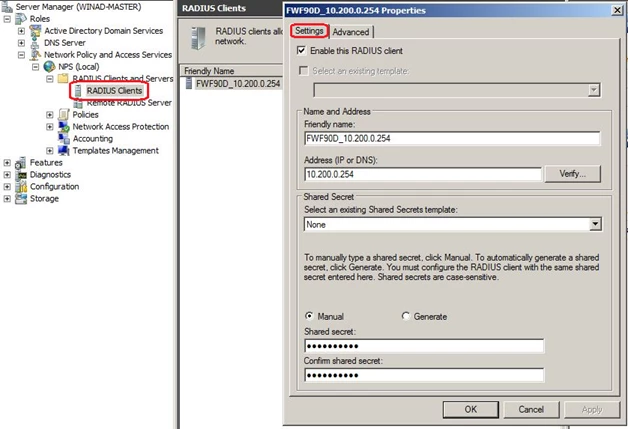
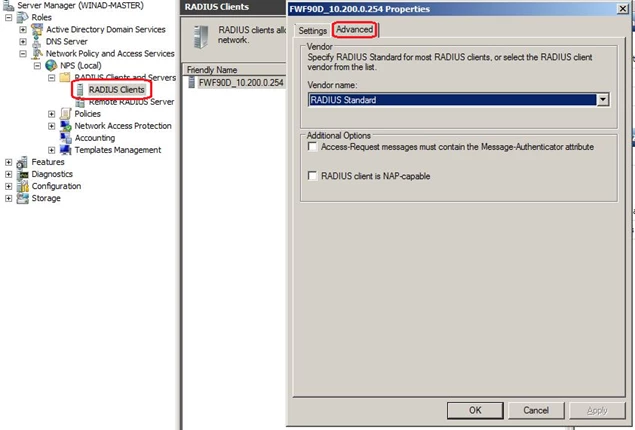
FortiGate configuration via CLI:
config user radius
edit <radius_name>
set server "10.200.0.11" <----- RADIUS Server IP.
set secret <string>
set nas-ip 10.200.0.254 <----- FortiGate IP.
end
config user group
edit <group_name>
set member <radius_name>
config match
edit 1
set server-name <radius_name>
set group-name "group1" <----- This string must match the string used on Network Policies -> Properties -> Settings -> Vendor Specific.
next
end
The user group can be used for the SSL VPN configuration (assign an SSL Portal and define the firewall policy).
Detailed NPS and FortiGate configuration can be found here.


