Mark a Best Answer
Blogs
Recently active
Introduction D-Link, a global leader in networking solutions and is particularly renowned for its offerings tailored to small and medium-sized businesses (SMBs). Over the decades, D-Link has expanded its product portfolio and global reach, making it a key player in the networking industry. Today there are many device vulnerabilities that have been identified across various D-Link devices, posing significant security risks. CVE-2020-9376: The D-Link DIR-610 devices are affected by an information disclosure vulnerability that exposes sensitive information through inadequately secured getcfg.php endpoints. This issue is particularly problematic because it impacts devices that are no longer supported by D-Link, meaning there are no official updates or patches available to address the vulnerability. CVE-2022-28956: The getcfg.php component in D-Link DIR816L routers with firmware version FW206b01 has a critical vulnerability that allows attackers to gain una
What is Check Point CVE-2024-24919? CVE-2024-24919 is an information disclosure vulnerability that could enable an attacker to access sensitive information on internet-connected Gateways configured with IPSec VPN, remote access VPN, or mobile access software blades. Check Point's advisory notes that this vulnerability has been exploited in the wild, with attacks primarily targeting devices set up with local accounts that use password-only authentication. Using password-only authentication is discouraged due to the risk of brute-force attacks, which can exploit weak passwords. Check Point recommends against using local accounts where possible and recommends implementing added layers of authentication if they are necessary. A hotfix is available to address this issue. Significance of CVE-2024-24919 On May 28, 2024, Check Point issued a zero-day advisory for CVE-2024-24919, which has a CVSS score of 8.6. According to the advisory, this vulnerability allows a
Many of today’s most damaging security breaches result from compromised user accounts and passwords. To address this issue, businesses of all sizes are seeking alternatives to password-only authentication. Multifactor authentication (MFA), whether through traditional hardware tokens orr mobile software tokens, or increasingly popular passkeys for passwordless authentication, has become the standard. Previously, implementing and managing MFA deployments was complex. FortiToken Cloud simplifies this process by offering a secure, effective way to manage MFA through an intuitive interface accessible from anywhere. FortiToken Cloud includes tokens for our FortiToken Mobile App, which features PUSH notification and response technology, making the end user experience as simple as swiping or clicking to approve a login. With FortiToken Cloud we continue to develop new application security features that ensure access to sensitive data and systems is restricted to authorized users o
Why FortiToken Cloud? Many of today’s most damaging security breaches result from compromised user accounts and passwords. To address this issue, businesses of all sizes are seeking alternatives to password-only authentication. Multifactor authentication (MFA), whether through traditional hardware tokens or increasingly popular mobile software tokens, has become the standard. Previously, implementing and managing MFA deployments was complex. FortiToken Cloud simplifies this process by offering a secure, effective way to manage MFA through an intuitive interface accessible from anywhere. FortiToken Cloud includes tokens for our FortiToken Mobile App, which features PUSH notification and response technology, making the end user experience as simple as swiping or clicking to approve a login. With FortiToken Cloud we continue to develop new application security features ensures that access to sensitive data and systems is restricted to authorized users only, thereby reducing
The rapid growth of electric vehicles (EVs) and the corresponding need for extreme fast charging (XFC) infrastructure have highlighted the importance of robust cybersecurity measures. The NIST Cybersecurity Framework Profile for Electric Vehicle Extreme Fast Charging Infrastructure (NIST IR 8473) offers a detailed, risk-based approach to managing cybersecurity in this complex ecosystem. FortiSOAR, with its advanced capabilities, is ideally positioned to help organizations comply with this profile. Here's how FortiSOAR can enhance compliance across the various phases of the NIST framework: Introduction to NIST IR 8473 Electric vehicle (EV) charging stations are critical to the growth of the EV industry, much like gas stations are for traditional vehicles. Countries worldwide are setting ambitious targets to ensure widespread availability of these charging points. For instance, the EU aims for 3 million public charging points by 2030, and the US targets at least
If you haven't used the open source iperf tool before, there is a lot of info on it (see https://iperf.fr), and I will only say it allows us to generate UDP/TCP traffic between 2 hosts of any bandwidth we desire. Load testing is a sure way to pinpoint "weak links" in the network, be it equipment or cabling. So iperf is a software (Linux & Windows) you install on 2 hosts and it works as client and server - one host sends TCP or UDP traffic, and the second one (well, iperf on it) receives it measuring jitter, packet loss, bandwidth. We use iperf to indicate network problems but also to prove (to client or ourselves) capacity of a line - is the claimed throughput indeed as expected? It becomes a challenge when you don't have Windows/Linux on remote site to install iperf or you cannot allow network downtime to disconnect your Fortigate from the line and connect instead laptop/server. Luckily, starting with FortiOS 5.2.x version, all Fortigate firewalls come with
In light of recent cybersecurity events, we would like to remind FortiEDR customers and partners about our software and content update release process, as well as our overarching release strategy. The following overview will detail our various release types, our systematic release process, and the measures we take to mitigate associated risks. Release types: We classify FortiEDR releases into three categories: Major, Minor, and Patch. Major and Minor releases undergo comprehensive QA cycles, followed by internal deployments where the system is tested in our own production environment for several months. Patch releases address a limited set of bugs and are considered less risky. These releases go through QA cycles that focus on the impact of the changed modules and include overall sanity checks. Similar to Major and Minor releases, Patch releases are tested internally for at least a few weeks before being deployed in production. Development and Q
What is CVE-2024-22024? CVE-2024-22024 represents a critical XML External Entity (XXE) vulnerability identified in the SAML (Security Assertion Markup Language) components of Ivanti Connect Secure and Ivanti Policy Secure platforms. This vulnerability impacts versions 9.x and 22.x of these platforms, exposing a significant security risk. An XXE vulnerability arises when an application improperly processes XML input from untrusted sources. In the context of CVE-2024-22024, attackers can exploit this flaw by crafting malicious XML documents designed to interact with external systems or access restricted resources without requiring legitimate authentication. This could potentially lead to unauthorized data disclosure, manipulation of sensitive information, or even complete compromise of affected systems. The implications of CVE-2024-22024 underscore the critical nature of XML processing security. By exploiting XXE vulnerabilities, attackers can bypass intended security c
Introduction With the latest updates to the Let's Encrypt CA certificate, our goal is to ensure minimal disruption to your operations. Let's Encrypt, a highly trusted Certificate Authority (CA) known for providing free SSL/TLS certificates, is set to introduce significant changes in 2024. These updates are designed to enhance security and performance, but they may also affect how certificates are issued and renewed. In this blog post, we will provide a comprehensive overview of the upcoming changes, detailing what you can expect and how they might impact your current setup. Additionally, we will explain how FortiWeb Cloud is equipped to facilitate a smooth transition. Our solutions are designed to seamlessly integrate with the new Let's Encrypt protocols, ensuring that your operations continue without interruption. We will also address any potential challenges that may arise with legacy devices, offering guidance and best practices to mitigate these issues effectively. 
What is CVE-2024-2879? CVE-2024-2879 is a critical security vulnerability identified in the LayerSlider plugin for WordPress, impacting versions 7.9.11 and 7.10.0. This vulnerability centers around an unauthenticated SQL injection exploit that occurs via the ls_get_popup_markup action. The issue stems from inadequate input sanitization and improper handling of SQL queries within the plugin's code. Exploiting CVE-2024-2879 allows attackers to manipulate SQL queries executed by the plugin, potentially enabling unauthorized access to sensitive information stored in the WordPress site's database. Since the vulnerability can be exploited without requiring authentication, malicious actors can craft specially crafted requests to extract confidential data, modify database content, or execute arbitrary commands. For websites running affected versions of the LayerSlider plugin, the risk posed by CVE-2024-2879 is significant. Unauthorized access to sensitive information could co
Critical Vulnerability CVE-2024-1709 in ConnectWise ScreenConnect What is CVE-2024-1709? CVE-2024-1709 is a critical security vulnerability found in ConnectWise ScreenConnect, impacting versions up to 23.9.7. This vulnerability is classified under CWE-288 (Authentication Bypass Using an Alternate Path or Channel). It enables unauthorized attackers to bypass authentication mechanisms by exploiting a flaw in URL path processing within ScreenConnect's .NET framework. The vulnerability arises from improper handling of URL paths, allowing attackers to manipulate them in a way that circumvents the authentication checks normally enforced by ScreenConnect. This exploit grants unauthorized access to sensitive functionalities or data that would typically require proper authentication. Due to its severity and potential impact, CVE-2024-1709 has been actively exploited in the wild. It has been added to CISA’s Known Exploited Vulnerabilities Catalog, indicating
What is CVE-2017-12615? CVE-2017-12615 is a critical vulnerability identified in Apache Tomcat versions 7.0.0 to 7.0.79 running on Windows systems. This vulnerability arises when HTTP PUTs are enabled by setting the `readonly` initialization parameter of the Default servlet to `false`. It permits the unauthorized upload and execution of JSP files via specially crafted requests, leading to potential remote code execution on the server. CVE-2017-12615 is a critical vulnerability found in Apache Tomcat versions 7.0.0 to 7.0.79 operating on Windows systems. This vulnerability is triggered when HTTP PUT requests are enabled by configuring the “readonly” initialization parameter of the Default servlet to “false”. Exploiting this flaw allows attackers to upload malicious JSP files through carefully crafted requests, thereby gaining unauthorized execution privileges on the server. This could potentially lead to remote code execution, posing serious security risks to the affe
How Critical is CVE-2024-30044 Microsoft SharePoint Server? CVE-2024-30044 is a critical remote code execution (RCE) vulnerability discovered in Microsoft SharePoint Server. It has received a CVSSv3 score of 8.8, highlighting its severity. This vulnerability poses a significant risk as it allows authenticated attackers with Site Owner privileges or higher to execute arbitrary code on the SharePoint Server. This means that attackers who exploit this flaw can potentially gain full control over the SharePoint environment, enabling them to manipulate data, compromise confidentiality, and disrupt services. Given its critical nature, administrators are urged to apply patches promptly and implement necessary security measures to protect SharePoint Server instances from exploitation. The Importance of Securing SharePoint Server Microsoft SharePoint Server is a platform that supports organizational functions like document management, collaboration, and web-
What is CVE-2018-11784? CVE-2018-11784 is an open redirect vulnerability impacting several versions of Apache Tomcat, specifically versions 9.0.0.M1 to 9.0.11, 8.5.0 to 8.5.33, and 7.0.23 to 7.0.90. This vulnerability arises when the default servlet in Apache Tomcat incorrectly handles redirects to directories. For instance, if a user requests '/foo', the server might improperly redirect them to '/foo/' using a specially crafted URL, allowing an attacker to redirect to any URI. This could be exploited to redirect users to malicious websites without their knowledge. The Significance of Mitigating Open Redirect Vulnerabilities Open redirect vulnerabilities are crucial to mitigate because they can serve as a mechanism in phishing attacks, misleading users about the authenticity of a website. When exploited, these vulnerabilities allow attackers to redirect users from legitimate websites to malicious ones. This redirection can deceive users into believing the
Overview On October 10th, 2023, Google disclosed a zero-day vulnerability in the HTTP/2 protocol, resulting in the most significant attack reaching up to 398 million requests per second. Cybersecurity and Infrastructure Security Agency (CISA) also released an advisory on this DDoS attack on the same day. This vulnerability has been exploited in the wild from August 2023 through October 2023. This HTTP/2 vulnerability allows malicious actors to launch a DDoS attack targeting HTTP/2 servers. The attack sends a set number of HTTP requests to generate high traffic on the targeted HTTP/2 servers. Attackers can cause a significant increase in the request per second and high CPU utilization on the servers that eventually can cause resource exhaustion. FortiGuard Labs identified the Distributed Denial-of-Service (DDoS) attack technique is used in the wild for the CVE-2023-44487 vulnerability. This DDoS attack, known as 'HTTP/2 Rapid Reset', leverages a flaw in the implementatio
GitLab Slack/Mattermost Integration Vulnerability: CVE-2023-5356 What is CVE-2023-5356? The discovery of CVE-2023-5356 adds to the growing list of concerns for GitLab, a widely used platform for software development and version control. This vulnerability involves incorrect authorization checks in both the Community Edition (CE) and Enterprise Edition (EE) of GitLab, affecting versions from 8.13 up to 16.7.2, before specific updates. The security flaw allows a user to abuse Slack/Mattermost integrations to execute slash commands as another user, potentially leading to unauthorized actions within the GitLab environment. This security issue underscores the critical importance of maintaining rigorous security practices in software development and collaboration platforms. The potential for such vulnerabilities to be exploited can have far-reaching implications for both the security of code and the integrity of the development process. What
CVE-2024-3400: Palo Alto Network OS Command Injection Vulnerability in GlobalProtect Introduction A recent zero-day command-injection vulnerability, identified as CVE-2024-3400, has been discovered in Palo Alto Networks PAN-OS. This vulnerability has been assigned the highest possible severity score of 10.0 and can be exploited by an unauthenticated user to execute arbitrary commands on the target system with root privileges. The vulnerability was initially discovered and reported by Volexity. Following this, the Cybersecurity and Infrastructure Security Agency (CISA) included CVE-2024-3400 in its Known Exploited Vulnerability Catalog. In this blog, we will discuss the exploitation activity related to this vulnerability, as observed by Fortinet FortiGuard Labs Threat Intelligences. Additionally, we will explore a newly discovered Python-based backdoor and its unique interaction mechanism with the operator
Operational technology (OT) organizations across many industries are using technology to transform their business, but these benefits can lead to increased risks as well. Granting third-party contractors and remote employees remote access to OT systems presents a unique challenge because these remote endpoints are often unable to have endpoint security agents installed, leaving the OT network vulnerable to misuse and other insider threats. FortiSRA helps OT organizations implement secure remote access, mitigating the risk associated with maintaining external access to critical OT resources. FortiSRA is an agentless solution, so OT organizations can employ remote protections without having to deploy a software agent on third-party and remote employee endpoints. FortiSRA offers a rich set of capabilities and controls to help secure remote access and encourage safe transformation for OT organizations. Features include: &nbs
Fortinet has just announced FortiAIOps, an Artificial Intelligence with Machine Learning (AI/ML) tool for network operations. “Wait,” some people may ask, “isn’t Fortinet, a security company? Yes, it is, but it is also a networking company, as in “Security-Driven Networking.” The objective of network operations, in general, is evolving to focus on the quality of the end-user experience. It is not just a matter of, “Is everything up” but “is everything working well?” A holistic view of the network is needed, starting at the LAN Edge – where the users are – and Fortinet has been a leader in unified networking. Among Fortinet customers, 40% of network operations trouble tickets are connectivity issues. “The Wi-Fi is down.” I’m a Wi-Fi guy. Properly designed Wi-Fi is rarely the problem. That said, there can be DHCP issues, DNS issues, VLAN configurations, fat-fingered passwords, and, occasionally, radio frequency (RF) problems. It is bad enough when things are not working, but what about
In the rapidly evolving landscape of cybersecurity, effective governance is paramount. With the release of NIST Cybersecurity Framework (CSF) 2.0, organizations now have an enhanced toolset to manage and reduce cybersecurity risks. FortiSOAR, a robust Security Orchestration, Automation, and Response (SOAR) platform, plays a critical role in reinforcing governance across all phases of the NIST CSF 2.0. This blog explores how FortiSOAR empowers organizations to implement the framework's guidelines effectively. Introduction to NIST CSF 2.0 The NIST Cybersecurity Framework 2.0 provides comprehensive guidance for organizations to manage cybersecurity risks. It expands its scope beyond critical infrastructure to include all types and sizes of organizations, introducing a new "Govern" function to emphasize the importance of cybersecurity governance as a major enterprise risk. Read more about NIST CSF 2.0 here. How FortiSOAR Enhances Governance Across NIST CSF 2.0 Phases 1. Identify As
A Fortune 500 warehouse club operator faced challenges in enhancing their security design and best practices within their AWS infrastructure. They turned to Fortinet Cloud Consulting Services for strategic development of a comprehensive security design tailored to their needs. Expertise in Selecting the Right Cloud Architecture Fortinet Cloud Consulting Services team initiated a detailed consultation process, expertly building an architecture that flawlessly incorporated the FortiGate Next Generation Firewall into a central network Security Virtual Private Cloud (VPC) for deep packet inspection. The designed architecture emphasized scalability, reliability, cybersecurity, and robustness. Fortinet architects thoroughly analyzed the existing environment and requirements to develop solution options. A notable aspect of this collaboration was the comprehensive evaluation of diverse architectural designs. The Fortinet consultants outlined multiple options, highlighting their u
A prominent US-based specialty engineering and construction company faced challenges centralizing security controls, gaining visibility into traffic patterns and intrusion attempts, and applying policies at the application level within their cloud infrastructure. They turned to Fortinet Cloud Consulting Services to develop a comprehensive cloud network security design tailored to their unique requirements to ensure top-tier security and operational efficiency on AWS. Guided Expertise in Selecting the Right Cloud Architecture The Fortinet Cloud Consulting Services team worked closely with the customer to create an architecture that emphasized scalability, reliability, and robustness. The Fortinet consultants outlined multiple options, highlighting their unique benefits and potential challenges. This in-depth analysis enabled the customer to make informed decisions, ensuring their infrastructure not only satisfied current needs but was also adaptable for future advancements
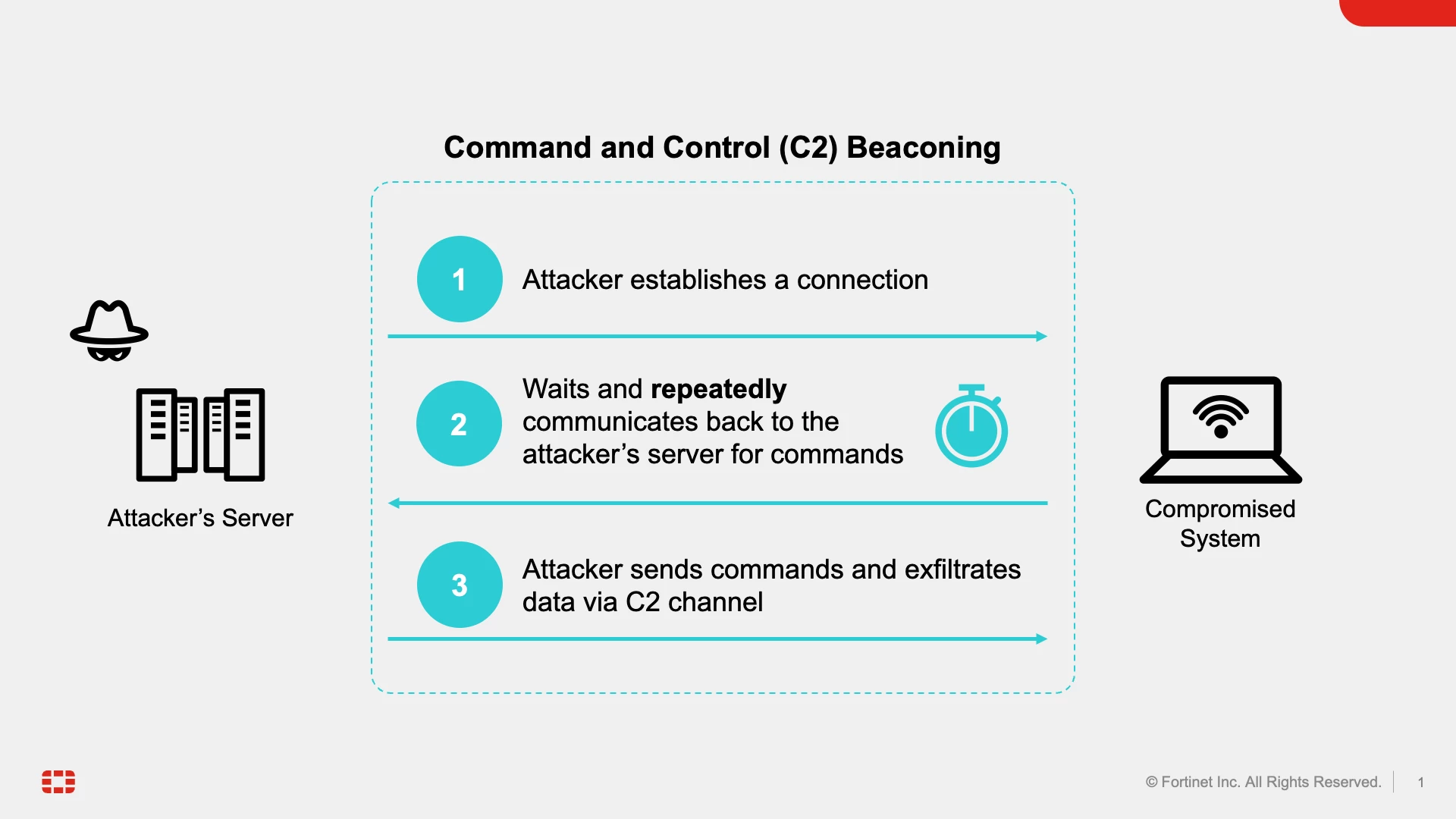
Background When attackers access a victim device and determine they want to run commands on that device in the future, they often install backdoor implants. A feature of these implants is the ability to beacon to an attacker's Command & Control (C2) server. Each beacon is a callback that tells the attacker the implant is still active and then retrieves and executes instructions assigned to the implant. One example of these instructions is tasking the implant to execute automated commands (such as changing the frequency of beacons, looking for information stored on the device, scanning the network for vulnerabilities, or attempting to exploit additional machines) and transmitting the results back to the C2 server. This workflow allows the attacker to operate asynchronously by assigning instructions to multiple devices, knowing they will be executed in the near future. Alternatively, when an attacker needs to interactively execute a series of specific commands based on quickly analyz
Another Critical Vulnerability in Apache Struts: CVE-2023-50164 Vulnerability Overview Another one? Apache Struts seems to be experiencing quite a series of vulnerabilities. Apache Struts has been a target for malicious actors due to its widespread adoption and the potential impact of vulnerabilities within applications built on the framework. One of the most notable instances was the Equifax data breach in 2017, where attackers exploited a vulnerability in Apache Struts to gain unauthorized access to sensitive data. The Equifax breach was a wake-up call for many organizations regarding keeping frameworks and libraries up-to-date and implementing robust security measures in their web applications. Since then, there has been increased awareness and emphasis on regularly patching and securing Apache Struts applications to mitigate the risk of exploitation by cybercriminals. Fortinet Product Security Incident Response Team (PSIRT) continuously works to identify and address
Fortinet is pleased to announce that FortiExtender Cloud 24.1 has just been released. The time has come to use wireless LAN access on FEV211F and FEV-211F-AM! This release brings the following improvements: FEV211F/FEV211F-AM Wireless support SSIDs – The user can configure the SSID profiles and push configuration to the FEX devices WIFI Configuration – The user can configure the different types of Security profiles and sync to the FEX devices Radios – The user can configure 2.4 and 5 GHz radios and sync to an FEX device SSIDs, Wi-Fi Configuration, and Radio configuration parameters can be applied: Inside the Profile Per-device override option available by clicking on In-service -> click on SN -> Click on Edit - SSIDs, WIFI Configuration, and Radio parameter Public Documentation was also updated. Admin Guide A few Screenshots: Profile SSID Configuration Wi-Fi Configu
Already have an account? Login
Enter your E-mail address. We'll send you an e-mail with instructions to reset your password.