


Basic ZTNA Deployment
The following snippet summarizes the Basic ZTNA deployment for protecting web application access using HTTPS access proxy for remote access, and IP/MAC based access control for local access. To view the complete guide, go to ZTNA Deployment Guide.
Design Considerations
When designing your Zero Trust Access solution, and in this case, ZTNA access to internal web applications, several things will need to be considered:
- What are the web applications that you want to allow for our users?
- How will users resolve the address to these web applications?
- What are the user groups that are allowed access to the web applications?
- Who will authenticate the users? Where does the authentication server reside?
- Where will users be accessing the web applications from?
- What are the required security postures for an endpoint to access the resources?
- Where is the optimal location for the EMS server?
- How do you provision and onboard FortiClient endpoints?
Deployment Procedures
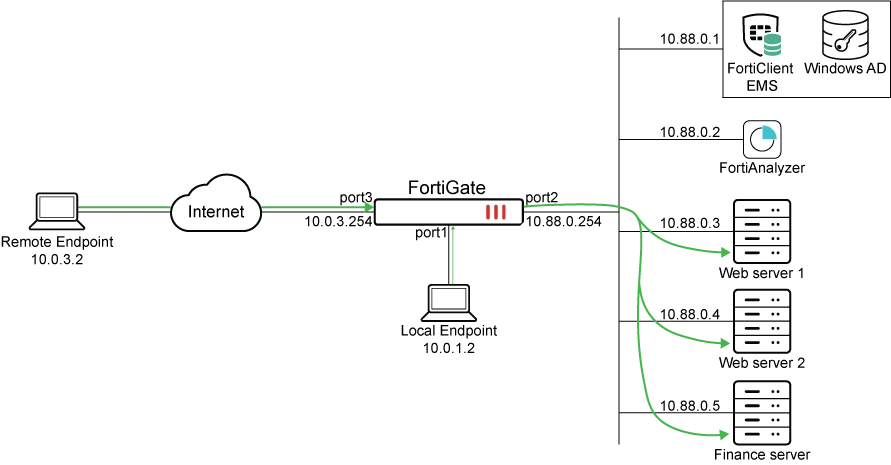
In this deployment example, we will demonstrate remote and local access to protected web applications as indicated by the traffic arrows above.
The following is an overview of the procedure:
-
Configure firewall policies with IP/MAC based access control for internet access
- Full ZTNA vs Simple ZTNA Policies
For more information, go to ZTNA Deployment Guide.
Related documentation:
Technical Tip: ZTNA - Zero Trust Network Access Resource List

