


Troubleshooting Tip: FortiGate interface error counters
Description
This article describes interface error counters.
Scope
All FortiGate units.
The output of the diagnose command may vary depending on the interface driver.
Solution
The counters and their meaning describe what can be seen when using the CLI command:
diagnose hardware deviceinfo nic <interface name>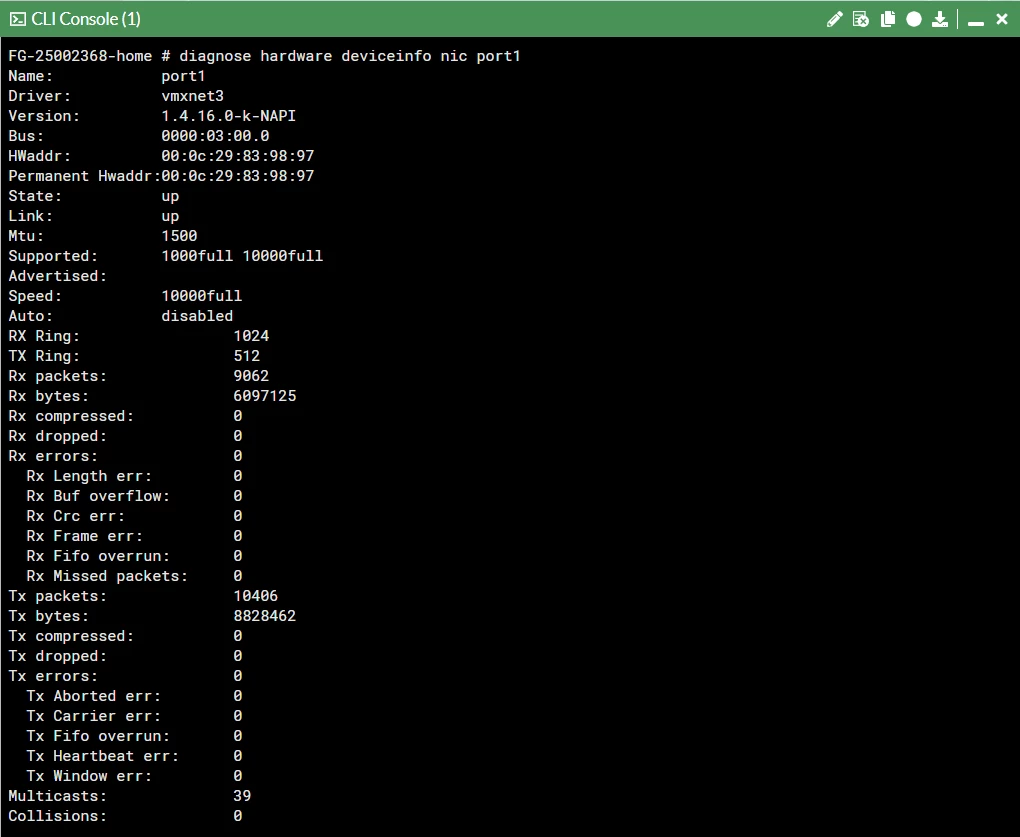
Using port1 as an example.
Rx_Errors = rx error count | The bad frame was marked as an error by PHY. |
Rx_CRC_Errors | Frame CRC errors can be caused by several factors. Typically, they are caused by either faulty cabling or as a result of a collision. |
Rx_Dropped | Running out of buffer space. A newer error is rx_no_buffer_count. |
Rx_Missed_Errors | Equals Rx_FIFO_Errors + CEXTERR (Carrier Extension Error Count). Only valid in 1000M mode, which is marked by PHY. |
Tx_Errors=Tx_Aborted_Errors | ECOL, Excessive Collisions Count. Valid in half-duplex mode. |
Tx_Window_Errors | LATECOL, Late Collisions Count. Late collisions are collisions that occur after 64-byte time into the transmission of the packet, while working at 10-100 Mb/s data rate, and 512-byte time into the transmission of the packet while working at the 1000 Mb/s data rate. This registers only increments if transmits are enabled and the device is in half-duplex mode. |
Tx_Dropped | Number of dropped packets. |
Collisions | Total number of collisions experienced by the transmitter. Valid in half-duplex mode. |
Rx_Over_Errors | Receive the FIFO overflow event counter. |
Rx_Frame_Errors | Same as Rx_Align_Errors. This error is only valid in 10/100M mode. |
Tx_Collision_Errors | Errors are experienced when there is a mismatch in duplex settings on both sides of the cable. |
Rx_FIFO_Errors | Same as Rx_Missed_Errors; missed packet count. |
Tx_Carrier_Errors | The PHY should assert the internal carrier sense signal during every transmission. Failure to do so may indicate that the link has failed, or the PHY has an incorrect link configuration. This register only increments if transmits are enabled. This register is not valid in internal SerDes1 mode (TBI mode for the 82544GC/EI), and is only valid when the Ethernet controller is operating at full duplex. |
Rx_Length_Errors | Transmission length error. |
Tx_FIFO_Errors | Number of Frame transmission errors due to underflow. |
Tx_Heartbeat_Errors | Number of heartbeat errors. |
Tx_Single_Collision_Frames | Counts the number of times that a successfully transmitted packet encountered a single collision. The value only increments if transmits are enabled and the Ethernet controller is in half-duplex mode. |
Tx_Multiple_Collision_Frames | Multiple Collision Count counts the number of times that a transmitter encountered more than one collision but fewer than 16. The value only increments if transmits are enabled and the Ethernet controller is in half-duplex mode. |
Tx_Deferred | Counts defer events. A defer event occurs when the transmitter cannot immediately send a packet due to the medium being busy either because another device is transmitting, the IPG timer has not expired, half-duplex deferral events, reception of XOFF frames, or the link is not up. This register only increments if transmits are enabled. This counter does not increment for streaming transmits that are deferred due to the TX IPG. |
Rx_Frame_Too_Longs | Rx frame oversized. |
Rx_Frame_Too_Shorts | Rx frames are too short. |
Rx_Align_Errors | This error is only valid in 10/100M mode. |
Symbol Error Count | SYMERRS - Counts the number of symbol errors between reads. The count increases for every bad symbol received, whether or not a packet is currently being received, and whether or not the link is up. This register only increments in internal SerDes mode. |
htx_e_busy | A large volume of HTTP/HTTPs may overload the network processing unit can raise this counter due to the business due to the overload. |
htx_drop | Due to the queuing in the network processor, the retransmission can take place and packets can be dropped due to the business or overload of NPU. Therefore the counter may rise if the packets are being dropped continuously. |
How to interpret interface counters during troubleshooting:
When investigating packet loss, interface errors, or intermittent connectivity, collect interface-counter output at multiple points in time rather than relying on a single snapshot.
Collect the initial counter values using the above command.
Reproduce the issue or monitor the interface while the affected traffic is active.
Collect the same output again and compare the counter values.
If a counter increases during the failure window, correlate the increase with interface traffic, link events, and the corresponding switch-port or transceiver counters.
An existing non-zero counter does not necessarily indicate an active fault. Counters may represent events accumulated over time, and their reset behavior can vary by platform and driver.
Interpret the counters in context:
Increasing CRC or physical-layer error counters warrant checks of the cable, transceiver, peer port, and supported link settings.
Increasing drop counters warrant further investigation to determine whether the drops occur at the physical interface, driver, queue, or another processing stage.
Increasing collision-related counters should be interpreted in the context of the interface type, negotiated duplex, and platform-specific counter definitions.
Where possible, compare both ends of the link during the same time interval. Do not conclude that the FortiGate interface is defective based solely on a non-zero counter; first establish whether the counter is increasing and whether the increase correlates with the observed symptoms.

