lmelo
Staff
Staff
October 10, 2023

Technical Tip: Block a specific VPN application by using application control

Description This article describes how to block a specific VPN application by using the application control signature.
Scope FortiGate.
Solution

To prevent LAN users from using a specific VPN application, enable SSL Deep Inspection + application control profile in the firewall policy.


  1.  Select Security Profiles -> Application Control, select the application profile, and select 'Edit'.
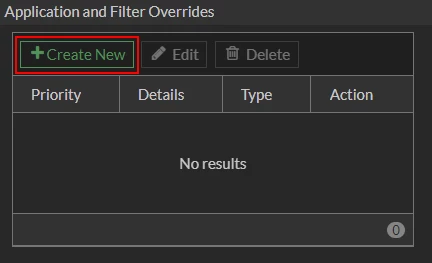
  2. In the Profile, select 'Create New' under the Application and Filter Overrides section.


2.png


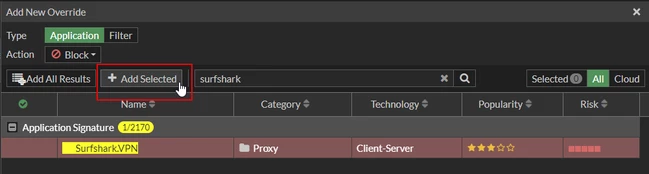
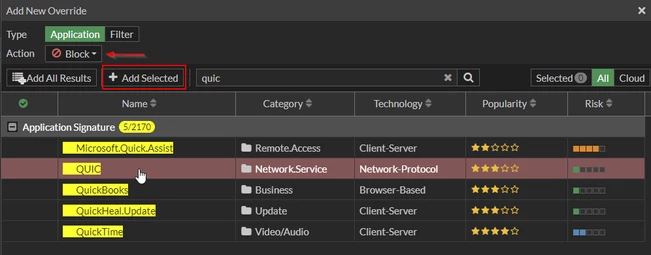
  1. Search for the VPN Application, select the signature, and then select the button '+ Add Selected'. Repeat the process for QUIC and then add to Action the option Block.


3.png


4.png


It is necessary to block the QUIC protocol since UDP/443 is used for some applications, including some VPN applications, to avoid inspection.


  1. Add the application control profile to the desired Firewall policy. Also, enable SSL Deep Inspection on the Firewall policy.


6.png


Related documents:

Technical Tip: How to enable deep inspection and import a certificate in the browser

Technical Tip: How to import CA certificates into IOS mobile devices

Technical Note: How to import CA certificates into Android devices

Application Control 
Technical Tip: How to block third party VPN

    Thought Leadership. Security Summit. Thursday, November 12th, PGA National Resort, Palm Beach Gardens, FL.
    Security Operations Summit: Modernize SecOps. Operate AI-Native.AMER: November 4 | 9:00 AM PST. India and SAARC: November 5 | 10:00 AM IST. EMEA: November 5 | 10:30 AM CET. APAC: November 5 | 11:00 AM SGT