

lofix
Visitor III
February 3, 2025
Question

Virtual server

  • February 3, 2025
  • 3 replies
  • 1794 views

Hello,

It is my first post here and I'm not experienced to much with Fortinet.

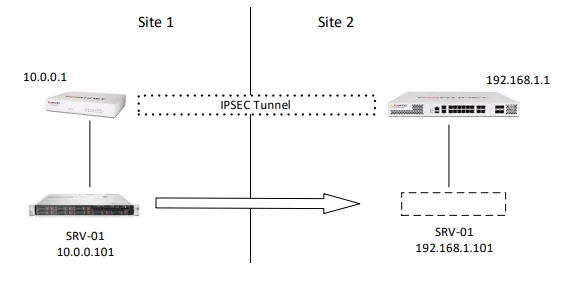
What I would like to do is move the server from Site 1 to Site 2 and keep the ip address for the users from Site 1.


Sites are connected via ipsec vpn and I try to avoid changing database connection details on all clients.

I mean... If I ping 10.0.0.101 from Site 1 then I get reply from 192.168.1.101.

Is it possible to achieve it with virtual server function inside these to networks?
 

virtual_server.png


3 replies

Toshi_Esumi
SuperUser
SuperUser
February 3, 2025

If nothing else is in the subnet (10.0.0.0/24?), it's possible to set a VIP/DNAT to forward any access to 10.0.0.101 to 192.168.1.101 over the tunnel. But all other devices in the same subnet would try reaching the server directly without coming to the FGT(10.0.0.1) via switch/L2 network, the FGT can do nothing about that.

Toshi

lofix
lofixAuthor
Visitor III
February 3, 2025

Unfortunately, I expected such an answer.

Inside the Site 1 there is no any vlans etc. Everything is in 10.0.0.0/24 :(

Maybe I will be able to create a separate vlan and move the clients there, then all traffic to 10.0.0.0/24 will go through the FGT.

dingjerry_FTNT
Staff
Staff
February 3, 2025

Hi @lofix ,


I believe that you can refer to this KB:


https://community.fortinet.com/t5/FortiGate/Technical-Tip-How-to-configure-an-IPsec-tunnel-with-Overlapping/ta-p/242267


The Server is the "computer 10.10.10.56" in the KB.


192.168.1.0/24 (I assume that you are using this subnet on the other side) is "2.2.2.0/24" in the KB.

lofix
lofixAuthor
Visitor III
February 3, 2025

Thanks all of you for your posts!!!

I dind't expect so much helpful information in such a short time.


Why I even thought about it, not just the change client settings?

I wanted to do it without the people knowing.


@dingjerry_FTNT 

I will study this article, and try it in my lab. Thanks a lot.

funkylicious
SuperUser
SuperUser
February 3, 2025

simplest way of doing that is by telling them to use a DNS entry instead of the actual IP :) 

"jack of all trades, master of none"
lofix
lofixAuthor
Visitor III
February 3, 2025

yeeah... it is esy to say ;)

Site 1 has been taken over by Site 2 and now I am trying to integrate it.


I'm thinking about one more solution... Connection string to the database is stored in windows registry. I can try to replace it via GPO and nobody will now about it.

