
Jirka1
Explorer II
September 16, 2018
Solved

RSSO authentication

  • September 16, 2018
  • 3 replies
  • 30759 views

Hello everyone, we have setup a basic wifi network (UniFi) which auth against a windows 2016R2 radius server

 All is working fine.

 The problem we are having is that the fortigate firewall is not seeing the usernames and therefore not pulling them into the correct rule set. Since users authenticate to WiFi using NPS on Win2016, FSSO does not detect them on FGT.

Is it possible to get FGT to detect which user is authenticated by the radius??

I tried this: https: //cookbook.fortinet.com/ssl-vpn-radius-authentication/ and unsuccessfully. But I do not know if it is right for this workaround.


Thank you.


Jirka
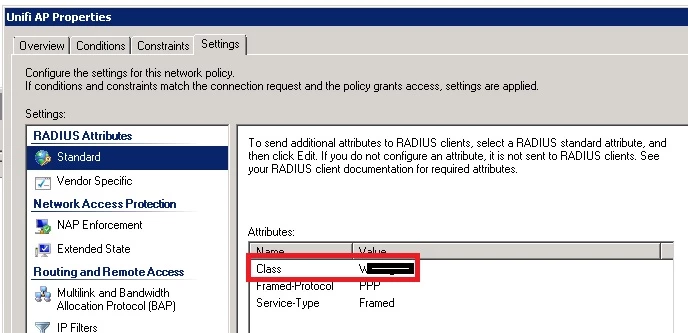


    Best answer by Jirka1

    Hi rafiki,

    yes, the problem was that I had to add an attribute named "Class" to the NPS and specify the exact name of the group that was created on FGT - see the screenshot.

    Jirka


    3 replies

    neonbit
    New Member
    September 17, 2018

    The RSSO radius implementation would be different from the SSL VPN one.


    There's a document that goes through integrating with NPS and RSSO here: https://docs.fortinet.com/uploaded/files/2345/fortios-radius-single-sign-nps-523.pdf


    It's the older version of FortiOS but should still be good.

    xsilver_FTNT
    Staff
    Staff
    September 17, 2018

    Hi,

    if user logon do not create event on Windows AD, or is audit of such events is disabled, then FSSO will see nothing. So to make FSSO working make sure your DCs audit logon events (at least success logon).


    Alternative approaches are:

    - WSSO if FortiGate is the controller then it's able to remember logons - RSSO so make NPS to send RADIUS Accounting to FortiGate and setup RSSO agent and groups


    Choose one of those 3 methods. I would not suggest to combine those.

    Jirka1
    Jirka1Author
    Explorer II
    September 17, 2018

    Hi Tomas, I tried to follow the recommendations of the "neonbit" user, unfortunately it does not work.  NPS on Win2016R2 is set according to the screenshot. Radius connection test is successful. User Authentication Not.


    FGT81-xxxxxx (radius) # show full-configuration 
    config user radius
        edit "RSSO Agent"
            set timeout 5
            set radius-coa disable
            set h3c-compatibility disable
            set username-case-sensitive disable
            set password-renewal disable
            set password-encoding auto
            set acct-all-servers disable
            set rsso enable
            set rsso-radius-server-port 1813
            set rsso-radius-response enable
            set rsso-validate-request-secret enable
            set rsso-secret ENC S6LV+Oa2bXI7dBOywvWPudKiGwjLeldiyg2F+RDcecYyBjwY37PRGr3Vd54TierR6QRiiv1SI//ZsiguS7fy8MVftt6wa/FC6ubmM6lfkg5mehZAhhVgXwoF6qO1e80srOIRTZ4SYwkzBJcEDr/bRT7MoSZ2roT9sBzbl/pH5SpsDHQhMqZhRLAaIGrPTvlnQ6q5Qw==
            set rsso-endpoint-attribute User-Name
            unset rsso-endpoint-block-attribute
            set sso-attribute Class
            set sso-attribute-key ''
            set sso-attribute-value-override enable
            set rsso-context-timeout 28800
            set rsso-log-period 0
            set rsso-log-flags protocol-error profile-missing accounting-stop-missed accounting-event endpoint-block radiusd-other
    --More-- set rsso-flush-ip-session disable
            set rsso-ep-one-ip-only disable
        next
        edit "RSSO-PDC"
            set server "172.28.0.2"
            set secret ENC zuxEeGMjKCmXCawpxSsYr0Bj2VZqt6V2z4p0enb2ZWkywD1HGw9mYTo5LbaoBU69R2LRreaFsfD+AmgRatUV3GLJqy3B8dG98gSqqMQr2dVoLDMhSQ1MOY03BaG1HKncvULLPHxHrxuvvEJUJgIziRzSFHf3jIBDqD7LH93NWDbBc+CGmC189MTqaK3WmGR8QcMlNw==
            set timeout 5
            set all-usergroup disable
            set use-management-vdom disable
            set nas-ip 0.0.0.0
            set acct-interim-interval 0
            set radius-coa disable
            set radius-port 0
            set h3c-compatibility disable
            set auth-type ms_chap_v2
            set source-ip ''
            set username-case-sensitive disable
            set password-renewal disable
            set password-encoding auto
            set acct-all-servers disable
            set rsso disable
            set secondary-server ''
    --More-- set secondary-secret ENC UNS8CrDt5nu6R/sl3hlzD8AtmR3cXmK4+J227CTfE+n391rr+7kIfU0C0Ilruu0hQMWtcFlqb+rHDgZq9nc+L6H6gh6MPZOqY0QrA4uz4Hfeu/ns3ql6BS/TNJ90qgZOwOr1/Czv+ZBdPj7cwVITf+qceCWKOfvNdT9ML4XC5mbMsVZ6mo0t2p3i42epi9QCOe7o/w==
            set tertiary-server ''
            set tertiary-secret ENC StUafpxxLJRs/bGUvcqvJKFZpvBHZhLHeDt1JPZLHEK5Ge84QBJ01ucugwHyOj432O6j295xw65OXf58y+7bNOi3zQCdW23AtFDVo4WAo5Wi3Rtc240R7+Wr0AB2qDOWZuStnpPpWZ1jn9oSurzY66DBkx3qiXK7Z017k3gj/WIMkaEKTgFfT7eQL4IAW6DXvHPnKA==
            config accounting-server
                edit 1
                    set status enable
                    set server "172.28.0.2"
                    set secret ENC WZ/ACTtaQEnzmTMj1CJWVMa6OKIM4MxCivB1BApM1r+9zZxuPxdz8HVKHn+tZpkIyVaGUoEnLaRhNxJ+PDq6rTxT3s1sRLy7XW2Ky3ZE61L6Ri/6RiGylrVzREn2+5LjAyk5urCuxurykVHqvQkuFI1WJ+RTecjWc7V2RL0F3qERTalnATCu+WAVPJ1JAmOc/HCt9Q==
                    set port 0
                    set source-ip ''
                next
            end
        next
    end


    FGT81-xxxxxx # diag test application radiusd 3
    No RADIUS server database [vd root]


    neonbit
    New Member
    September 17, 2018

    Can you take a packet capture of RADIUS traffic from/to the FortiGate to the RADIUS server to see which RADIUS attributes are being sent to the FortiGate when a user logs in?

    owla
    New Member
    July 21, 2020

     We had an issue , we didn't see just "User Group" names. We downgraded firmware (to 6.2.2)  and RSSO was fine, after upgraded back (to 6.2.3) we still had successfully detected RSSO User groups.  Now we are using 6.2.4 - RSSO works fine.

