Liza1
Explorer II
July 12, 2024
Solved

OSPF Areas Problems

  • July 12, 2024
  • 2 replies
  • 1522 views

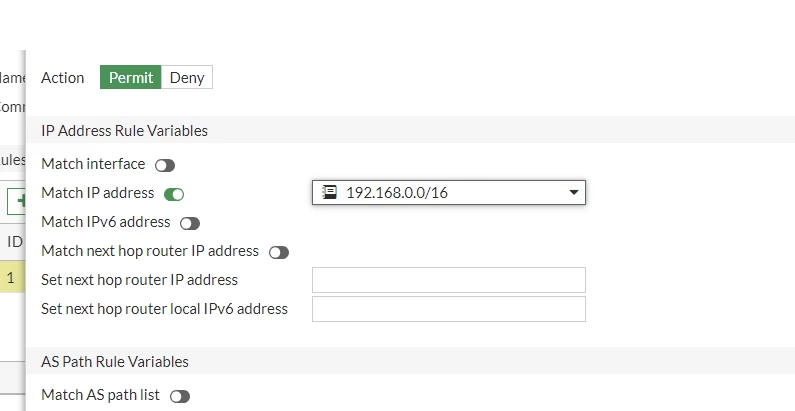
I have the following issue and need your help, please. I have a FortiGate device and a router with an internal network of 192.168.0.0/24. I've set up multiple branches in OSPF area 0, excluding the internal network 192.168.0.0/24 because the second branch needs to act as the main distributor.

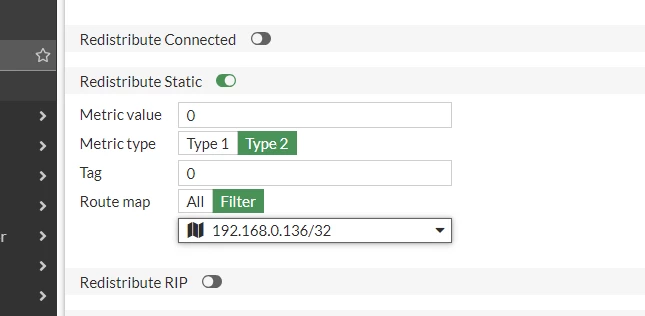
Additionally, I have two tunnels with another company, set in OSPF area 10. To ensure they see a specific IP address (e.g., 192.168.0.136) from our network, I used "redistribute static". However, enabling this causes the second branch to not see the 192.168.0.0/24 network. When I disable it, the issue reverses, and the other company cannot see the second branch.

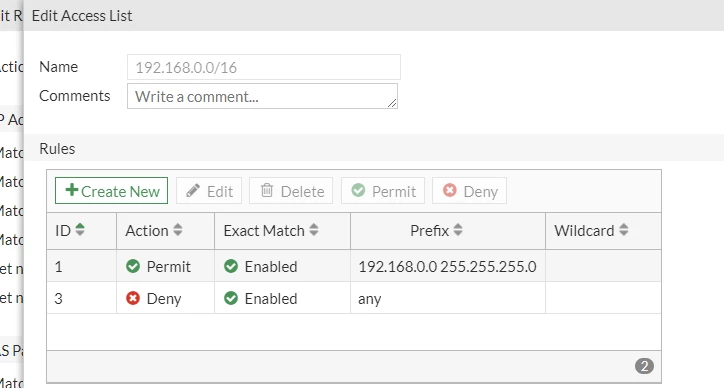
Is it possible to resolve this by creating access lists for both OSPF areas? Here's   the configuration snippet for "redistribute static":
1.png2.png3.png


FortiGate


Best answer by Liza1

In this access-list, I also added 192.168.0.136/32. After that, their connection started working because it was configured to only receive route 192.168.0.136/32. That's how this conflict was resolved. Thank you for your help.

2 replies

Toshi_Esumi
SuperUser
SuperUser
July 12, 2024

Other part of OSPF network doesn't need to have routes for individual host. As long as 192.168.0.0/24 is in the routing table, that router can reach 192.168.0.136 and all other host in the /24 subnet.
Besides, "Redistribut static" in OSPF configuration redistributes all static routes into OSPF domain. You don't have any static routes to those host IPs so it wouldn't do whatever you're thinking it would. Instead, it's causing routing conflict/confusion.

Toshi

Liza1
Liza1AuthorAnswer
Explorer II
July 16, 2024

In this access-list, I also added 192.168.0.136/32. After that, their connection started working because it was configured to only receive route 192.168.0.136/32. That's how this conflict was resolved. Thank you for your help.

Thought Leadership Security Summit. Outpace New Threats with AI - enhanced defense. Tuesday, Septmeber 15, 8:30 AM - 2:30 PM PT. The Golf Club at Newcastle, WA.
Fortinet Flag the Hack. Wednesday, August 26, 9:00 AM - 5:00 PM ET, COSM, Atlanta, GA.
Virtual event | September 2026. SASE summit. The age of autonomous trust. Register here!