wismail
New Member
March 10, 2023
Solved

CoreSwitch MACAddress everywhere

  • March 10, 2023
  • 9 replies
  • 4250 views

I have a core switch that acts as gateway for all the users. 


10.10.10.254 Gateway (coreswtich)


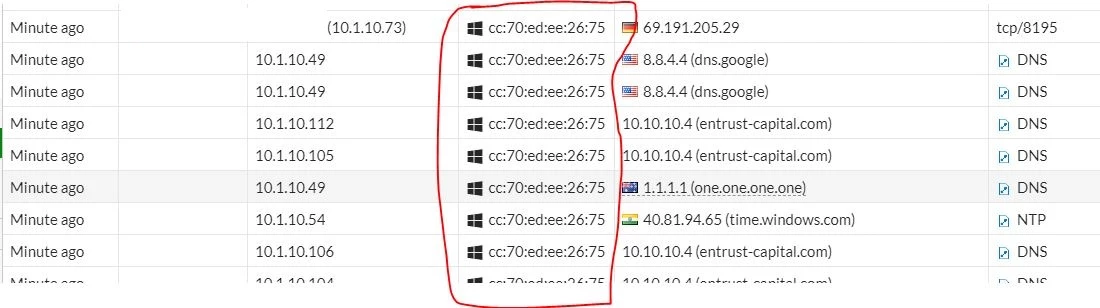
1. I am seeing traffic from User IP but with core switch MACaddress.

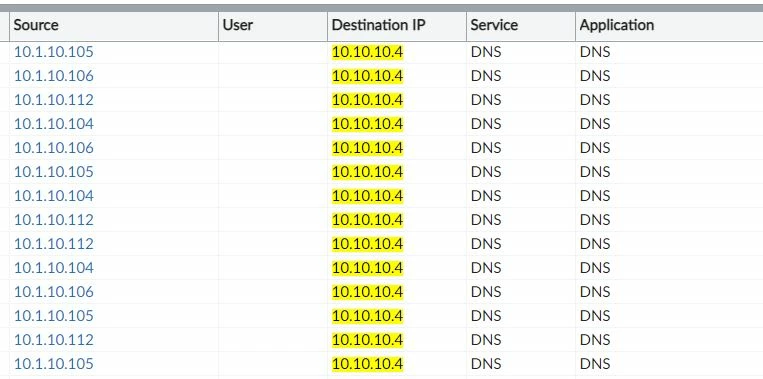
2.I am seeing DNS queries from host with core switch MACaddress to DNS Address that is not configured on the host. 

3.I am seeing wrong IP address associated with this MAC (screen shot)

4.I cannot delete it in devices (delete option is dimmed)

how can i resolve this issue?
DNSTraffic.JPGDNSSwitchMAC.JPGwrongMACIP.JPG


Best answer by Anthony_E

Here the answer from one of our engineer:


'The "core switch" is probably an L3 switch, meaning it replaces MAC addresses.
So any traffic from end device to FGT through switch will arrive at FGT with switch MAC address.


There is nothing we can do, that's just what FGT picks up on.


If you have device detection enabled on FGT interface, then FGT will create a device entry based on switch MAC address.

o clear it, 'dia user device clear' removes all entries, 'dia user device list' lists the entries, and 'dia user device del <MAC address>' clears a single entry.'

9 replies

Anthony_E
Staff
Staff
March 13, 2023

Hello Ismail,


Thank you for using the Community Forum. I will seek to get you an answer or help. We will reply to this thread with an update as soon as possible.


Thanks,

Best Regards
Anthony_E
Staff
Staff
March 15, 2023

Hello Ismail,


We are still looking for someone to help you.

We will come back to you ASAP.


Regards,

Best Regards
Anthony_E
Staff
Staff
March 16, 2023

Hello,


Could you please indicate which unit you are using and under which version?


Thanks a lot in advance.


Regards,

Best Regards
wismail
wismailAuthor
New Member
March 16, 2023

F81 version 6.4.12

Anthony_E
Staff
Staff
March 20, 2023

Hello Ismail,


Thank you. I will indicate this information to find the best solution.


Regards,

Best Regards
Anthony_E
Staff
Anthony_EAnswer
Staff
March 20, 2023

Here the answer from one of our engineer:


'The "core switch" is probably an L3 switch, meaning it replaces MAC addresses.
So any traffic from end device to FGT through switch will arrive at FGT with switch MAC address.


There is nothing we can do, that's just what FGT picks up on.


If you have device detection enabled on FGT interface, then FGT will create a device entry based on switch MAC address.

o clear it, 'dia user device clear' removes all entries, 'dia user device list' lists the entries, and 'dia user device del <MAC address>' clears a single entry.'

Best Regards
wismail
wismailAuthor
New Member
March 22, 2023

So do you suggest changing the Gateway for all the devices to the FortiGate instead of the Switch? and convert the switch to L2?

Esteemed Contributor III
March 22, 2023

Hi @wismail ,

This depend on your requirements. Which device will be the gateway?
Gateway on Fortigate - Fortigate will handle the routing

Gateway on CoreSwitch - Switch will handle the routing

Layer2 will not involve in handling routing.


Gateway on Fortigate will be more secured as any traffic passing through LAN/VLAN to LAN/VLAN can be inspected by Firewall.

If gateway terminated on the CoreSwitch, traffic  from LAN to LAN did not pass through Fortigate . It will handle internally on the CoreSwitch level only.

Thought Leadership. Security Summit. Thursday, November 12th, PGA National Resort, Palm Beach Gardens, FL.
Thought Leadership. Security Summit. Thursday, October 8th. Disney's Grand Californian Hotel & SPA, Anaheim, CA.
Security Operations Summit: Modernize SecOps. Operate AI-Native.AMER: November 4 | 9:00 AM PST. India and SAARC: November 5 | 10:00 AM IST. EMEA: November 5 | 10:30 AM CET. APAC: November 5 | 11:00 AM SGT