nappy
New Member
April 12, 2013
Solved

Allow Specific URL

  • April 12, 2013
  • 13 replies
  • 148781 views
Hi, I would like to block www.facebook.com, but I would like to only allow access to a specific facebook URL eg www.facebook.com/radiowave So Users should not be able to access facebook but should be able to access the company facebook page. How can I accomplish this? Thanks
    Best answer by Dave_Hall
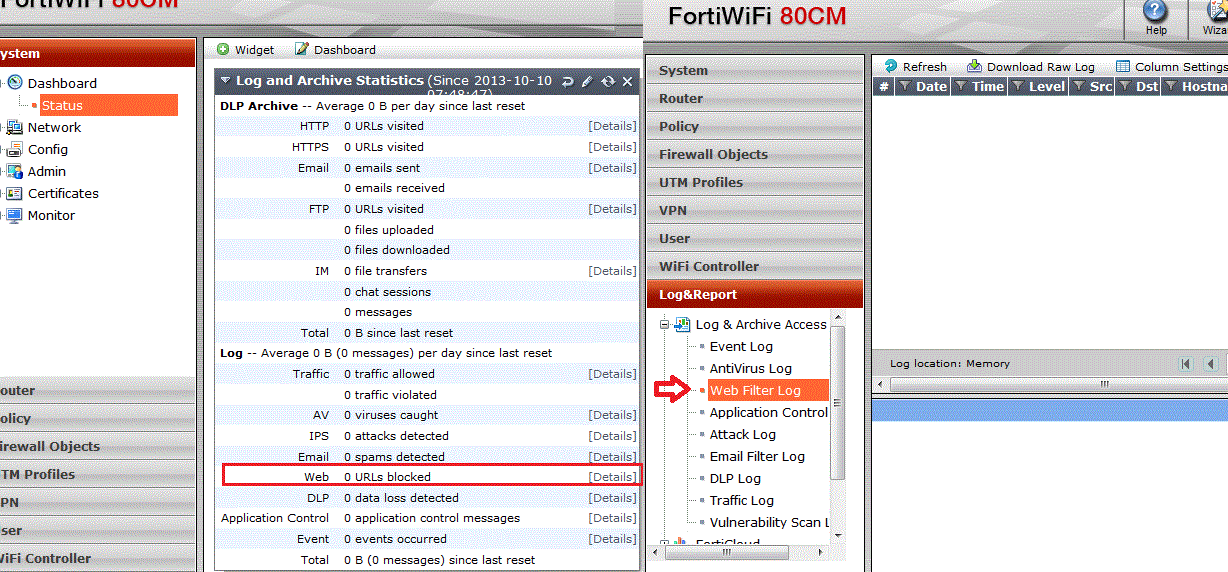
    Hi Stryker. The web site functionality may depend on other sites/domains. If you have logging enabled you should be able to check the blocked URLs (under the Log and Archive Statistics widget) or the Web Filter log under " Log&Report" . Add any " missed" urls to your URL or Local ratings category. (You may want to play around with " Allow Websites When a Rating Error Occurs" , " Strict Blocking" , or " Block HTTP redirects by Rating" options in your web filter Profile to see if that makes a difference.) The attached screen shot is from 4.0 MR3 patch 14. You did not indicate which firmware your fgt device is running.

    13 replies

    Aigarz
    New Member
    June 24, 2013
    Hello, I will bump this one up with " how to allow specific twitter account" . Company account should be allowed, however the rest of the twitter.com - block To start off, I' m able to get results with almost any other site. www.specificsite.com/foo - exempt or pass www.specificsite.com - block But when it comes to twitter - it doesnt work. Heres is the config and specific user which should be permitted - doesn' t work
      config webfilter urlfilter      edit 1          set comment ' '               config entries                  edit " twitter.com/user1"                       set action exempt                      set exempt av filepattern web-content activex-java-cookie dlp fortiguard range-block all                      set status enable                      set type simple                  next                                edit " twitter.com/user2"                     set action allow                      set status enable                      set type simple                  next                                   edit " twitter.com"                       set action block                      set status enable                      set type simple                  next            set name " custom-wf"           set one-arm-ips-urlfilter disable      next  end    
    system FG300c (HA [A-P]) /w 5.0.2 code
    Dipen
    New Member
    June 26, 2013
    You have to use URL Filters I suggest you use *.facebook.com/* in Wildcard Mode [Not Simple Mode] as block. Then use www.facecook.com/radiowave in Simple Mode as allow. Allow should take precedence over block.
    Faaeq
    New Member
    July 30, 2013
    Hello, I have web filtering enabled and it blocks the sites by category fine. but i want to unblocked one of the blocked sites. I have added it to URL Filter to keep it from blocking, but doesnt work.
    Dave_Hall
    New Member
    July 30, 2013
    ORIGINAL: Faaeq I have added it to URL Filter to keep it from blocking, but doesnt work.
    Try changing the type to regex and set the URLs (using your example) to " .*\.msn\.com.*" and " .*\.tv\.com.*" (without the quotes). If that does not work, try setting the URL to " msn.com" and " tv.com" (leave the type at reqex). If app control is enabled on the fw policy, you may want to check that app control to see nothing in it is blocking the sites in question. An alternate way to " allow" a website through FortiGuard web filtering is to use the Ratings Override to reclassify the web site (in question) to a category that is already allowed through the firewall.
    Stryker412
    New Member
    October 11, 2013
    I have a teacher who needs to get to a specific pinterest website. We already have pinterest.com unblocked. So she can get to the root home page but cannot get to a user' s pinterest page. We have a ratings override category of " allowed sites teachers" which pinterest is in. Not sure why the entire site isn' t whitelisted. Would appreciate any suggestions.
    Dave_Hall
    Dave_HallAnswer
    New Member
    October 11, 2013
    Hi Stryker. The web site functionality may depend on other sites/domains. If you have logging enabled you should be able to check the blocked URLs (under the Log and Archive Statistics widget) or the Web Filter log under " Log&Report" . Add any " missed" urls to your URL or Local ratings category. (You may want to play around with " Allow Websites When a Rating Error Occurs" , " Strict Blocking" , or " Block HTTP redirects by Rating" options in your web filter Profile to see if that makes a difference.) The attached screen shot is from 4.0 MR3 patch 14. You did not indicate which firmware your fgt device is running.

    mosameer
    New Member
    April 5, 2018

    this was most helpful hint, I had this problem, and discovered that other dependent URLs are blocked. all was done is to exempt these URLs, and the website is fully operational.

    Stryker412
    New Member
    October 14, 2013
    We are running 5.0 build 179 (GA patch2). So I can get to pinterest.com but not this specific URL: http://www.pinterest.com/montessorimom/education-ideas/ I checked the logs and this URL never shows up. My version looks a little different than yours. I do not have Log&Archive Access in my Logs section. I also tried to add the widget you have for the dashboard and it' s not available.
    Devendra_Palan
    New Member
    October 15, 2013
    Hi Stryker, In V5.0 Under log&Reports check in security logs for the web filtering logs. Also check in forwarded traffic logs for packet info. Pls cross verify the rating override config with the particular URL.
    Stryker412
    New Member
    October 15, 2013
    I allowed skype.com under our teacher_filter. I also added skype.com under category allowed sites staff. So on one computer I go to skype and it shows the correct category but the site is still blocked. Edit: I can get to the site on my wireless device, just not on any wired device. Edit 2: Ok scratch that, it does look like it is working. For some reason the computer I' ve been testing on is not falling under the teacher filter. Sorry about that.
    Stryker412
    New Member
    October 28, 2013
    We have profiles setup for teachers and students to allow content. How is it determined how a user falls in what category?
    Bromont_FTNT
    Staff
    Staff
    October 28, 2013
    you can restrict based on IP address in the firewall policy otherwise you' ll need identity based policies where users will be assigned the correct group based on firewall authentication or FSSO group status.