

Explorer II
June 8, 2026
Solved

SSL Inspection Blocking Network Acces

  • June 8, 2026
  • 15 replies
  • 508 views

After upgrading our FortiGate device from FortiOS version 7.6.6 to 7.6.7, users at the branch lost internet access when the BambiDeep SSL/SSH Inspection profile (Deep Inspection) was used in the firewall rule.

Traffic is allowed by the firewall rule, and NAT is working properly. However, HTTPS connections fail when Deep Inspection is enabled.

As a temporary solution, we changed the SSL/SSH Inspection profile from BambiDeep (Deep Inspection) to Certificate Inspection, and internet access was immediately restored.
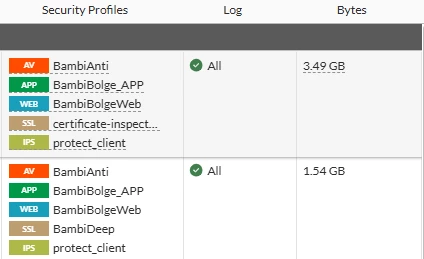


The first rule includes certificate inspection, and internet access works fine, but the second rule is the old one and includes “BambiDeep” SSL inspection; after the firmware upgrade, internet access is not working. Also ı tested the problem on new rule by adding  BambiDeep SSL inspection ant internet acces is not working.


Are they any known issue about 7.6.7 version for tihs topic ?

Best answer by sferoz

Hi All,
For websocket related issues when some websites/application not loading after upgrade to 7.6.7 when proxy + deep inspection enabled.
Kindly apply the web socket changes as per below KB:


This is a known issue in 7.6.7 already resolved in upcoming release 7.6.8.

Thanks.

15 replies

Jean-Philippe_P
Staff & Editor
Staff & Editor
June 12, 2026

Hello Dzhem35, 


Thank you for using the Community Forum. I will seek to get you an answer or help. We will reply to this thread with an update as soon as possible. 


Regards,

Jean-Philippe - Fortinet Community Team
sjoshi
Staff
Staff
June 13, 2026

Hi ​@Dzhem35 

Can you confirm if the same Bambi Deep inspection certificate was used before the upgrade.

Do you see any SSL block logs?

Did you try installing the CA certificate on the endpoints.

Thanks, Salon
Dzhem35Author
Explorer II
June 13, 2026

Hi ​@sjoshi, yes BambiDeep inspection certificate was using before without no problem, on friday 23:45 was auto uptaded the system to 7.6.6 to 7.6.7 after the upgrade this problem has seen

Also CA certificate already installed on the endpoints

sjoshi
Staff
Staff
June 13, 2026

Hi ​@Dzhem35 

Can you enable the Bambi deep inspection policy and bring it on top to reproduce the issue. Since it affects the user traffic please edit the source address to a specific endpoint IP so that only one user is affected and can test out.

Try accessing the websites and once the issue resurfaces check the SSL event logs.

Share the ssl event logs, if you see any block logs.

Thanks, Salon
jiahoong112
Staff
Staff
June 15, 2026

If you were to use deep-inspection without first installing the Fortinet_CA certificate that’s used for deep-inspection into the Trusted Root Certificate folder on your client device, your browser will not trust the Fortinet_CA certificate that is used to replace the website’s certificate. This is done so that deep-inspection can decrypt and inspect the full packet.

To fix this, you will need to install the certificate (Fortinet_CA) used for deep-inspection into the Trusted Root Certificate folder of your device.


https://docs.fortinet.com/document/fortigate/8.0.0/administration-guide/122078/deep-inspection 

HS08
Contributor III
August 6, 2026

i facing same issue, afer upgrade to v7.6.7 then some web application is not responding, the page say ‘took too long to respond’. If i change to no inspection then all working fine. Currenlty the ssl inspection set to SSL certification Inspection (not full).

Is fortinet know this issue and there is a fix to solve this?

Dzhem35Author
Explorer II
August 6, 2026

The same issue is still on going; I haven't been able to find a solution to it.

HS08
Contributor III
August 6, 2026

so what you do is set to no inspection?

sferoz
Staff
Staff
August 6, 2026

Hi Dzhem35 and HS08,

Could you update more details on the issue to reproduce in our lab :
1.  Specific sites /applications details that were not working after the upgrade?
2. Could you collect the ssl/forwardlogs/etc on this specific sites that are not working?
3. Since deep inspection used earlier could we check the exact error that the websites were displaying?
4. Is this issue happenning to all users on all networks VPN/wireless etc?
5. Could you review if there any crashes:
di de crashlog read | grep 2026

If there’s a TAC case created, kindly share the case no for review or share the logs,requested information,config file, policy no and inspection profile used directly to email sferoz@fortinet.com for more investigation on this issue.

HS08
Contributor III
August 6, 2026

hi ​@sferoz Email sent. Thanks

sferoz
Staff
sferozAnswer
Staff
August 12, 2026

Hi All,
For websocket related issues when some websites/application not loading after upgrade to 7.6.7 when proxy + deep inspection enabled.
Kindly apply the web socket changes as per below KB:


This is a known issue in 7.6.7 already resolved in upcoming release 7.6.8.

Thanks.

HS08
Contributor III
August 13, 2026

hi ​@sferoz it’s applicable for my case?

sferoz
Staff
Staff
August 18, 2026

Thank you for reaching out. Since we troubleshoot this issue via TAC case kindly continue to monitor if more issues please reach out.

Thought Leadership Security Summit. Outpace New Threats with AI - enhanced defense. Tuesday, Septmeber 15, 8:30 AM - 2:30 PM PT. The Golf Club at Newcastle, WA.
Virtual event | September 2026. SASE summit. The age of autonomous trust. Register here!
