


Technical Tip: Web Filtering certificate warning
Description
This article presents a flowchart of the expected behavior and troubleshooting information of certificate warnings when using only a web filtering security profile in combination with SSL certificate inspection or deep inspection.
Scope
Scope
FortiGates running v5.2, v5.4, v5.6, v6.0, v6.2, v6.4, v7.0., v7.2, v7.4, 7.v6. Firewall policies use only a web filtering security profile in combination with SSL inspection (certificate inspection or deep inspection).
Solution
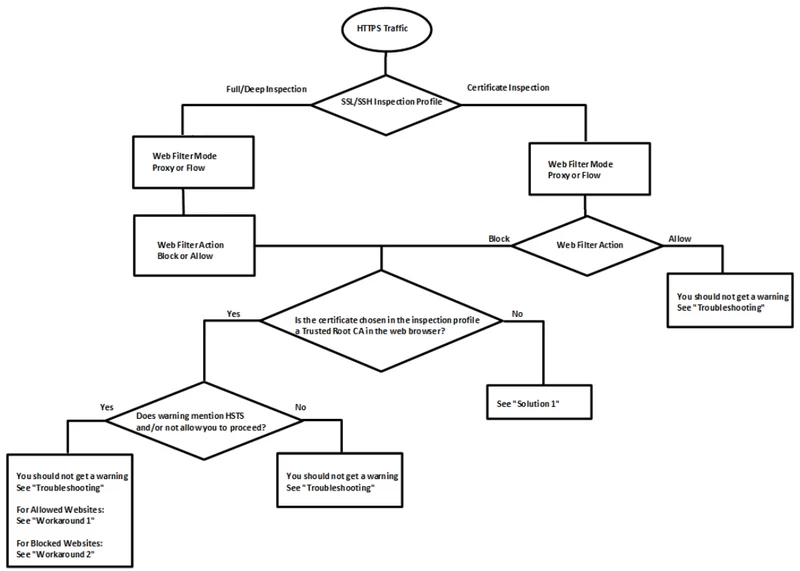
Troubleshooting:
Verify what policy ID the traffic is hitting via the FortiGate session table or traffic logs. Check the web filtering and SSL inspection profiles that are applied to this policy.
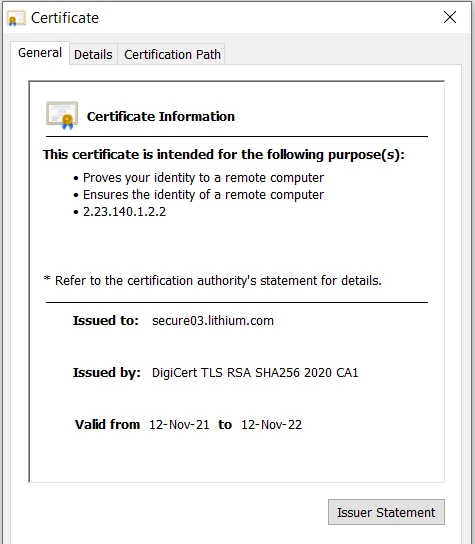
Compare the certificate presented in the web browser with the certificate configured in the SSL inspection profile. Check that the information in the sections 'Issued To', 'Issued By', and 'Validity Period' match.
Solution 1:
Download the FortiGate certificate used for SSL Inspection (default certificate is 'Fortinet_CA_SSL') and import it as a trusted root CA in the web browser as explained in the 'Certificate inspection | FortiGate / FortiOS 7.4.4 | Fortinet Document Library' section of the Administration Guide.
The certificate can also be pushed via GPO as explained in the following guide: How to distribute a Fortinet CA SSL certi... - Fortinet Community.
Workaround 1: Add the website as an exemption in the SSL deep inspection profile as explained in the 'Exempting Google from SSL inspection' Cookbook Recipe.
Workaround 2: Disable the FortiGate from showing the block page for HTTPS sites blocked under this particular web filtering profile with the commands listed below:
Workaround 1: Add the website as an exemption in the SSL deep inspection profile as explained in the 'Exempting Google from SSL inspection' Cookbook Recipe.
Workaround 2: Disable the FortiGate from showing the block page for HTTPS sites blocked under this particular web filtering profile with the commands listed below:
config webfilter profile
edit {name}
set https-replacemsg disable
end
edit {name}
set https-replacemsg disable
end
- The FortiGate presents the block page with the certificate used in the SSL inspection profile (which is why blocking websites with certificate inspection will still require trusting the certificate).
- A certificate cannot be purchased signed by a public CA (GoDaddy, Verisign, DigiCert, etc.) that meets the requirements for use in SSL inspection.
- The choice between using a certificate or deep inspection is addressed in the 'Why you should use SSL inspection' Cookbook Recipe.
- Webfiltering features warning/authenticate/override can only work with deep inspection because FortiGate has to terminate the SSL connection to send back warning/authenticate pages. Web filtering features warning/authenticating relies on redirecting to a FortiGate page (replacement message) which means it is necessary to interrupt the SSL connection to allow the redirect.
Related articles:
Technical Tip: Differences between SSL Certificate Inspection and Full SSL Inspection

