



Technical Tip: UTM Application control logging
Description
This article discusses how application Control generates two logs by default: 'Traffic' log and 'Application Control' log.
This article explains the differences between these log messages and explains how to disable one type of logging or the other.
This article explains the differences between these log messages and explains how to disable one type of logging or the other.
Scope
FortiGate, UTM Application control logging.
Solution
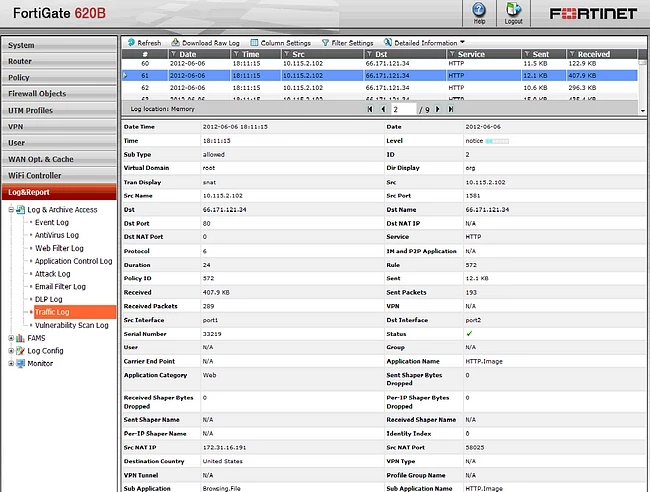
Traffic log message generated by UTM application control:
Application control log message:
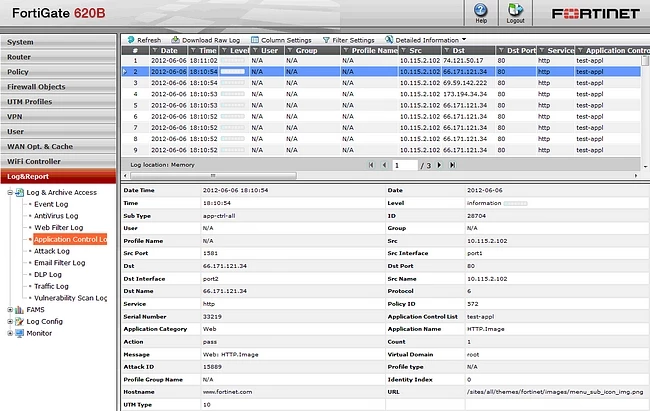
These two log messages correspond to the same traffic flow.
The information found in only one type of log is:
In the Traffic log only:
- Volume of traffic (sent and received bytes, sent and received packets).
- Traffic shaping counters.
- NAT details (source and destination NAT).
- VPN details.
In Application log only:
- Application Control list.
- Message.
- Attack ID.
- UTM type.
Disabling Application Control log (CLI only).
At the application control list level, by using set log disable.
At the application control list level, by using set log disable.
For example:
config application list
edit "test-appl"
config entries
edit 1
set action pass
set application 16339 15889
set log disable
next
edit "test-appl"
config entries
edit 1
set action pass
set application 16339 15889
set log disable
next
Disabling Traffic Log for Application Control events (CLI only)
At the policy level, by usingthe set logtraffic-app disable.
At the policy level, by usingthe set logtraffic-app disable.
For example:
config firewall policy
edit 572
set srcintf "port1"
set dstintf "port2"
set srcaddr "all"
set dstaddr "all"
set action accept
set schedule "always"
set service "ANY"
set utm-status enable
set logtraffic-app disable
set application-list "test-appl"
set profile-protocol-options "default"
next
end
edit 572
set srcintf "port1"
set dstintf "port2"
set srcaddr "all"
set dstaddr "all"
set action accept
set schedule "always"
set service "ANY"
set utm-status enable
set logtraffic-app disable
set application-list "test-appl"
set profile-protocol-options "default"
next
end
With v4.0 MR3, a new default logging behavior of application control was introduced: by default, application control generates logs in 'Traffic Log' and in 'Application Control Log'.
With v5.0, this behavior will chang,e and by default, the application log will generate a log only in 'Traffic Log'.
With v5.0, this behavior will chang,e and by default, the application log will generate a log only in 'Traffic Log'.
Note:
On the newest versions of the FortiOS, including branches v7.4.x and v7.6.x, the configuration to enable logging for specific categories looks like below:
config application list
edit "app_unsecure_protocols_monitoring"
set other-application-log enable
set unknown-application-log enable
config entries
edit 2
set category 2 3 5 6 7 8 12 15 17 21 22 23 25 28 29 30 31
set action pass
next
end
next
end
edit "app_unsecure_protocols_monitoring"
set other-application-log enable
set unknown-application-log enable
config entries
edit 2
set category 2 3 5 6 7 8 12 15 17 21 22 23 25 28 29 30 31
set action pass
next
end
next
end
By default, if not specified as disabled, the logging is enabled for these entries:
FortiGate (app_unsecure_pro~ing) # show full-configuration
config application list
edit "app_unsecure_protocols_monitoring"
set comment ''
set replacemsg-group ''
set extended-log disable
set other-application-action pass
set app-replacemsg enable
set other-application-log enable
set enforce-default-app-port disable
set force-inclusion-ssl-di-sigs disable
set unknown-application-action pass
set unknown-application-log enable
unset p2p-block-list
set deep-app-inspection enable
set options allow-dns
config entries
edit 2
set category 2 3 5 6 7 8 12 15 17 21 22 23 25 28 29 30 31
set protocols all
set vendor all
set technology all
set behavior all
set popularity 1 2 3 4 5
set action pass
set log enable
set log-packet disable
set session-ttl 0
set shaper ''
set shaper-reverse ''
set per-ip-shaper ''
set quarantine none
next
end
set control-default-network-services disable
next
end
edit "app_unsecure_protocols_monitoring"
set comment ''
set replacemsg-group ''
set extended-log disable
set other-application-action pass
set app-replacemsg enable
set other-application-log enable
set enforce-default-app-port disable
set force-inclusion-ssl-di-sigs disable
set unknown-application-action pass
set unknown-application-log enable
unset p2p-block-list
set deep-app-inspection enable
set options allow-dns
config entries
edit 2
set category 2 3 5 6 7 8 12 15 17 21 22 23 25 28 29 30 31
set protocols all
set vendor all
set technology all
set behavior all
set popularity 1 2 3 4 5
set action pass
set log enable
set log-packet disable
set session-ttl 0
set shaper ''
set shaper-reverse ''
set per-ip-shaper ''
set quarantine none
next
end
set control-default-network-services disable
next
end
To get the list of applications on the same security profile, the following configuration can be used:
FortiGate (app_unsecure_pro~ing) # config entries
FortiGate (entries) # edit 2
FortiGate (2) # set category ?
ID Select Category ID
2 P2P
3 VoIP
5 Video/Audio
6 Proxy
7 Remote.Access
8 Game
12 General.Interest
15 Network.Service
17 Update
21 Email
22 Storage.Backup
23 Social.Media
25 Web.Client
26 Operational.Technology
28 Collaboration
29 Business
30 Cloud.IT
31 Mobile
32 Unknown Applications
36 GenAI

