



Technical Tip: SD-WAN Load balancing per-rule
| Description | This articles describes SD-WAN load balancing for all explicit rules. When a rule is hit, traffic is hashed based on the defined load balancing algorithm among the selected SD-WAN members that satisfy the defined SLA. Previously, SD-WAN load balancing was only available on the last implicit rule. This covered all the SD-WAN interface members, but when an explicit SD-WAN rule was created, it prevented load balancing from occurring for that protocol, and traffic was only routed over a single interface. |
| Scope | FortiGate configured with SDWAN and two or more internet links. |
| Solution | 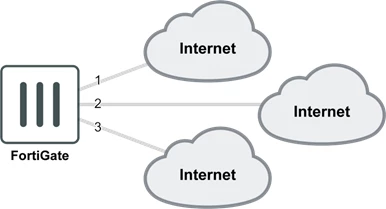
To add load balancing to a rule from GUI, go to Network -> SD-WAN Rules, edit a rule, or create a new one. Under Outgoing Interfaces, select a Strategy, Interface preference, and Required SLA target or Measured SLA. 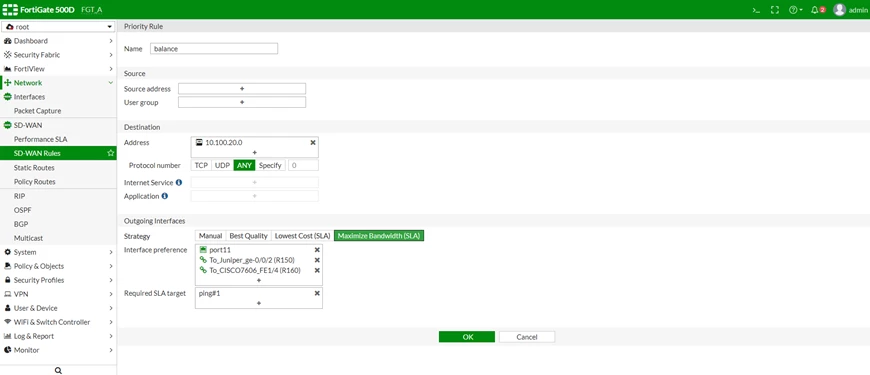 Select 'OK' to apply the changes. To add load balancing to a rule from CLI: config system virtual-wan-link config service edit 1 set name "balance" set mode load-balance set dst "10.100.20.0" config sla edit "ping" set id 2 next end set priority-members 1 2 3 next end end To diagnose the load balancing status: FGT_A (root) # diagnose system virtual-wan-link health-check Health Check(ping): Seq(2): state(alive), packet-loss(40.000%) latency(0.049), jitter(0.017) sla_map=0x3 Seq(1): state(alive), packet-loss(0.000%) latency(0.020), jitter(0.005) sla_map=0x3 FGT_A (root) # diagnose system virtual-wan-link service Service(22): Address Mode(IPV4) flags=0x0 TOS(0x0/0x0), Protocol(0: 1->65535), Mode(load-balance) Members: 1: Seq_num(1), alive, sla(0x1), num of pass(1), selected 2: Seq_num(2), alive, sla(0x1), num of pass(1), selected Dst fqdn: gmail.com(119)
Note: |

