



Technical Tip: 'Parameters Required' under 'Application Control'
Description
This article describes the 'Parameters Required' message which can appear when adding signatures under 'Application Control'.
Scope
For version 6.0.10 and below.
Solution
Under Application Control -> Application Overrides select 'Add Signatures'.
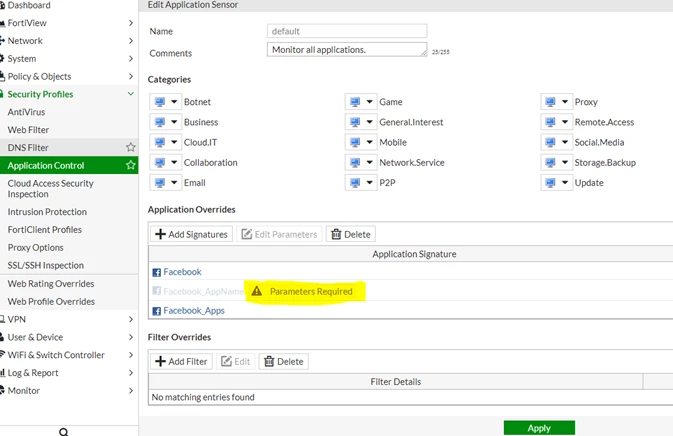
Enter the 'AppName' to block as a parameter.
The AppName can be obtained from the URL of the Facebook game page.
For example: '8 Ball Pool' on Facebok.
When the game is selected, it brings the game page where the URL is https://apps.facebook.com/livepool/?ref=br_rs
So in this case, the 'AppName' is 'livepool'.
So in this case, the 'AppName' is 'livepool'.
This is the string needed to put it as the parameter to the signature 'Facebook_AppName'.
Simply select 'edit parameter' and use ',' to separate the app names to block multiple app name.
This feature requires deep-inspection, so make sure to have that too.
This feature requires deep-inspection, so make sure to have that too.

