


Technical Tip: HA Reserved Management Interface
Description
This article describes how to configure the FortiGate HA Reserved Management Interface.
The aim is to provide direct management access to each cluster unit using a different IP address by reserving a management interface as part of the HA configuration.
This simplifies the use of external services such as SNMP to monitor and manage the cluster units.
Note/prerequisite:
It is not possible to use this interface to route traffic as it is an Out-Of-Band management interface for each cluster member, use a different subnet for 'HA Reserved Management Interface (Out-Of-Band) than the cluster access subnet, and if the need is to use the same subnet, consider using In-Band Management as explained in this article: Technical Tip: Differences of In-band and Out-of-band management for FortiGate cluster.
It is not possible to configure a VRF on this Reserved Management Interface. When the Out-of-band management with reserved management interfaces feature is activated there is an HA Reserved Management special VDOM (hidden VDOM) as described in Technical Tip: HA Reserved Management Interface's hidden VDOM (vsys_hamgmt VDOM)). This special/hidden VDOM does not allows VRFs. Should a VRF be associated to this Reserved Management VDOM a 'reverse path check fail, drop' error will be triggered even if a route has been already configured.
HA Reserved Management Interface and In-Band Management cannot be used for FortiGuard updates.
Scope
FortiGate.
Solution
The HA direct management interface can be configured from the GUI as follows:
Go to System -> HA, edit Primary FortiGate -> Management Interface Reservation, and enable this option.
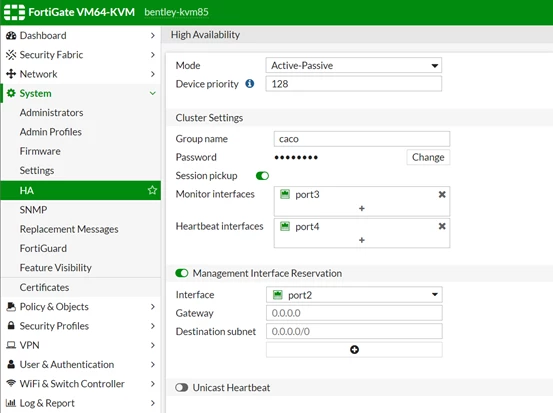
Interface: An interface used for management access. Bear in mind that if the interface (port2 in this case, as shown in the screenshot) is used as the SLBC management interface, then it is not available to be selected as a reserved management interface. Refer to SLBC (Session-aware Load Balancing Cluster) using Configuring the SLBC management interface.
In a multi-VDOM setup, use the following command:
config global
    config load-balance setting
        set slbc-mgmt-intf port2
end
Note:
The interface must not be referenced in any config to be set as a reserved management interface. To check if the interface is referenced, use this KB article: Technical Tip: How to Check Referenced Objects.
Gateway: IPv4 address of the gateway in case the unit will be accessed from a different subnet.
Destination subnet: In case the unit needs to be accessed from a remote subnet, specify the subnet or use the wildcard subnet 0.0.0.0/0 (default setting). Ensure that the traffic arrives through the same interface; otherwise, it will be dropped, and access will not be possible (port2 in this case).
In this example, it is connected from a host 192.168.181.10/24, which is in the same subnet as port2 on the FortiGate cluster with IP 192.168.181.1; no gateway is used.
Issue the command 'get system ha status'. Use the HA cluster index of the slave from the previous picture. Beware, as the HA cluster index is different from the HA operating index.
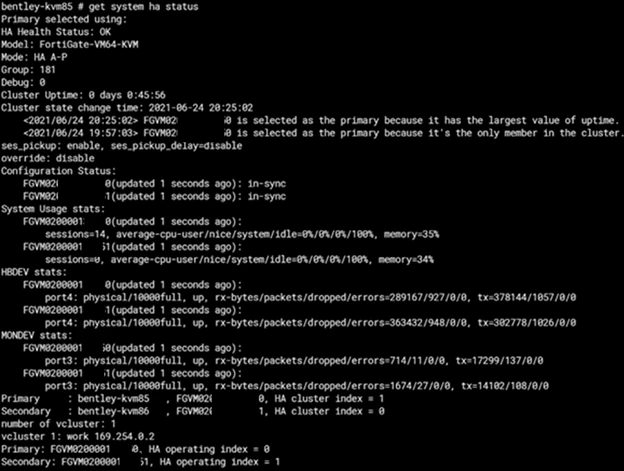
To connect to the secondary FortiGate, proceed with the following command in the CLI:
execute ha manage <HA cluster index of slave> <username> <password>
Configure the port intended for HA management.
Since the configuration is synchronized, the secondary FortiGate has retained the address from the master FortiGate in the first place.
Since the HA management interface does not sync the configuration with the cluster, it is possible to change the IP address.
In this example:
Port2 is used as an HA management interface.
Set IP 192.168.181.2 255.255.255.0 under 'set ip <IP address> <subnet mask>'.
config system interface
    edit port 2
        set ip <IP address> <subnet mask>

    next
end
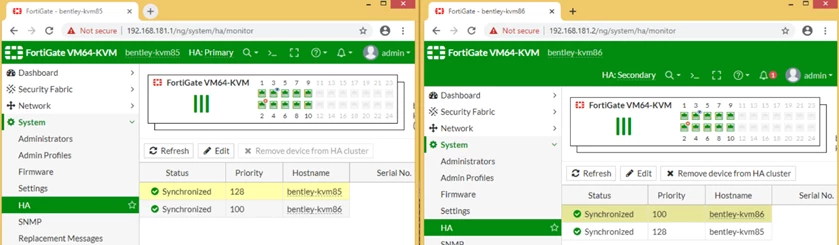
As a result of the previous configuration, it is possible to connect to the secondary unit directly through the HA management IP address.
For v5.2 and v5.4.
Configuration using the CLI:
'set ha-mgmt-interface-gateway' is skipped when 'ha-mgmt-interface' is in DHCP/PPPOA.
'set vdom xxx' is skipped if the current interface is ha-mgmt-interface.
config system ha
    set ha-mgmt-status [enable|disable]
    set ha-mgmt-interface <interface-name>
    set ha-mgmt-interface-gateway
end

config system interface
    edit xxx
        set vdom xxx
    next
end
From the GUI:
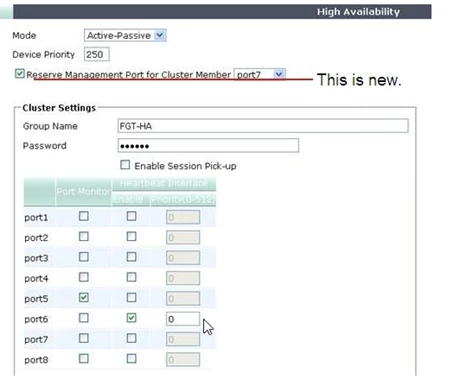
Graphical view from the secondary unit:
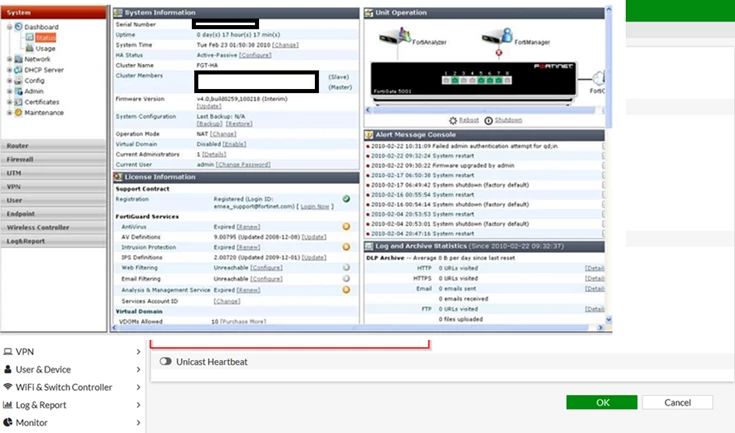
A gateway can only be set from the CLI.
config system ha
    set ha-mgmt-status enable
    set ha-mgmt-interface port7
    set ha-mgmt-interface-gateway 172.31.224.10
end
For v6.4.x and newer versions:
Configuration using the CLI:
config system ha
    set ha-mgmt-status [enable|disable]
        config ha-mgmt-interface
            edit <x>
                set interface <interface name>
                set gateway <xxx.xxx.xxx.xxx>
            next
        end
As an example, this is how this configuration looks on the CLI:
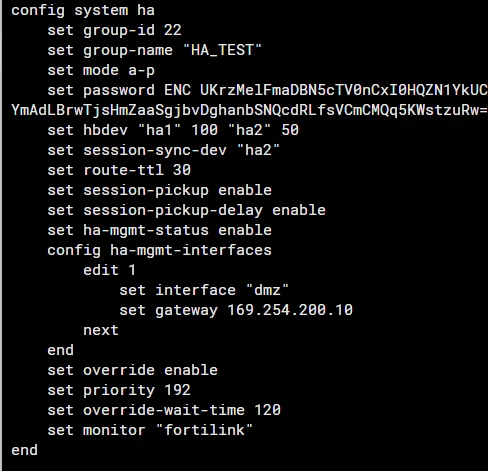
The gateway IP address has to be configured on the secondary unit as well. Without configuring the gateway IP on the secondary unit, the secondary unit cannot be accessible from the GUI.
For v7.6.3+, FortiOS supports IPv6 for HA reserved management port and usage of IPv6 gateway:
config system ha
    set ha-mgmt-status [enable|disable]
         config ha-mgmt-interface
            edit <x>
                set interface <interface name>
                set gateway <xxx.xxx.xxx.xxx>
                set gateway6 xxxx:xxxx:xxxx:xxxx:xxxx:xxxx:xxxx:xxxx
                set dst <destination_subnet>
            next
        end
end
Note:
The routing table does not contain any route associated with port7, as this port is reserved for the HA management only. It is not visible under the 'get router info routing-table all'.
If access from one of the IPsec tunnels is needed, make sure that the traffic from the VPN remote network will be routed to gateway 172.31.224.10. It is not possible to configure a firewall rule where port7 is used as a source or destination interface.
Important note:
Starting from v7.6.1, the HA password for the new cluster build is mandatory. If the cluster is upgraded from v7.0.x, v7.2.x, or v7.4.x is without an HA password, the system will skip the password check. However, any subsequent modification to the 'system.ha' settings, such as adding HA management interfaces, will enforce the password check and will require the HA password to be configured on all cluster members.
Related documents:

