



Technical Tip: DNS over HTTPS/443 configuration
| Description | This article describes the basic configurations for enabling DNS over HTTPS/443 (DoH) for local-out DNS queries. |
| Scope | FortiOS firmware 7.0 onwards. |
| Solution | New option is added to DNS Profile, forcing DNS over HTTPS/443 for added security.
DNS over HTTPS (DoH) provides a method of performing DNS resolution over a secure HTTPS connection. The goal of the protocol is to increase user privacy, performance and security by preventing eavesdropping and manipulation of DNS data via man-in-the-middle attacks.
To enable DoH DNS from GUI:
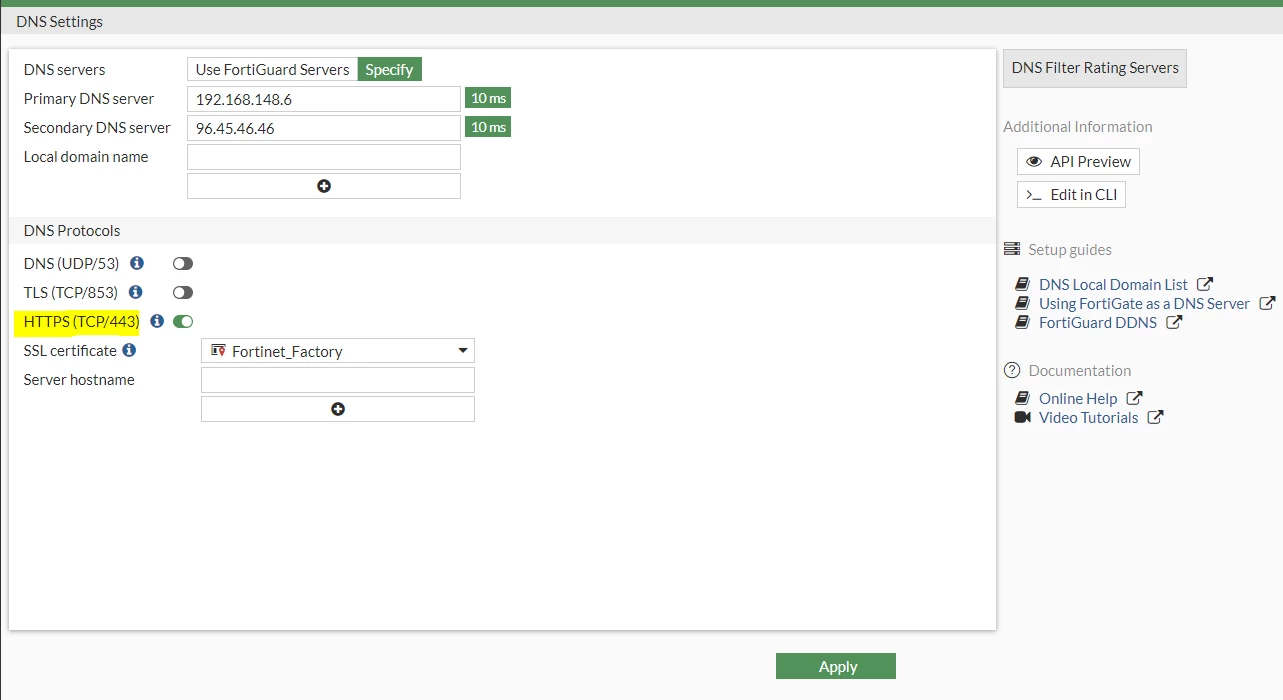
To enable DoH DNS from the CLI:
config system dns set primary 192.168.148.6 set secondary 96.45.46.46 set protocol doh end
To enable DoH on the DNS server from GUI:
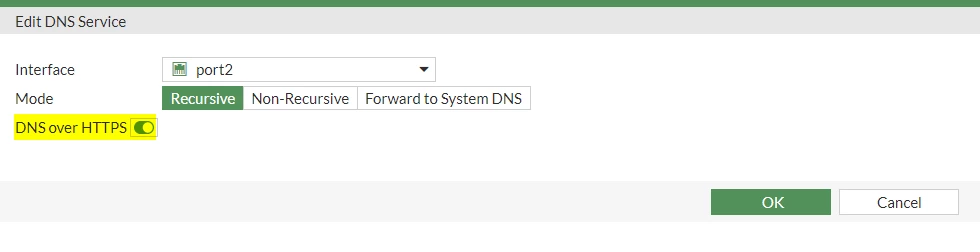
To enable DoH on the DNS server from CLI:
config system dns-server edit "port2" set doh enable next end
FortiGuard DNS servers (96.45.45.45 and 96.45.46.46) support DNS over TLS/HTTPS protocol.
Note: When enabling DNS over HTTPS under DNS Service, make sure the GUI access (HTTPS) port is not 443. Otherwise, there will be a conflict as DNS over HTTPS also uses port 443. To check which port is being used for GUI access, run the command below:
show full | grep admin-sport
Related document: |


