Solution | Deregister endpoint will disconnect FortiClient from EMS. FortiClient will lose the whole configuration (Malware, VPN, Sandbox, etc) and it will only have Zero Trust Telemetry to connect on EMS. The endpoint record will not be removed from EMS, it will have to be deleted manually from the EMS.
Related document: Disconnecting and connecting endpoints.
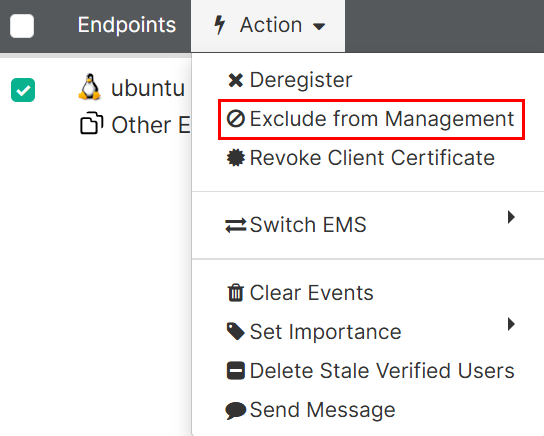
Exclude from Management removes the assigned profile from the client (totally disconnected) but the user stays connected to EMS until selecting 'Enable Management'.
Important: Performing these steps does not remove the endpoints from the All Endpoints list. To delete a device from the console, the endpoint must not be synchronized via AD. In other words, only devices listed in workgroups within FortiClient EMS can be deleted.
For example, to exclude the 'Ubuntu' device in FortiClient EMS, select the endpoint and select Actions -> Exclude from Management.
Afterwards, select the device again and select Actions -> Delete Device.
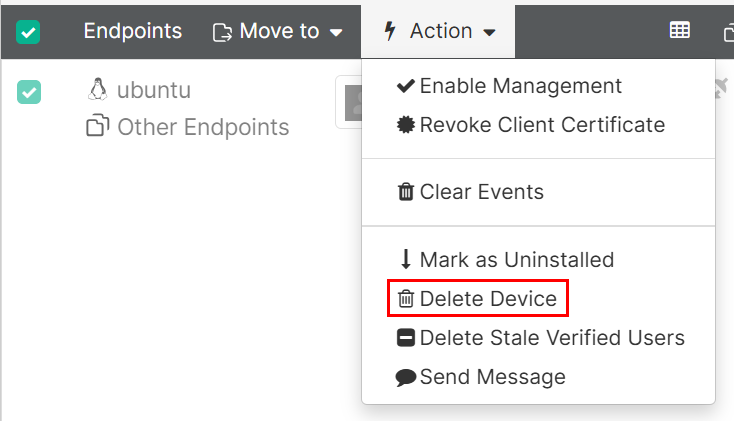
This way, the device will be deleted from the FortiClient EMS endpoint list.
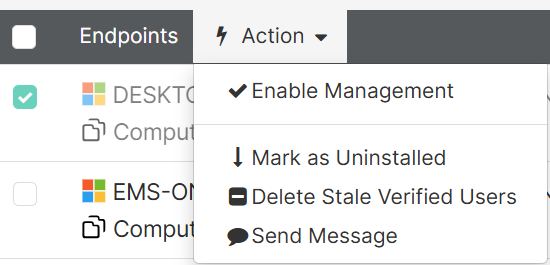
For devices synchronized via AD Connector, however, the option to remove the device does not exist after it is removed from management, because the device remains in AD and therefore continues to appear in the list of synchronized devices:
Related document:
Excluding endpoints from management
|



